
Nissan Sentra B18 (2020-2025) Service Manual: Power Consumption Control System
System Description
SYSTEM DIAGRAM
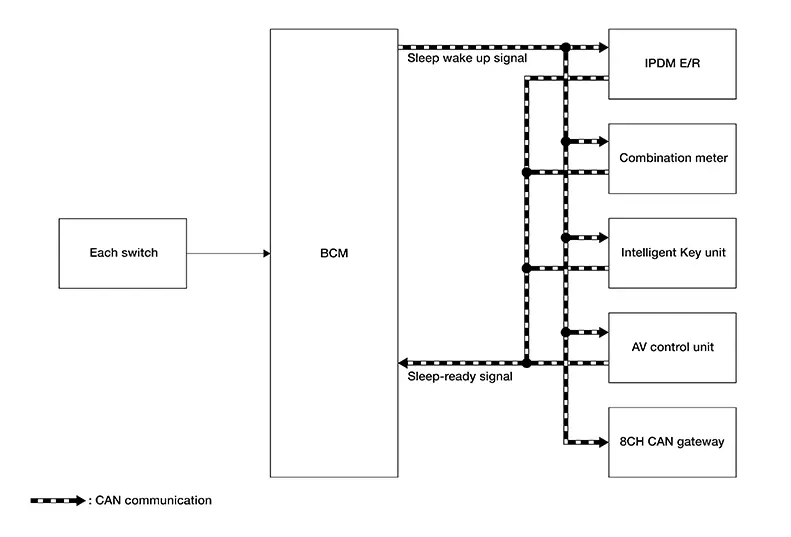
INPUT SIGNAL AND OUTPUT SIGNAL
Major signal transmission between each unit via communication is shown in the following table:
|
Component parts |
Signal description |
|---|---|
|
IPDM E/R |
|
|
Combination meter |
|
|
Intelligent Key unit |
|
|
AV control unit |
|
|
8CH CAN gateway |
|
|
BCM |
|
System Description
OUTLINE
-
The BCM incorporates a power saving control function that reduces power consumption according to the Nissan Sentra vehicle status.
-
The BCM switches the status (control mode) by itself with the power saving control function. It performs the sleep request to each unit (IPDM E/R and combination meter) that operates with the ignition switch OFF.
Normal mode (wake-up)
-
CAN communication is normally performed with other units
-
Each control with BCM is operating properly
CAN communication sleep mode (CAN sleep)
-
CAN transmission is stopped
-
Control with BCM only is operating
Low power consumption mode (BCM sleep)
-
Low power consumption control is active
-
CAN transmission is stopped
-
LOW POWER CONSUMPTION CONTROL WITH BCM
The BCM reduces power consumption with the following operation in low power consumption mode:
-
The reading interval of each switch changes from 10 ms interval to 60 ms interval.
Sleep mode activation
-
The BCM receives the sleep-ready signal (ready) from the IPDM E/R and combination meter via CAN communication.
-
The BCM transmits the sleep wake up signal (sleep) to each unit when all of the CAN sleep conditions are fulfilled.
-
Each unit stops the transmission of CAN communication with the sleep wakeup signal.
-
The BCM is in low power consumption mode and performs low power consumption control when all of the BCM sleep conditions are fulfilled with CAN sleep condition.
|
CAN sleep condition |
BCM sleep condition |
|---|---|
|
|
Wake-up operation
-
The BCM transmits the sleep wake up signal (wake up) to each unit when any of the CAN wake-up conditions are fulfilled. It changes from the low power consumption mode or the CAN communication sleep mode to the normal mode.
-
Each unit starts the transmission of CAN communication with the sleep wake up signal. In addition, the combination meter transmits the wake up signal to the BCM via CAN communication to report the CAN communication start.
|
BCM wake-up condition |
CAN wake-up condition |
|---|---|
|
|
 Signal Buffer System
System Description
System Description
SYSTEM DIAGRAM
OUTLINE
The BCM has the signal transmission function that
outputs/transmits each input/received signal to each unit.
Signal trans ...
 Shipping Mode Control System
System Description
System Description
SYSTEM DIAGRAM
OUTLINE
The BCM has the shipping mode control system
function that reduces the drain on the battery during extended
storage.
...
Other materials:
Locking with power door lock switch
Door lock switch
To lock all the doors without a key, push the door
lock switch (driver’s or front passenger’s side) to
the lock position 1 . When locking the door this
way, be certain not to leave the key inside the
vehicle.
To unlock all the doors without a key, push the
door lock ...
P0365 Exhaust Valve Timing Control Position Sensor
Dtc Description
DTC Description
DTC DETECTION LOGIC
DTC
CONSULT screen terms
(Trouble diagnosis
content)
DTC detection
condition
...
Work Flow
Work Flow
CUSTOMER INTERVIEW
Interview the customer if possible, to determine
the conditions that exist when the noise occurs. Use the Diagnostic
Worksheet during the interview to document the facts and conditions
when the noise occurs and any customer's comments; refer to Diagnos ...
