Nissan Sentra B18 (2020-2025) Owner's Manual: Operating range
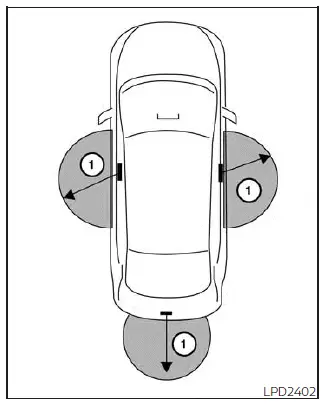
The NISSAN Intelligent Key functions on the Nissan Sentra can only be used when the Intelligent Key is located within the specified operating range of the request switch (if so equipped) 1. This ensures secure and reliable communication between the vehicle and the Intelligent Key system.
When the Intelligent Key battery is weak or discharged, or when strong radio waves are present near the vehicle, the operating range of the Intelligent Key may be reduced. Under such conditions, the Intelligent Key for your Nissan Sentra may not function correctly or may respond intermittently.
The normal operating range is approximately 31.50 in (80 cm) from each request switch (if so equipped) 1 on the Nissan Sentra.
If the Intelligent Key is positioned too close to the door glass, door handle, or rear bumper, the request switches (if so equipped) may not operate as intended due to signal interference.
When the Intelligent Key is within the operating range, it is possible for anyone—even a person not carrying the Intelligent Key—to press the request switch (if so equipped) to lock or unlock the doors of the Nissan Sentra. For this reason, always keep the Intelligent Key in your possession.
Door locks/unlocks precaution
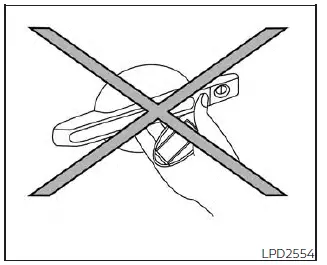
- Do not press the door handle request switch (if so equipped) while holding the Intelligent Key in your hand as illustrated. Being too close to the door handle may prevent the Nissan Sentra from recognizing that the Intelligent Key is outside the vehicle.
- After locking the doors using the door handle request switch (if so equipped), always confirm that the doors are securely locked by checking them manually.
- To avoid accidentally leaving the Intelligent Key inside the Nissan Sentra, make sure the key is with you before locking the doors.
- Do not pull the door handle before pressing the door handle request switch (if so equipped). If this occurs, the door may unlock but will not open. Release the handle once, then pull it again to open the door properly.
Other materials:
Clutch Point Learning
Description
Description
TCM memorizes a clutch point (engagement timing), and this enables
accurate control. For work procedure, refer to Work Procedure.
Work Procedure
Work Procedure
CLUTCH POINT LEARNING
With CONSULT
Start the engine.
...
Trunk Lid Opener Actuator
Component Function Check
Component Function Check
CHECK FUNCTION
CONSULT
Select "Trunk/back door" in "Active Test" mode of
"BCM(TRUNK)".
Select “On� to check tha ...
Ho2s2
Component Inspection
Component Inspection
INSPECTION START
Will CONSULT be used?
YES >>
GO TO
2.
NO >>
GO TO
3.
CHECK HEATED OXYGEN SENSOR 2-1
With CONSULT
Select “DATA ...