Nissan Sentra B18 (2020-2025) Service Manual: Oil Filter
Removal and Installation
Removal and Installation
REMOVAL
Remove the front under cover. Refer to Removal and Installation.
Using
suitable tool (A), remove the oil filter (1). 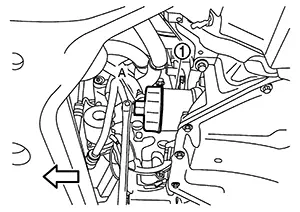
CAUTION:
-
Oil filter is provided with relief valve.
-
Be careful not to get burned when engine and engine oil may be hot.
-
When removing, prepare a shop cloth to absorb any engine oil leaks or spills.
-
Completely wipe off any engine oil that adheres to engine and Nissan Sentra vehicle.
|
|
: Nissan Sentra Vehicle front |


It is recommended to use a Genuine NISSAN oil filter or equivalent. The use of parts that do not meet or exceed NISSAN specifications may cause damage to the Nissan Sentra vehicle, and have an effect on warranty coverage. Always check with the Parts Department for the latest parts information.
INSTALLATION
Remove foreign materials adhering to the oil filter installation surface.
Apply new
engine oil to the oil seal contact surface of new oil
filter.
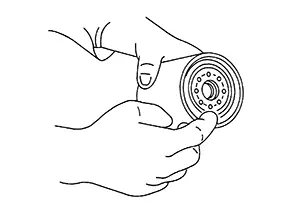
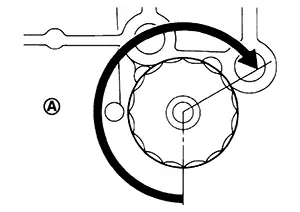
Screw oil
filter manually until it touches the installation surface, then
tighten it by 2/3 turn (A). Or tighten to specification.
|
Oil filter |
: 17.7 N·m (1.8 kg-m, 13 ft-lb) |
Install the front under cover. Refer to Removal and Installation.
Inspection
Inspection
Check the engine oil level. Refer to Inspection.
Start the engine, and check there is no leaks of engine oil.
Stop the engine and wait for 10 minutes.
Check the engine oil level and adjust the level. Refer to Inspection.
Other materials:
P0137 Ho2s2
Dtc Description
DTC Description
The heated oxygen sensor 2 has a much longer switching time
between rich and lean than the air fuel ratio (A/F) sensor 1. The oxygen storage
capacity of the three way catalyst (manifold) causes the longer switching
time.
...
Outside Key Antenna
Outside Key Antenna (rear Door Lh)
Removal and Installation
Removal and Installation
REMOVAL
Remove rear
door finisher (LH). Refer to Removal and Installation.
Disconnect
the harness connector from the outside key antenna (rear door
LH).
Release
clips and remove out ...
Wiper & Washer. Removal and Installation
Washer Tank
With Washer Level Switch
Exploded View
Exploded View
1.
Washer tank inlet
2.
Washer tank
...