
Nissan Sentra Service Manual: Harness connector
Description
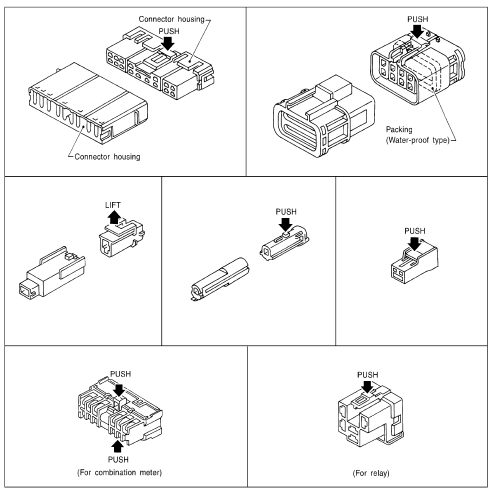
Harness connector (tab-locking type)
- The tab-locking type connectors help prevent accidental looseness or disconnection.
- The tab-locking type connectors are disconnected by pushing or lifting the locking tab(s). Refer to the figure below.
Refer to the next page for description of the slide-locking type connector.
Caution:
Do not pull the harness or wires when disconnecting the connector.
[Example]
Harness connector (slide-locking type)
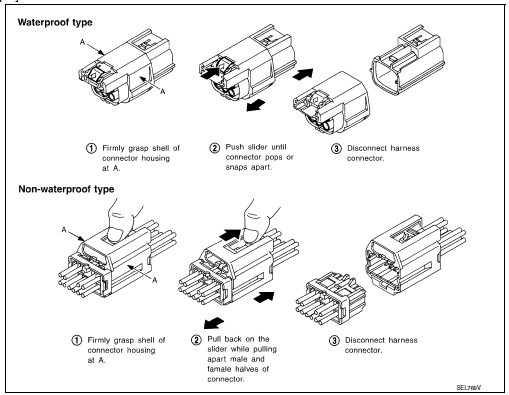
- A new style slide-locking type connector is used on certain systems and components, especially those related to obd.
- The slide-locking type connectors help prevent incomplete locking and accidental looseness or disconnection.
- The slide-locking type connectors are disconnected by pushing or pulling the slider. Refer to the figure below.
Caution:
- Do not pull the harness or wires when disconnecting the connector.
- Be careful not to damage the connector support bracket when disconnecting the connector.
[Example]
Harness connector (lever locking type)
- Lever locking type harness connectors are used on certain control units and control modules such as ecm, abs actuator and electric unit (control unit), etc.
- Lever locking type harness connectors are also used on super multiple junction (smj) connectors.
- Always confirm the lever is fully locked in place by moving the lever as far as it will go to ensure full connection.
Caution:
Always confirm the lever is fully released (loosened) before attempting to disconnect or connect these connectors to avoid damage to the connector housing or terminals.
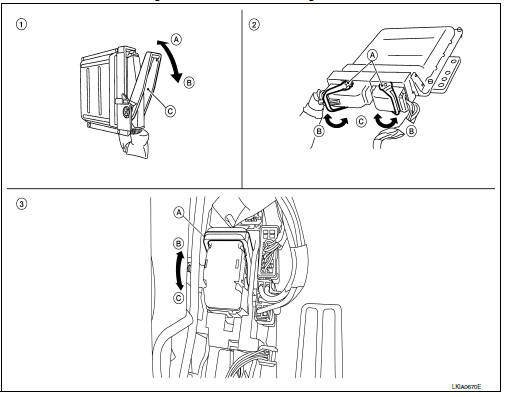
- Control unit with single lever
- Fasten
- Loosen
- Lever
- Control unit with dual lever
- Lever
- Fasten
- Loosen
- Smj connector
- Lever
- Fasten
- Loosen
Harness connector (direct-connect srs component type)
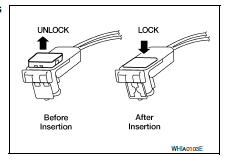
- Srs direct-connect type harness connectors are used on certain srs components such as air bag modules and seat belt pre-tensioners.
- Always pull up to release black locking tab prior to removing connector from srs components.
- Always push down to lock black locking tab after installing connector to srs components.When locked, the black locking tab is level with the connector housing.
Caution:
Do not pull the harness or wires when removing connectors from srs components.
 Electrical units location
Electrical units location
Engine compartment
Passenger compartment
Luggage compartment
...
 Standardized relay
Description
Normal open, normal closed and mixed type relays
Relays can mainly be divided into three types: normal open, normal closed and
mixed type relays.
Type of standardized relays
...
Other materials:
Encoder
Driver side
DRIVER SIDE : Description
Detects condition of the front power window motor lh operation and transmits
to main power window and door
lock/unlock switch as pulse signal.
DRIVER SIDE : Component Function Check
1. Check encoder operation
Check front door glass lh perform auto open ...
Parking brake shoe
Adjustment - Drum Brake
If equipped with drum brakes, refer to PB-11, "Inspection and
Adjustment".
Adjustment - Disc Brake
Adjust parking brake lever stroke. Refer to PB-4,
"Inspection and Adjustment".
Perform parking brake break-in (drag on) operation by
d ...
Rear disc brake
Brake Burnishing
CAUTION:
Burnish contact surfaces between brake pads and disc rotor
according to the following procedure
after refinishing the disc rotor, replacing brake pads or if a soft pedal
occurs at very low mileage.
Be careful of vehicle speed. Brakes do not operate firmly/sec ...
