Nissan Sentra B18 (2020-2025) Service Manual: Front Disc Brake
Inspection - Front Brake Pad
Inspection - Front Brake Pad
INSPECTION
Check brake pad wear thickness from an inspection hole (A) on cylinder body.
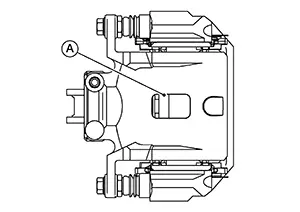
|
Wear thickness |
: Refer to Front Disc Brake. |
Inspection - Front Disc Brake Rotor
Inspection - Front Disc Brake Rotor
APPEARANCE
Check the surface of the disc brake rotor for uneven wear, cracks, or damage. Replace the disc brake rotor if any abnormal conditions exist. Refer to Removal and Installation.
RUNOUT
Check the wheel bearing axial end play before the inspection. Refer to Inspection.
Secure the
disc brake rotor to the wheel hub with wheel nuts at two wheel nut
locations. 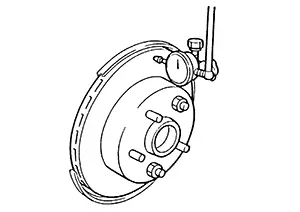
Measure the runout using a dial indicator to 10 mm (0.39 in) from the disc brake rotor edge.
|
Runout (with it attached to the Nissan Sentra vehicle) |
: Refer to Front Disc Brake. |
Find the installation position with the minimum runout by shifting the disc brake rotor-to-wheel hub installation position by one hole at a time if the runout exceeds the limit value.
Refinish the disc brake rotor if the runout is outside the limit even after performing the above operation. When refinishing, use Tool.
|
Tool number |
: 38-PFM92 ( — ) |
CAUTION:
-
Check in advance that the thickness of the disc brake rotor is wear thickness + 0.3 mm (0.012 in) or more.
-
If the thickness is less than wear thickness + 0.3 mm (0.012 in), replace the disc brake rotor. Refer to Removal and Installation.
|
Wear thickness |
: Refer to Front Disc Brake. |
THICKNESS
Check the thickness of the disc brake rotor using a micrometer. Replace the disc brake rotor if the thickness is below the wear limit. Refer to Removal and Installation.
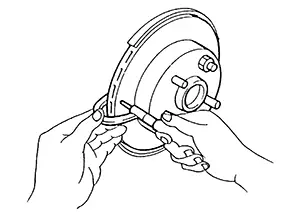
|
Wear thickness |
: Refer to Front Disc Brake. |
Other materials:
Precaution. Precautions
Precautions
Precautions for Supplemental Restraint System (srs) "air Bag" and "seat Belt Pre-Tensioner"
Precautions for Supplemental Restraint System (SRS) "AIR BAG" and "SEAT BELT PRE-TENSIONER"
The Supplemental Restraint System such as
“AIR BAG� and “SEAT BELT PRE-TENSIONER�,
...
Multi Remote Ent
Consult Function (bcm - Multi Remote Ent)
CONSULT Function
(BCM - MULTI REMOTE ENT)
DATA MONITOR
Note:
The following table includes information (items)
inapplicable to this Nissan Sentra vehicle. For information (items) applicable to
this vehicle, refer to CONSULT display items ...
Driver Side
Exploded View
Exploded View
POWER SEAT
1.
Seatback trim
2.
Seatback pad
3.
...