
Nissan Sentra Service Manual: Front coil spring and strut
Exploded View
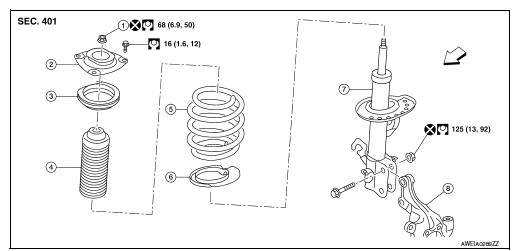
- Piston rod lock nut
- Strut mount insulator
- Strut mount bearing
- Bound bumper
- Coil spring
- Lower rubber seat
- Strut
- Steering knuckle
 Front
Front
Removal and Installation
REMOVAL
- Remove the wheel and tire using power tool. Refer to WT-47, "Exploded View".
- Remove the lock plate from the front coil spring and strut and reposition the brake hose. Refer to BR-25, "FRONT : Exploded View".
- Disconnect the stabilizer connecting rod from the front coil spring and strut. Refer to FSU-12, "Removal and Installation".
- Remove the wheel sensor bolt. Position the wheel sensor and the wheel sensor harness aside. Refer to BRC-106, "FRONT WHEEL SENSOR : Removal and Installation".
- Use a jack to support the transverse link and the steering knuckle.
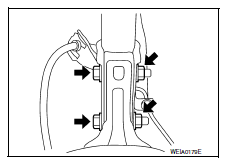
- Remove the lower strut nuts and bolts (
 ).
).
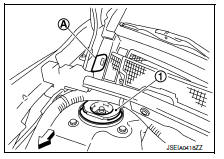
- Remove the grommet (A) from the cowl top cover.
 : Front
- Access 1 upper strut bolt through the grommet hole.
- Remove the upper strut bolts from the strut mount insulator (1).
- Remove the front coil spring and strut.
- Inspect the components. Refer to FSU-21, "Inspection".
INSTALLATION
Installation is in the reverse order of removal.
CAUTION:
Do not reuse piston rod lock nut or strut nuts.
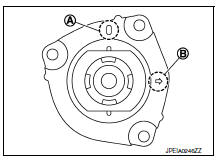
- Install the front coil spring and strut with the identification mark (A) of the strut mount insulator facing toward the front of the vehicle and the arrow (B) facing the outboard side.
NOTE:
The identification mark "0" shows the (RH) strut mount insulator and "1" shows the (LH).
- Perform the final tightening of the bolts and nuts under unladen conditions with the tires on level ground.
- Complete the inspection. Refer to FSU-21, "Inspection".
- After replacing the strut, always follow the disposal procedure to discard the old strut. Refer to FSU-22, "Disposal".

 Transverse link
Exploded View
Upper link
Front suspension member
Transverse link
Front
Removal and Installation
REMOVAL
Remove the wheel and tire using power tool. Refer to WT-47, "Explode ...
Other materials:
Door mirror remote control switch
Removal and Installation
Removal
Remove the instrument finisher D. Refer to IP-14, "Exploded View".
Using suitable tool (a) release the pawls and remove the door mirror
remote control switch (2) from the
switch bracket (1).
Pawl
Installation
Installation is in the rev ...
Cylinder block
Exploded View
Cylinder block
Block heater (for Canada)
Top ring
Second ring
Oil ring
Piston
Piston pin
Snap ring
Connecting rod
Connecting rod bearing (upper)
Connecting rod bearing (lower)
Crankshaft key
Connecting rod cap
Connecting rod cap bolt
Main bearing ca ...
Removal and installation
Combination meter
Exploded view
Combination meter
Front cover
Removal and installation
Removal
Remove cluster lid a. Refer to ip-19, "removal and installation".
Remove the screws from the combination meter.
Remove the combination meter.
Disconnect the comb ...
