
Nissan Sentra Service Manual: Removal and installation
Combination meter
Exploded view
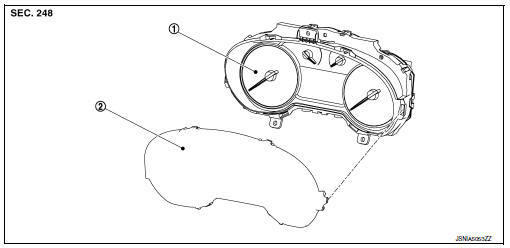
- Combination meter
- Front cover
Removal and installation
Removal
- Remove cluster lid a. Refer to ip-19, "removal and installation".
- Remove the screws from the combination meter.
- Remove the combination meter.
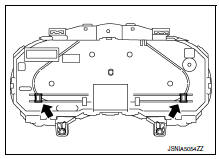
- Disconnect the combination meter harness connector and remove.
Installation
Installation is in the reverse order of removal.
Disassembly and assembly
Disassembly
Caution:
- Do not touch the display, pointer, the inside of front cover and the printed area of the dial during the work.
- Keep away from magnetic sources.
- Release the pawls and remove the front cover.
 Pawl
Pawl
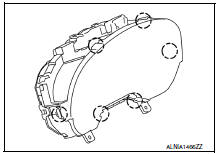
Assembly
Assembly is in the reverse order of disassembly.
Caution:
- Do not touch the display, pointer, the inside of front cover and the printed area of the dial during the work.
- Keep away from magnetic sources.
Steering switch
Removal and installation
For removal and installation of the steering switch, refer to AV-62, "Removal and Installation".
Illumination control switch
Removal and installation
For removal and installation of the illumination control switch refer to inl-57, "removal and installation".
 Normal operating condition
Compass
Compass : description
Compass
The electronic compass is highly protected from changes in most magnetic
fields. However, some large
changes in magnetic fields can affect it. Some exa ...

Other materials:
Intake valve timing control
INTAKE VALVE TIMING CONTROL : System Description
SYSTEM DIAGRAM
INPUT/OUTPUT SIGNAL CHART
Sensor
Input signal to ECM
ECM function
Actuator
Crankshaft position sensor (POS)
Engine speed and piston position
Intake valve timing
control
Intake valve timing con ...
Symptom diagnosis
Nissan vehicle immobilizer systemnats
symptoms
Symptom Table
Note:
Before performing the diagnosis in the following table, check
“SEC-171, "Work Flow"”.
Check that vehicle is under the condition shown in “Conditions of
vehicle” before starting diagnosis, ...
Fuel gauge
NOTE:
The ignition switch must be placed in the
ON position for the gauge to give a reading.
The gauge indicates the approximate fuel level
in the tank.
The gauge may move slightly during braking,
turning, acceleration, or going up or down hills.
The low fuel warning light comes on when ...
