Nissan Sentra B18 (2020-2025) Owner's Manual: FM/AM radio
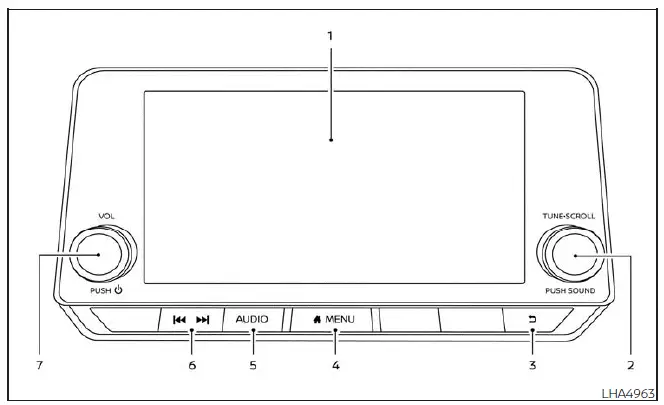
- Display screen
- PUSH SOUND button / TUNE·SCROLL knob
-
 BACK
button
BACK
button -
 MENU
button
MENU
button - AUDIO button
-
 (SEEK/TRACK)
buttons
(SEEK/TRACK)
buttons - VOL (volume) knob / PUSH (power) button
Audio main operation
VOL (volume) knob / PUSH
 (power)
button
(power)
button
Place the ignition switch in the ON position and press the PUSH
 (power) button while the system is off to resume the audio mode (radio, AUX, Bluetooth
audio, USB or iPod) that was playing immediately before the Nissan Sentra audio
system was turned off.
(power) button while the system is off to resume the audio mode (radio, AUX, Bluetooth
audio, USB or iPod) that was playing immediately before the Nissan Sentra audio
system was turned off.
To turn the audio system off, press the PUSH
 (power) button.
Rotate the VOL (volume) knob to increase or decrease the sound level according to your preference.
This Nissan Sentra may be equipped with Speed Sensitive Volume. When this feature is enabled, the audio volume automatically adjusts in relation to vehicle speed to help maintain consistent sound levels.
 MENU
button
MENU
button
Press the
 MENU
button to display the Menu screen. Touch the "Settings" key on the display, then
select the "Sound" key to access audio customization options.
MENU
button to display the Menu screen. Touch the "Settings" key on the display, then
select the "Sound" key to access audio customization options.

Bass, treble, balance, fade, and Speed Sensitive Volume can be adjusted by touching the corresponding "-" / "+" , "L" / "R", or "R" / "F" keys on the Nissan Sentra display.
Audio button
Press the AUDIO button to display the audio screen. If this button is pressed while another screen is active, the Nissan Sentra audio system will automatically return to the last audio source that was playing.
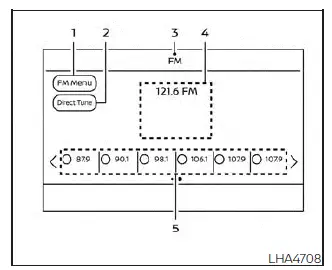
AM/FM radio screen
1. "AM Menu" / "FM Menu" key
Touch to display the corresponding radio menu screen.
2. "Direct Tune" (if so equipped)
Touch to manually enter a radio station frequency.
3. Audio source indicator
Displays the currently selected audio source.
4. Reception information display
Shows available reception information such as frequency, station name, and broadcast
data.
5. Preset list
Touch a preset station to begin listening. If available, touch the "<" or ">" keys
to scroll through the preset list.
AM radio operation
Press the
 MENU button and touch the "AM" key, or press the AUDIO button and select AM from
the Launch Bar to display the AM radio screen.
MENU button and touch the "AM" key, or press the AUDIO button and select AM from
the Launch Bar to display the AM radio screen.
If another audio source is active when the "AM" key is selected, the Nissan Sentra system will automatically switch to AM radio and begin playing the last selected AM station.
AM Menu
Touch the "AM Menu" key to access the following AM radio options:
- SCAN: Touch the "SCAN" key to automatically search available stations from low to high frequencies. The radio stops briefly at each detected station. Touching "SCAN" again will stop scanning and lock onto the current station.
- Refresh: Touch the "Refresh" key to rescan and update the AM station list shown on the right side of the menu screen.
 (SEEK/TRACK) buttons
Press the
 or
or
 buttons to tune through frequencies and stop at the next available broadcasting
station.
buttons to tune through frequencies and stop at the next available broadcasting
station.
1 to 6 Station memory operations
Up to six AM radio stations can be saved to the preset list in the Nissan Sentra audio system.
1. Select the AM radio band.
2. Tune to the desired station.
3. Touch and hold one of the preset numbers in the preset list until the station is stored.
The station frequency and related information will appear in the preset list.
To listen to a stored station, briefly press
 or
or
 on the steering wheel, or touch the desired preset directly on the screen.
FM radio operation
Press the
 MENU button and touch the "FM Menu" key, or press the AUDIO button and select FM
from the Launch Bar to display the FM radio screen.
MENU button and touch the "FM Menu" key, or press the AUDIO button and select FM
from the Launch Bar to display the FM radio screen.
If another audio source is active when the "FM" key is selected, the currently playing source will automatically be turned off and the Nissan Sentra audio system will begin playing the last FM radio station that was used.
The FM stereo indicator (STEREO) appears on the display during FM stereo reception, confirming that the Nissan Sentra is receiving a stereo broadcast signal.
If the stereo broadcast signal becomes weak, the radio will automatically switch from stereo to monaural reception to help maintain stable audio quality. This behavior is normal and does not indicate a malfunction.
FM Menu
Touch the "FM Menu" key to open the FM Menu screen and access the following options available in the Nissan Sentra:
- SCAN: To scan available stations, touch the "FM Menu" key on the radio screen and then select the "SCAN" key. The system will tune from lower to higher frequencies and pause at each broadcasting station for several seconds. Touching the "SCAN" key again during this pause will stop scanning and keep the radio tuned to the current station.
- Refresh: Touch the "Refresh" key to rescan and update the station list displayed on the right side of the FM Menu screen.
- RDS Info: Displays available Radio Data System (RDS) information, such as station name and song details, on the FM display screen when supported.
 (SEEK/TRACK) buttons
Press the
 or
or
 buttons to tune from lower to higher or higher to lower frequencies and stop automatically
at the next available broadcasting station.
buttons to tune from lower to higher or higher to lower frequencies and stop automatically
at the next available broadcasting station.
1 to 12 Station memory operations
Up to twelve FM radio stations can be stored in the preset list of the Nissan Sentra audio system.
1. Select the FM radio band.
2. Tune to the desired station.
3. Touch and hold one of the preset numbers in the preset list until the station is stored.
The stored station information, such as frequency, will be displayed in the preset list.
To listen to a preset station, briefly press
 or
or
 on the steering wheel, or touch the desired station directly on the preset list
shown on the radio screen.
on the steering wheel, or touch the desired station directly on the preset list
shown on the radio screen.
Auxiliary (AUX) devices operation
Connecting auxiliary devices
Connect an external AUX device to the AUX input jack located on the center console below the heater and air conditioner controls in the Nissan Sentra.
The AUX input jack supports standard analog audio input from devices such as portable cassette players, CD players, MP3 players, or smartphones.
Insert a 1/8 in (3.5 mm) stereo mini plug into the audio input jack. If a mono plug is used, audio output may not function correctly.
Activation and playing
Turn on the AUX device and connect it using an appropriate AUX cable. Select AUX mode from the audio source menu screen or by pressing the Source button on the steering wheel to begin playback through the Nissan Sentra audio system.
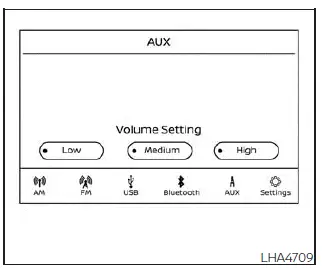
AUX screen
- Audio source indicator
Shows that the AUX input is currently selected and playing. - "Volume Setting" keys
Allows selection of output gain levels: Low, Medium, or High, to match the connected device’s volume. - AUX from Launch Bar
Touch to switch directly from another audio source to AUX.
Additional features
For more details, refer to the section titled "iPod player operation" for information about iPod functionality available in the Nissan Sentra.
Refer to "USB (Universal Serial Bus) Connection Port" for details about USB audio playback supported by this system.
See "Bluetooth streaming audio" for information on using the Bluetooth audio interface available in the Nissan Sentra.
Microsoft (WMA) Obligation of Labeling
Additional Obligation of Labeling
This product is protected by certain intellectual property rights of Microsoft Corporation and third parties. Use or distribution of this technology outside of this product is prohibited without a license from Microsoft, an authorized Microsoft subsidiary, or applicable third parties.
Other materials:
Component Parts
Ipdm E/r (intelligent Power Distribution Module Engine Room)
Component Parts Location
Component Parts
Location
A.
Engine compartment LH
...
Preparation. Preparation
Preparation
Special Service Tools
Special Service
Tools
The actual shape of the tools may differ from those
illustrated here.
Tool number
(TechMate No.)
Tool name
...
B203f-14 Outside Antenna
Dtc Description
DTC Description
DTC DETECTION LOGIC
DTC No.
CONSULT screen items
(Trouble diagnosis
content)
DTC detecting condition
...