Nissan Sentra B18 (2020-2025) Service Manual: Engine Stand Setting
Setting
Setting
Note:
Explained here is how to disassemble with engine stand supporting transaxle surface. Some steps may be different if using a different type of engine stand.
Remove the engine and the transaxle assembly from the Nissan Sentra vehicle, and separate the transaxle from the engine. Refer to Removal and Installation.
Install
engine to engine stand using the following procedure: Remove the drive plate (CVT Models)
or flywheel (M/T Models). Refer to Exploded View (CVT Models) or Exploded View (M/T Models). Remove the pilot
converter from the
rear end of the crankshaft with suitable tool before mounting to
engine stand (if necessary). 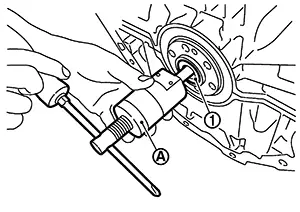 Lift
the engine with a hoist to install it onto widely use engine
stand.
Lift
the engine with a hoist to install it onto widely use engine
stand.
CAUTION:
-
Use the engine stand that has a load capacity [approximately 135 kg (298 lb) or more] large enough for supporting the engine weight.
-
If the load capacity of stand is not adequate, remove the following parts beforehand to reduce the potential risk of overturning stand.
-
Intake manifold: Refer to Removal and Installation.
-
Exhaust manifold: Refer to Removal and Installation.
-
CAUTION:
Before removing the hanging chains, check the engine stand is stable and there is no risk of overturning.
Note:
Shown is an example of widely used engine stand (A) that can support mating surface of transaxle with the torsion damper removed.
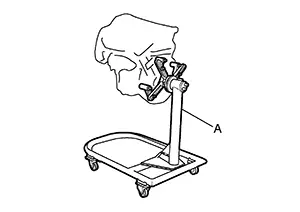
Drain engine oil. Refer to Draining.
CAUTION:
Be sure to clean drain plug and install with new drain plug washer.
Drain
engine coolant from cylinder block by removing water drain plug (1)
from the side of the engine. 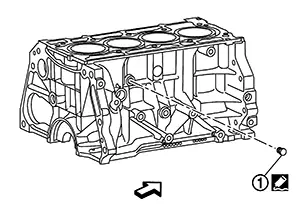
Use Genuine Silicone RTV Sealant or equivalent. Refer to Recommended Chemical Products and Sealants.
|
Tightening torque |
: Refer to Disassembly and Assembly. |
|
|
: Engine front |

Other materials:
Dtc/circuit Diagnosis
Eco Mode Switch
Component Function Check
Component Function Check
CHECK ECO MODE SWITCH OPERATION
Ignition switch ON.
Check ECO mode indicator turns ON/OFF
on combination meter when turn ECO mode switch
O ...
Sonar System. Removal and Installation. Sonar Control Unit. Removal and Installation
Sonar Control Unit. Removal and Installation
Removal and Installation
Removal and Installation
REMOVAL
CAUTION:
When replacing the sonar control unit, perform
"ADDITIONAL SERVICE WHEN REPLACING SONAR CONTROL UNIT". Refer to Work Procedure.
Partially
remove the trunk s ...
U2118-87 Can Comm Circuit
Dtc Description
DTC Description
CAN (Controller Area Network) is a serial
communication system for real time application. It is an on-Nissan Sentra vehicle
multiplex communication system with high data communication speed
and excellent error detectability. Many electronic control un ...