Nissan Sentra B18 (2020-2025) Service Manual: Door Switch
Component Function Check
Component Function Check
-
CHECK FUNCTION
-
 CONSULT
-
Select "Door switch AS", "Door switch DR", "Door switch RL" or "Door switch RR" in "Data Monitor" mode of "BCM(DOOR LOCK)".
-
Check that the function operates normally according to the following conditions:
Monitor Item
Condition
Status
DOOR switch DR
Front door LH
Open
On
Closed
Off
DOOR switch AS
Front door RH
Open
On
Closed
Off
DOOR switch RL
Rear door LH
Open
On
Closed
Off
DOOR switch RR
Rear door RH
Open
On
Closed
Off
-
Is the inspection result normal?
YES>>Door switch is OK.
NO>>Refer to Diagnosis Procedure.
-
Diagnosis Procedure
Diagnosis Procedure
-
CHECK DOOR SWITCH INPUT SIGNAL
-
-
Ignition switch OFF.
-
Disconnect malfunctioning door switch connector.
-
Check signal between malfunctioning door switch harness connector and ground using oscilloscope.
(+)
(–)
Signal
(Reference value)
Door switch
Connector
Terminal
Front LH
B21
3
Ground
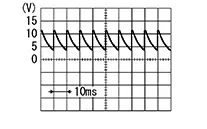
7.0 - 8.0 V
Front RH
B28
Rear LH
B26
Rear RH
B41
-
Is the inspection result normal?
YES >>GO TO 3.
NO >>GO TO 2.
-
-
CHECK DOOR SWITCH CIRCUIT
-
-
Disconnect BCM connector.
-
Check continuity between door switch harness connector and BCM harness connector.
Door switch
BCM
Continuity
Connector
Terminal
Connector
Terminal
Front LH
B21
3
M85
81
Yes
Front RH
B28
93
Rear LH
B26
94
Rear RH
B41
95
-
Check continuity between door switch harness connector and ground.
Door switch
—
Continuity
Connector
Terminal
Front LH
B21
3
Ground
No
Front RH
B28
Rear LH
B26
Rear RH
B41
-
Is the inspection result normal?
YES >>Replace BCM. Refer to Removal and Installation.
NO >>Repair or replace harness.
-
-
CHECK DOOR SWITCH
-
Refer to Component Inspection.
Is the inspection result normal?
YES >>GO TO 4.
NO >>Replace malfunctioning door switch. Refer to Removal and Installation.
-
-
CHECK INTERMITTENT INCIDENT
-
Refer to Intermittent Incident.
Inspection End.
-
Component Inspection
Component Inspection
-
CHECK DOOR SWITCH
-
-
Ignition switch OFF.
-
Disconnect malfunctioning door switch connector.
-
Check continuity between door switch terminals.
Door switch
Condition
Continuity
Terminal
3
Ground contact is part of the switch.
Door switch
Pressed
No
Released
Yes
-
Is the inspection result normal?
YES>>Inspection End.
NO>>Replace malfunctioning door switch. Refer to Removal and Installation.
-
Other materials:
Precautions when starting and driving
WARNING
Do not leave children or adults who normally require assistance unattended
in your Nissan Sentra.
Pets should also never be left alone inside the vehicle.
They could accidentally injure themselves or others through unintended
operation of vehicle controls. In addition, on ho ...
Settings
The Settings mode in the Nissan Sentra allows you to adjust and personalize the
information shown in the vehicle information display, helping tailor vehicle behavior
and on-screen data to your driving preferences:
VDC Setting
Driver Assistance
ECO Mode Setting
TPMS Settings
Clock
V ...
Avoiding collision and rollover
WARNING
Failure to operate the Nissan Sentra in a safe, attentive, and prudent manner
may result in loss of vehicle control, a serious accident, or a rollover.
Always remain alert and practice defensive driving techniques whenever operating
your Nissan Sentra.
Strictly obey all traffic laws a ...