Nissan Sentra B18 (2020-2025) Service Manual: Diagnosis and Repair Work Flow
Work Flow
Work Flow
OVERALL SEQUENCE
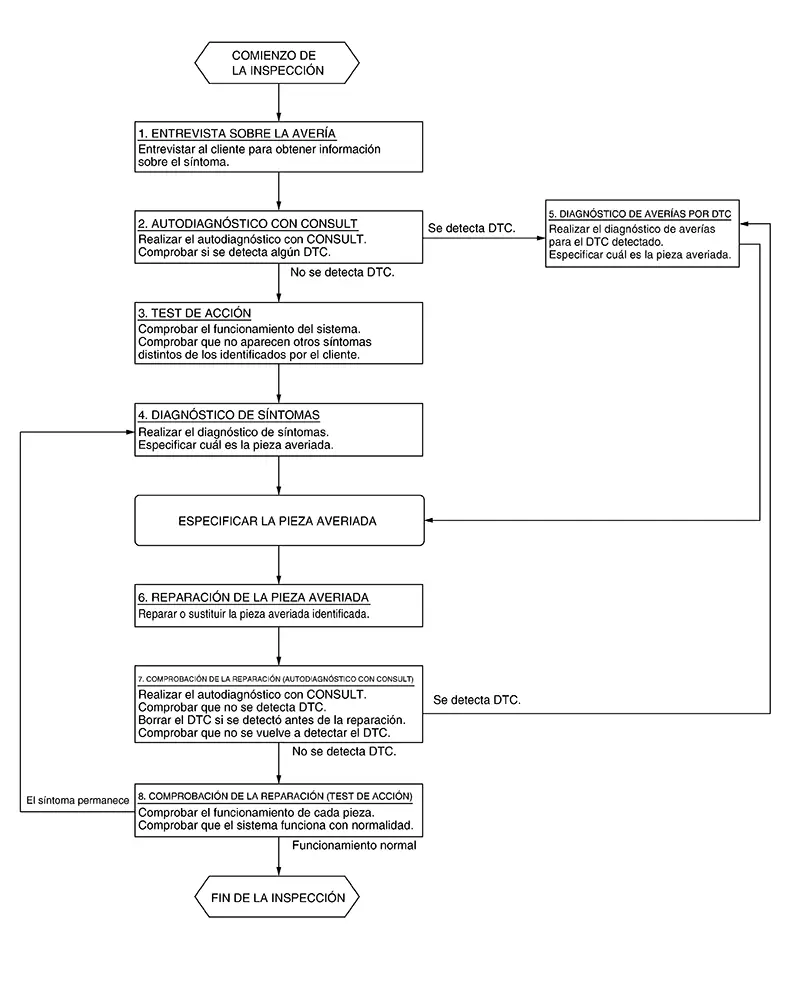
DETAILED FLOW
-
INTERVIEW FOR MALFUNCTION
It is important to clarify the customer’s concerns before starting the inspection. Interview the customer about the concerns carefully and understand the symptoms fully.
Note:
The customers are not professionals. Never assume that “maybe the customer means...� or “maybe the customer mentioned this symptom�.
>>GO TO 2.
-
SELF-DIAGNOSIS WITH CONSULT
 CONSULT
-
Perform “All DTC Reading� mode.
-
Check if the DTC is detected in the “Self Diagnostic Result� of the following:
-
“ICC/ADAS 2�
-
“LASER/RADAR�
-
“LANE CAMERA�
-
“Side radar (Rear left)�
-
“Side radar (Rear right)�
-
Is any DTC detected?
YES >>Record or print self-diagnosis results and freeze frame data (FFD).GO TO 5.
NO >>GO TO 3.
-
-
ACTION TEST
-
Perform the system action test to check the operation status of the following:
-
LDW: Refer to Work Procedure.
-
BSW: Refer to Work Procedure.
-
RCTA: Refer to Work Procedure.
-
I-DA: Refer to Work Procedure.
-
TSR: Refer to Work Procedure.
-
-
Check if any other malfunctions occur.
GO TO 4.
-
-
SYMPTOM DIAGNOSIS
Perform the applicable diagnosis according to the diagnosis chart by symptom. Refer to Symptom Table.
>>GO TO 6.
-
TROUBLE DIAGNOSIS BY DTC
CONSULT- Erase self-diagnostic results.
- Ignition switch OFF → ON.
CAUTION:
Be sure to wait of 10 seconds after turning ignition switch OFF or ON.
-
Check the DTC in the “Self Diagnostic Result�.
-
Perform trouble diagnosis for the following detected DTC:
-
“ICC/ADAS 2�: Refer to DTC Index.
-
“LASER/RADAR�: Refer to DTC Index.
-
“LANE CAMERA�: Refer to DTC Index.
-
“Side radar (Rear left)�: Refer to DTC Index.
-
“Side radar (Rear right)�: Refer to DTC Index.
-
If “DTC U1000� is detected, first diagnose the CAN communication system or ITS communication system.
>>GO TO 6.
-
MALFUNCTIONING PART REPAIR
Repair or replace the identified malfunctioning parts.
>>GO TO 7.
-
REPAIR CHECK (SELF-DIAGNOSIS WITH CONSULT)
-
Erase “Self Diagnostic Result�.
-
Perform “All DTC Reading� mode after repairing or replacing the specific items.
-
Check if any DTC is detected in self-diagnosis results of the following:
-
“ICC/ADAS 2�
-
“LASER/RADAR�
-
“LANE CAMERA�
-
“Side radar (Rear left)�
-
“Side radar (Rear right)�
-
Is any DTC detected?
YES >>GO TO 5.
NO >>GO TO 8.
-
-
REPAIR CHECK (ACTION TEST)
Perform the following system action test. Check that the malfunction symptom is solved or no other symptoms occur.
-
LDW: Refer to Work Procedure.
-
BSW: Refer to Work Procedure.
Is there a malfunction symptom?
YES >>GO TO 4.
NO >>Inspection End.
-
Other materials:
Manifold Absolute Pressure Sensor
Component Inspection
Component Inspection
CHECK MANIFOLD ABSOLUTE PRESSURE
(MAP) SENSOR-1
Turn ignition switch OFF.
Start engine and warm it up to normal
operating temperature.
Turn ...
B2c20-12 Starter Cut Relay
Dtc Description
DTC Description
DTC DETECTION LOGIC
DTC No.
CONSULT screen items
(Trouble diagnosis
content)
DTC detecting condition
...
P059f Active Grille Shutter
Dtc Description
DTC Description
DTC DETECTION LOGIC
Active grille shutter normally stops within zone which
is defined by zone (90°±20°).
If the active grille shutter stops within zone stuck
error is detected, and if the active grille shutter stops at position beyond
zon ...