
Nissan Sentra Owners Manual: CD care and cleaning
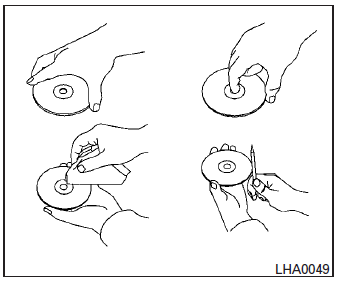
- Handle a CD by its edges. Do not bend the disc. Never touch the surface of the disc.
- Always place the discs in the storage case when they are not being used.
- To clean a disc, wipe the surface from the center to the outer edge using a clean, soft cloth. Do not wipe the disc using a circular motion.
- Do not use a conventional record cleaner or alcohol intended for industrial use.
- A new disc may be rough on the inner and outer edges. Remove the rough edges by rubbing the inner and outer edges with the side of a pen or pencil as illustrated.
 Pandora® audio (if so equipped)
The vehicle’s audio system is capable of playing
audio streaming through a compatible, USBconnected
audio device using the Pandora® music
service.
Connecting a device for use with
Pandora® au ...
 Steering wheel switch for audio control (if so equipped)
Tuning switch
Power on and SOURCE select switch
Volume control button
The audio system can be operated using the
controls on the steering wheel.
POWER on switch
With the ignition swit ...
Other materials:
Rear window and outside mirror (if so equipped)
defroster switch
To defrost the rear window glass and outside
mirror (if so equipped), start the engine and push
the rear window defroster switch on. The rear
window defroster indicator light on the switch
comes on. Push the switch again to turn the
defroster off.
The rear window defroster automatically ...
Variable voltage control system
CAUTION
Do not ground accessories directly to
the battery terminal. Doing so will bypass
the variable voltage control system
and the vehicle battery may not
charge completely.
Use electrical accessories with the engine
running to avoid discharging the
vehicle battery.
Your v ...
Service data and specifications (SDS)
Idle speed
*: Under the following conditions
A/C switch: OFF
Electric load: OFF (Lights, heater fan & rear window defogger)
Steering wheel: Kept in straight-ahead position
Ignition timing
*: Under the following conditions
A/C switch: OFF
Electric load: OFF (Lights, hea ...
