Nissan Sentra B18 (2020-2025) Service Manual: Basic Inspection
Diagnosis and Repair Workflow
Work Flow
Work Flow
OVERALL SEQUENCE
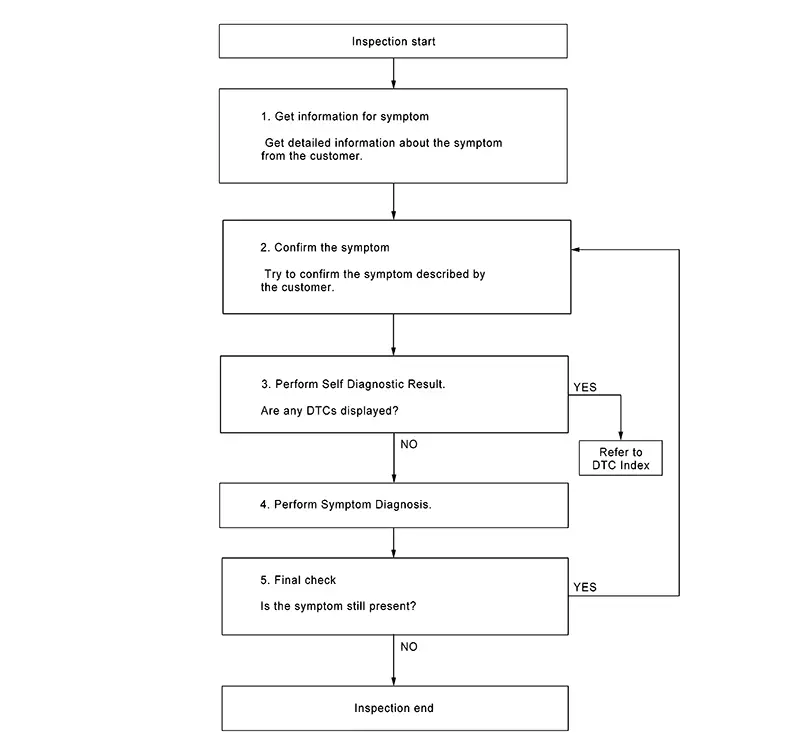
DETAILED FLOW
-
GET INFORMATION FOR SYMPTOM
-
Get detailed information from the customer about the symptom (the condition and the environment when the incident/malfunction occurred).
GO TO 2.
-
-
CONFIRM THE SYMPTOM
-
Try to confirm the symptom described by the customer. Verify relation between the symptom and the condition when the symptom is detected.
GO TO 3.
-
-
PERFORM SELF DIAGNOSTIC RESULT
-
 CONSULT
-
Ignition switch ON and wait for 2 seconds or more.
-
Select "Self Diagnostic Result" mode of "MULTI AV".
-
Are any DTCs displayed?
YES >>Refer to DTC Index.
NO >>GO TO 4.
-
-
PERFORM SYMPTOM DIAGNOSIS
-
Refer to Symptom Table.
GO TO 5.
-
-
FINAL CHECK
-
Refer to symptom described by the customer in step 1.
Is the symptom still present?
YES >>GO TO 2.
NO >>Inspection End.
-
Additional Service When Replacing Av Control Unit
Description
Description
BEFORE REPLACEMENT
When replacing AV control unit, save or print current vehicle specification with CONSULT configuration before replacement.
Note:
If “Before Replace ECU” cannot be used, use the “After Replace ECU” or “Manual Configuration” after replacing AV control unit.
AFTER REPLACEMENT
CAUTION:
When replacing AV control unit, you must perform “After Replace ECU” with CONSULT.
-
Complete the procedure of “After Replace ECU” in order.
-
If you set incorrect “After Replace ECU”, incidents might occur.
-
Configuration is different for each Nissan Sentra vehicle model. Confirm configuration of each vehicle model.
Work Procedure
Work Procedure
-
SAVING VEHICLE SPECIFICATION
-
CONSULT
Enter “Re/Programming, Configuration” and perform “Before Replace ECU” to save or print current Nissan Sentra vehicle specification.
Note:
If “Before Replace ECU” cannot be used, use the “After Replace ECU” or “Manual Configuration” after replacing AV control unit.
GO TO 2.
-
-
REPLACE AV CONTROL UNIT
-
Replace AV control unit. Refer to Removal and Installation.
GO TO 3.
-
-
WRITING Nissan Sentra Vehicle SPECIFICATION
-
CONSULT
-
Enter "Re/Programming, Configuration".
-
If “Before Replace ECU” operation was performed, automatically an "Operation Log Selection" screen will be displayed. Select the applicable file from the "Saved Data List" and press “Confirm” to write Nissan Sentra vehicle specification. Refer to Work Procedure.
-
If “Before Replace ECU” operation was not performed, select "After Replace ECU" or "Manual Configuration" to write Nissan Sentra vehicle specification. Refer to Work Procedure.
-
GO TO 4.
-
-
OPERATION CHECK
-
Check that the operation of the AV control unit and camera images (fixed guide lines) are normal.
Work End.
-
Configuration (av Control Unit)
Description
Description
Vehicle specification needs to be written with CONSULT because it is not written after replacing AV control unit.
Configuration has three functions as follows:
|
Function |
Description |
|---|---|
|
"Before Replace ECU" |
|
|
"After Replace ECU" |
Writes the Nissan Sentra vehicle configuration with manual selection. |
|
"Select Saved Data List" |
Writes the Nissan Sentra vehicle configuration with saved data. |
CAUTION:
-
When replacing AV control unit, you must perform “Select Saved Data List” or "After Replace ECU" with CONSULT.
-
Complete the procedure of “Select Saved Data List” or "After Replace ECU" in order.
-
If you set incorrect “Select Saved Data List” or "After Replace ECU", incidents might occur.
-
Configuration is different for each Nissan Sentra vehicle model. Confirm configuration of each vehicle model.
-
Never perform “Select Saved Data List” or "After Replace ECU" except for new AV control unit.
Work Procedure
Work Procedure
-
WRITING MODE SELECTION
-
CONSULT
Select “Reprogramming, Configuration” of AV control unit.
GO TO 2.
When writing manually>>GO TO 3.
-
-
PERFORM “SAVED DATA LIST”
-
CONSULT
Automatically “Operation Log Selection” window will display if “Before Replace ECU” was performed. Select applicable file from the “Save Data List” and press “Confirm”.
Work End.
-
-
PERFORM “AFTER REPLACE ECU” OR “MANUAL CONFIGURATION”
-
CONSULT
-
Select “After Replace ECU” or “Manual Configuration”.
-
Identify the correct model and configuration list. Refer to Configuration List.
-
Confirm and/or change setting value for each item.
CAUTION:
Thoroughly read and understand the Nissan Sentra vehicle specification. ECU control may not operate normally if the setting is not correct.
-
Select “Next”.
CAUTION:
Make sure to select “Next”, confirm each setting value and press “OK” even if the indicated configuration of brand new AV control unit is same as the desirable configuration. If not, configuration which is set automatically by selecting Nissan Sentra vehicle model can not be memorized.
-
When "Completed", select "End".
-
GO TO 4.
-
-
OPERATION CHECK
-
Confirm that each function controlled by AV control unit operates normally.
Work End.
-
Configuration List
Configuration List
CAUTION:
Thoroughly read and understand the vehicle specification. Incorrect settings may result in abnormal control of ECU.
|
SETTING ITEM |
NOTE |
|
|---|---|---|
|
Items |
Setting value |
|
|
ENGINE TYPE |
HYBRID ⇔ NORMAL |
|
|
AXLE TYPE |
2WD ⇔ 4WD |
|
|
NAVIGATION |
WITH ⇔ WITHOUT |
|
|
SOUND SYSTEM |
NORMAL (6SPKS) ⇔ NORMAL (4SPKS) ⇔ BOSE |
|
|
CAMERA SYSTEM |
REAR ⇔ AVM |
|
|
AIR COND |
AUTO A/C ⇔ MANUAL A/C |
|
⇔: Items which confirm Nissan Sentra vehicle specifications
Other materials:
Decel G Sensor Calibration
Description
Description
TCM stores calibration data (inherent characteristic value) of
decel G sensor to provide accurate control.
Therefore, it is required to perform calibration of decel G sensor
after the following work is performed.
Removing/ installing ABS actuator ...
Preparation. Preparation
Preparation
Special Service Tools
Special Service
Tools
The actual shape of the tools may differ from those
illustrated here.
Tool number
(TechMate No.)
Tool name
...
B2f06-15 Back Door/trunk Opener Switch
Dtc Description
DTC Description
DTC DETECTION LOGIC
DTC No.
CONSULT screen items (Trouble
diagnosis content)
DTC detecting condition
...