
Nissan Sentra Owners Manual: Control buttons
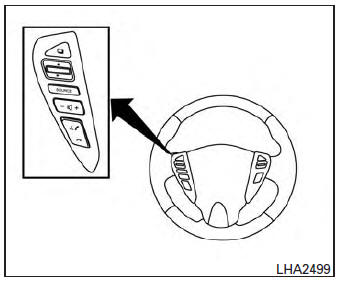
The control buttons for the Bluetooth® Hands- Free Phone System are located on the steering wheel.
 PHONE/SEND
Press the button to initiate
a VR session or answer an incoming
call.
You can also use the button to interrupt the system feedback and give a command at once. See “List of voice commands� and “During a call� in this section for more information.
 PHONE/END
While the voice recognition system
is active, press and hold
the button for 5 seconds to
quit the voice recognition system
at any time.
 Tuning switch
While using the voice recognition system, tilt the tuning switch up or down to manually control the phone system.
 Using the system
The NISSAN Voice Recognition system allows
hands-free operation of the Bluetooth® Phone
System.
If the vehicle is in motion, some commands may
not be available so full attention may be given to ...
 Connecting procedure
NOTE:
The connecting procedure must be performed
when the vehicle is stationary. If the
vehicle starts moving during the procedure,
the procedure will be cancelled.
To connect a phone to the ...
Other materials:
Glass lid
Exploded view
Glass lid
Roof panel
Front
Removal and installation
Removal
Caution:
After installing glass lid, check gap/height adjustments and
operation to make sure there is no malfunction.
Handle glass lid with care to prevent damage.
Open sunshade (1), then close ...
Fuel gauge
NOTE:
The ignition switch must be placed in the
ON position for the gauge to give a reading.
The gauge indicates the approximate fuel level
in the tank.
The gauge may move slightly during braking,
turning, acceleration, or going up or down hills.
The low fuel warning light comes on when ...
Illumination control switch
Removal and installation
Removal
Remove instrument finisher d. Refer to ip-14, "exploded view".
Remove the illumination control switch (1) from the switch carrier
(2) using suitable tool (a).
: Pawl
Installation
Installation is in the reverse order of removal. ...
