
Nissan Sentra B18 (2020-2025) Service Manual: Work Flow
OVERALL SEQUENCE
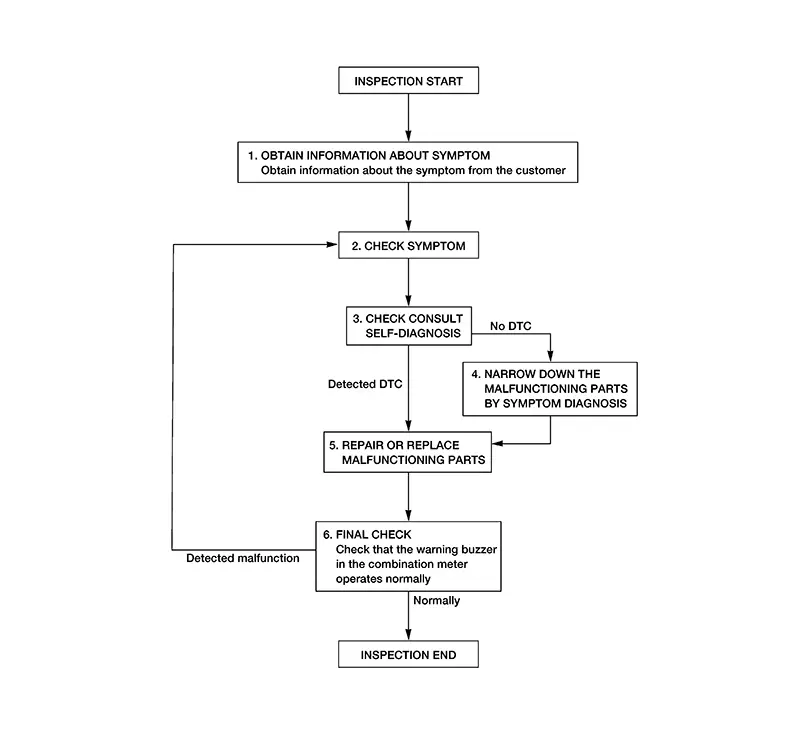
DETAILED FLOW
-
OBTAIN INFORMATION ABOUT SYMPTOM
-
Interview the customer to obtain as much information as possible about the conditions and environment under which the malfunction occurred.
GO TO 2.
-
-
CHECK SYMPTOM
-
-
Check the symptom based on the information obtained from the customer.
-
Check if any other malfunctions are present.
-
GO TO 3.
-
-
CHECK CONSULT SELF DIAGNOSTIC RESULT
-
 CONSULT
Select "Self Diagnostic Result" mode of "METER/M&A". Refer to DTC Index (Type A) or DTC Index (Type B).
Is the inspection result normal?
YES >>GO TO 4.
NO >>GO TO 5.
-
-
NARROW DOWN MALFUNCTIONING PARTS BY SYMPTOM DIAGNOSIS
-
Perform symptom diagnosis. Refer to Symptom Table.
GO TO 5.
-
-
REPAIR OR REPLACE MALFUNCTIONING PARTS
-
Repair or replace malfunctioning parts.
Note:
If DTC is displayed, erase DTC after repairing or replacing malfunctioning parts.
GO TO 6.
-
-
FINAL CHECK
-
Check that the warning buzzer in the combination meter operates normally.
Is the inspection result normal?
YES >>Inspection End.
NO >>GO TO 2.
-


Other materials:
Wiring diagram
SRS AIR BAG SYSTEM
Wiring Diagram
...
How to use this manual
How to use this section
Information
“Can” of lan section describes information peculiar to a vehicle and
inspection procedures.
For trouble diagnosis procedure, refer to lan-16, "trouble diagnosis
flow chart" of “can fundamental”.
Abbreviation list
Unit ...
Diagnosis system (BCM)
Common item
Common item : consult function (bcm - common item)
Application item
Consult performs the following functions via can communication with bcm.
Direct diagnostic mode
Description
Ecu identification
The bcm part number is displayed.
Self Diagnostic Result
...
