Nissan Sentra B18 (2020-2025) Service Manual: System Description
Component Parts
Telematics System
Component Parts Location
Component Parts Location
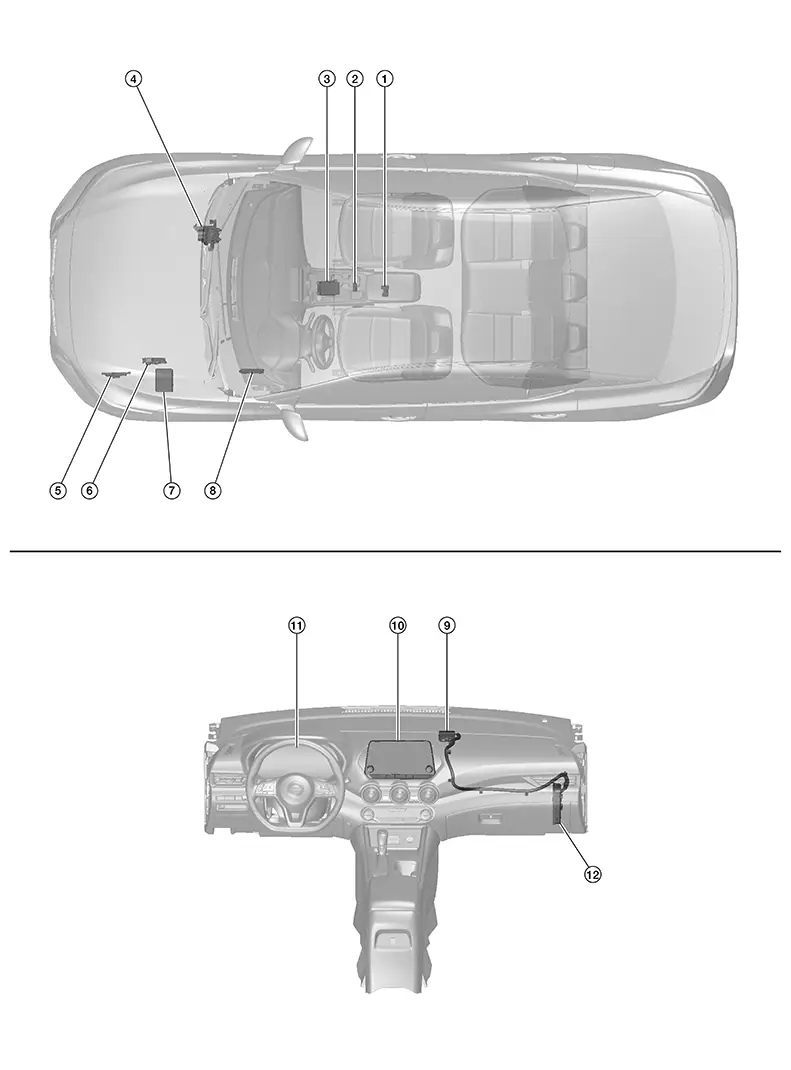
|
No. |
Component |
Function |
|---|---|---|
|
1. |
Air bag diagnosis sensor unit |
Provides TCU with air bag crash order signal via CAN communication. Refer to Component Parts Location for detailed component location. |
|
2. |
Moonroof switch assembly (telematics switch) |
Refer to Moonroof Switch Assembly (Telematics Switch). |
|
3. |
ABS (Anti-lock Braking System) actuator and electric unit (control unit) |
Provides TCU with ABS malfunction signal via CAN communication. Refer to Component Parts Location for detailed component location. |
|
4. |
TCM (Transmission Control Module) (with CVT models) |
Provides TCU with transmission range indication signal via CAN communication. Refer to Component Parts Location for detailed component location. |
|
5. |
ECM (Engine Control Module) |
Provides TCU with the following signals via CAN communication:
Refer to Component Parts Location for detailed component location. |
|
6. |
IPDM E/R (Intelligent Power Distribution Module Engine Room) |
Provides TCU with anti-theft horn status signal via CAN communication. Refer to Component Parts Location for detailed component location. |
|
7. |
BCM (Body Control Module) |
Provides TCU with door switches state signal via CAN communication. Refer to Component Parts Location for detailed component location. |
|
8. |
Microphone |
Refer to Microphone. |
|
9. |
Telematics antenna |
Refer to Telematics Antenna. |
|
10. |
AV control unit |
Refer to AV Control Unit. |
|
11. |
Combination meter |
Provides TCU with the following signals via CAN communication:
Refer to Component Parts Location for detailed component location. |
|
12. |
TCU (Telematics Communication Unit) |
Refer to TCU. |
Av Control Unit
AV Control Unit
-
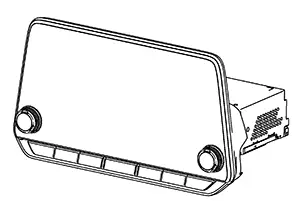
A 8-inch color display with multi-touch control, an AM/FM/HD electronic tuner radio with RDS and camera controller are integrated into the AV Control unit.
-
The 8-inch color display is a high resolution monitor that includes touch panel functions.
Tcu
TCU
-
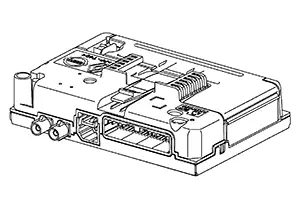
Telematics Communication Unit (TCU) is installed in RH side of instrument panel behind the glove box.
-
A radio communication terminal and SIM card are built into the unit and data is sent and received in SMS*, DTMF tone signal with the NissanConnect® center through the TEL antenna.
Note:
*: SMS stands for Short Message Service. It is also referred to as Text Messaging, Short Mail, etc. is the service that performs text based message communication.
-
It is connected to the AV control unit with the USB harness for sound signal input/output and USB communication.
-
It is connected to the air bag diagnosis sensor unit via CAN communication. TCU performs an emergency report when the air bag is inflated.
-
VIN information necessary for the Telematics service is memorized.
-
Audio signals received during SOS/Operator call are transmitted from TCU to each speaker via the AV control unit.
-
During the communication with NissanConnect center, TCU transmits a TEL ON signal to the AV control unit to prohibit the use of Bluetooth® hands-free phone.
Telematics Antenna
Telematics Antenna
-
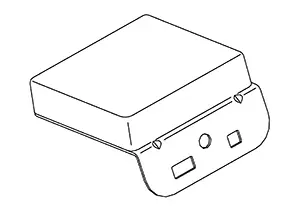
The telematics antenna consists of TEL antenna and GPS antenna.
-
It is installed in the instrument panel.
 Note:
Note:
The placement of an object on the instrument panel may cause desensitization in the receiver sensitivity.
Telematics Switch
Telematics Switch
-
The moonroof switch assembly (telematics switch) is located on the map lamp assembly.
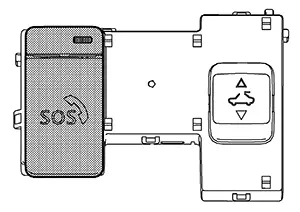
-
The moonroof switch assembly (telematics switch) is connected to TCU and transmits an operation signal.
-
The state of LED (ON/Blink/OFF) shows the status of SOS call.
LED ON
:SOS Call available
LED Blink
:SOS Call in communication
LED OFF
:Out of service area or system error
Microphone
Microphone
-
Microphone is installed on the map lamp assembly.
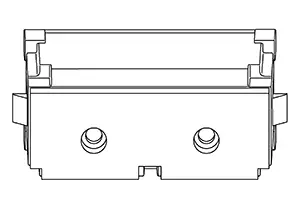
-
The microphone is used for the operation of the NissanConnect, hands-free phone system, voice recognition function.
-
The power is supplied from the TCU to the microphone, transmitting sound signals to the TCU during operation of the NissanConnect system, hands-free phone communication, and voice recognition.
System
System Description
System Description
SYSTEM DIAGRAM
Display Audio System - Without Bose Audio System With 8� Color Display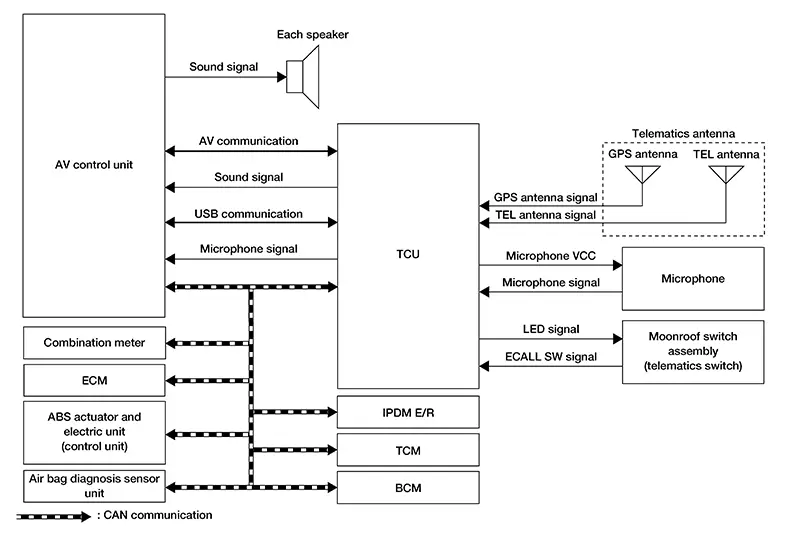 Display Audio System - With Bose Audio System With 8�
Color
Display
Display Audio System - With Bose Audio System With 8�
Color
Display 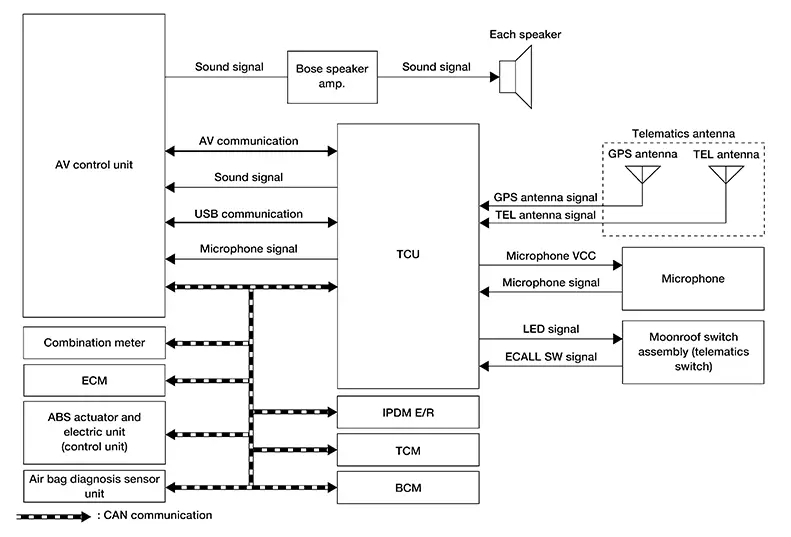
TCU Input Signal (CAN Communication)
| Transmit unit | Signal name |
|---|---|
|
Air bag diagnosis sensor unit |
Air bag crash order signal |
|
ABS actuator and electrical unit (control unit) |
ABS malfunction signal |
|
BCM |
Door switches state signal |
|
Combination meter |
|
|
ECM |
|
|
IPDM E/R |
Anti-theft horn status signal |
|
TCM |
Transmission range indication signal |
DESCRIPTION
-
The Telematics system is a system for providing information by connecting the Nissan Sentra vehicle and the user to the NissanConnect center.
-
Telematics Communication Unit (TCU) equipped with a radio communication terminal communicates with the information center (NissanConnect center) via radio waves for receiving NissanConnect services.
-
With the equipment of the radio communication terminal, TCU communicates with NissanConnect center by Packet communication*1 and SMS*2 via TEL antenna.
Note:
-
*1: Packet communication means a communication method that data is broken down into smaller chunks for communication. The split data is called a packet and improves the efficiency of the communication circuit.
-
*2: SMS stands for Short Message Service, also known as text messaging or short mail, and provides text-based message communication services.
-
-
While communicating with the operator, data (e.g. transmission of own Nissan Sentra vehicle location) is transmitted to the NissanConnect Service Center by using DTMF tone signals and SMS via the radio communication module included in TCU.
-
Audio signals transmitted and received while communicating with the operator are input by microphone connected to TCU.
-
Audio signals are output from TCU via the audio data circuit connected to the AV control unit.
Diagnosis System (ivc)
Consult Function
CONSULT Function
CONSULT FUNCTIONS
CONSULT performs the following functions via communication with the TCU.
|
Direct Diagnostic Mode |
Description |
|---|---|
|
Self Diagnostic Result |
The TCU self diagnostic results are displayed. |
|
Data Monitor |
The TCU input/output data is displayed in real time. |
|
Work support |
Performs TCU activation setting and VIN data saving/writing. |
|
ECU Identification |
The TCU part number is displayed. |
|
Configuration |
|
SELF DIAGNOSTIC RESULT
Refer to DTC Index.
DATA MONITOR
Note:
The following table includes information (items) inapplicable to this Nissan Sentra vehicle. For information (items) applicable to this vehicle, refer to CONSULT display items.
|
Monitor Item [Unit] |
Description |
|---|---|
|
USB [No con/Con/No dete] |
Status of USB connection to AV control unit is displayed. |
|
SIM status [Unlock/Lock] |
Note:
This item is displayed, but cannot be used. |
|
Backup battery age [day(s)] |
Set value for continued operation time to control back up battery consumption is displayed. Note:
Number of days (default/no battery preset) |
|
eUICC STATUS PIN used [Enable/Disable] |
Note:
This item is displayed, but cannot be used. |
|
SOS switch [On/Off] |
Status of SOS switch is displayed. |
|
Zone [U.S.A] |
Regional setting of Nissan Sentra vehicle is displayed. |
|
Power type [Engine/EV/HEV/PHEV] |
Nissan Sentra Vehicle powertrain type is displayed. |
|
Brand [Renault/Nissan/Infiniti] |
Brand name is displayed. |
|
Radio wave [On/Off] |
Network access device on Nissan Sentra vehicle is displayed. |
WORK SUPPORT
|
Conditions |
Description |
|---|---|
|
SAVE VIN DATA |
VIN data saved in TCU is stored in CONSULT. |
|
WRITE VIN (SAVED DATA) |
VIN data from SAVE VIN DATA can be written to new TCU. |
|
WRITE VIN (MANUAL INPUT) |
VIN data can be manually written to new TCU. |
|
TCU ACTIVATE SETTING |
Off: TCU activation Off. |
|
On: TCU activation On. |
ECU IDENTIFICATION
The part number of TCU is displayed.
CONFIGURATION
Configuration has the three following functions:
|
Function |
Description |
|
|---|---|---|
|
Read/Write Configuration |
Before Replace ECU |
Allows storage of the Nissan Sentra vehicle specification written in TCU to the CONSULT. |
|
After Replace ECU |
Allows writing of the Nissan Sentra vehicle specification stored in CONSULT to the TCU. |
|
|
Manual Configuration |
Allows writing of the Nissan Sentra vehicle specification to the TCU manually. |
|
CAUTION:
-
When replacing TCU, you must perform “Read / Write Configuration� or “Manual Configuration� with CONSULT.
-
Complete the procedure of “Read / Write Configuration� or “Manual Configuration� in order.
-
If you set incorrect “Read / Write Configuration� or “Manual Configuration�, incidents might occur.
-
Configuration is different for each Nissan Sentra vehicle model. Confirm configuration of each vehicle model.
Other materials:
Sonar System. Symptom Diagnosis. Sonar System. Symptom Table
Sonar System. Symptom Table
Symptom Table
Symptom Table
Symptom
Possible cause
Reference page
Malfunction is detected in
...
B1000-49 Air Bag Diagnosis Sensor Unit
Dtc Description
DTC Description
DTC DETECTION LOGIC
DTC No.
CONSULT screen items
(Trouble diagnosis
content)
DTC Detection Condition
...
Consult Checking System
Description
Description
Note:
This vehicle is diagnosed using the CONSULT-III
plus.
When CONSULT is connected with a data link connector equipped on the
Nissan Sentra vehicle side, it will
communicate with the control unit equipped in the vehicle and then
...