Nissan Sentra B18 (2020-2025) Owner's Manual: Rear Sonar System (RSS)
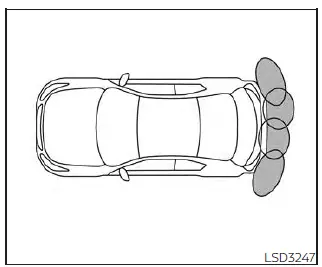
The Rear Sonar System (RSS) in the Nissan Sentra emits audible tones to inform the driver of obstacles detected near the rear bumper, helping improve awareness during low-speed maneuvering and parking.
When the "DISPLAY" key is activated, the sonar view automatically appears on the touch-screen display. In addition, a supplementary sonar status view is shown in the vehicle information display, allowing the Nissan Sentra driver to monitor obstacle proximity more easily.
WARNING
- The RSS is a convenience feature and is not a substitute for proper parking techniques or attentive driving.
- The driver is always responsible for safety during parking and other
maneuvers.
Always visually check surroundings and confirm it is safe before parking or reversing the Nissan Sentra.
- Read and fully understand the limitations of the RSS described in this
section.
The colors of the corner sonar indicators and the distance guide lines in the rear view represent different distances to detected objects.
- Inclement weather or ultrasonic interference sources—such as automatic car washes, compressed-air brakes on trucks, or pneumatic tools—may affect system operation, potentially causing reduced performance or false activation.
- This function is designed to assist the driver in detecting large stationary objects to help avoid vehicle damage.
- The system is not intended to prevent contact with small or moving objects.
Always move slowly when reversing.
The RSS may not detect small objects below the bumper, objects very close to the bumper, or objects lying on the ground.
- The system may not detect certain objects, including fluffy materials such as snow, cloth, cotton, glass, or wool; thin objects such as rope, wire, or chain; and wedge-shaped objects.
If the Nissan Sentra sustains damage to the bumper fascia that causes misalignment or bending, the sonar sensing zone may be altered. This can result in inaccurate obstacle measurement or false alerts.
CAUTION
- Excessive noise—such as a high audio system volume or open windows—may interfere with the audible tone, making it difficult to hear.
- Keep the sonar sensors located on the rear bumper fascia free from snow,
ice, and heavy dirt buildup.
Do not clean the sensors with sharp objects. If the sensors are obstructed, sonar accuracy will be reduced.
System operation
The Rear Sonar System in the Nissan Sentra provides both visual and audible alerts for rear obstacles when the shift lever is placed in the R (Reverse) position.
The system automatically deactivates at speeds above 6 mph (10 km/h) and reactivates once the vehicle slows below this threshold.
If an obstacle is detected only by a corner sensor and the distance remains unchanged, the intermittent tone will stop after approximately 3 seconds. The tone will also stop if the object moves away or if the vehicle moves away from the obstacle.
When an object is first detected, a green indicator appears and blinks while an intermittent tone sounds. As the Nissan Sentra moves closer, the indicator changes to yellow and blinking accelerates. When very close to the object, the indicator turns solid red and the tone becomes continuous.
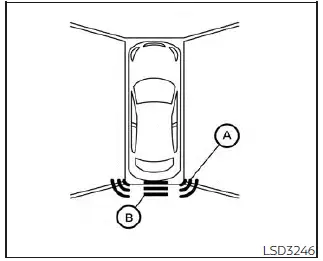
When the corner of the Nissan Sentra approaches an object, the corner sonar indicator A appears. When the center of the vehicle nears an object, the center sonar indicator B is displayed.
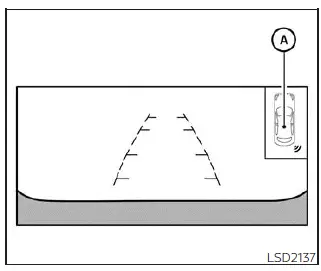
The system indicators A appear progressively as the Nissan Sentra moves closer to detected obstacles.
How to enable/disable the sonar system
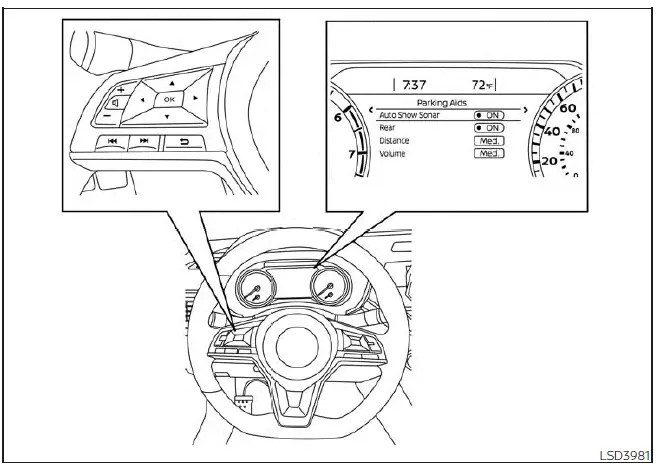
For vehicles with the 7 inch meter display
The Rear Sonar System is automatically activated when the ignition switch is in the ON position and the shift lever is placed in the R (Reverse) position.
To manually enable or disable the sonar system in the Nissan Sentra, follow these steps:
For vehicles with the 7 inch meter display:
1. Press the
 button until "Settings" appears in the vehicle information display.
Use the
 button to select "Driver Assistance," then press the OK button.
2. Select "Parking Aids" and press the OK button.
3. Select "Rear" and press the OK button to turn the system on or off.
- Select "Auto Show Sonar" to automatically display parking sensor visuals in the vehicle information display when the sonar system activates.
- Select "Distance" to adjust the sonar detection range to "Long," "Medium," or "Short."
- Select "Volume" to set the alert sound level to "High," "Medium," or "Low."
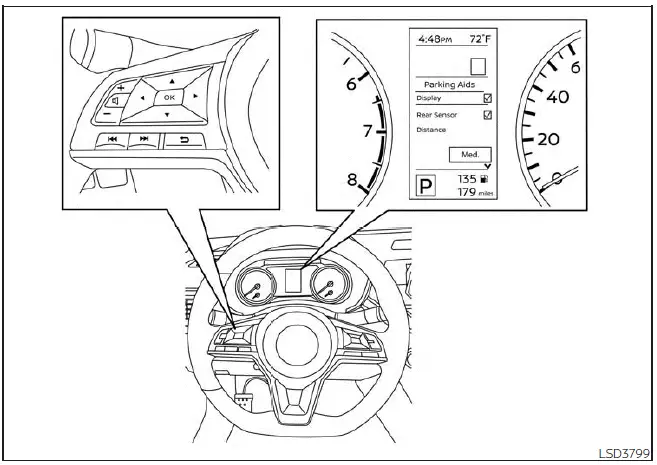
For vehicles with the 4.2 inch meter display
For vehicles with the 4.2 inch meter display:
1. Press the
 button until "Settings" is shown in the vehicle information display of your Nissan
Sentra.
button until "Settings" is shown in the vehicle information display of your Nissan
Sentra.
Use the
 button to select "Driver Assistance," then press the OK button to confirm.
2. Select "Parking Aids" and press the OK button to access the parking support features.
3. Select "Rear Sensor" and press the OK button to turn the Rear Sonar System (RSS) on or off as desired.
- Select "Display" to show the parking sensor indicators in the vehicle information display when the sonar system activates.
- Select "Distance" to adjust the sonar detection range to "Long," "Medium," or "Short," depending on driver preference and parking conditions.
- Select "Volume" to set the alert sound level to "High," "Medium," or "Low" for improved audibility inside the Nissan Sentra.
Sonar limitations
WARNING
Listed below are the operational limitations of the Rear Sonar System. Failure to use the Nissan Sentra in accordance with these limitations could result in serious injury or death.
- The system is automatically deactivated at speeds above 6 mph (10 km/h) and is reactivated again at lower speeds.
- Inclement weather or ultrasonic sources such as automatic car washes, compressed-air truck brakes, or pneumatic drills may affect system operation, potentially causing reduced performance or false alerts.
- The system is not designed to prevent contact with small or moving objects. Always reverse slowly and cautiously. The system will not detect small objects below the bumper or objects lying on the ground.
- The system may not detect certain objects, including fluffy materials such as snow, cloth, cotton, or glass wool; thin objects such as rope, wire, or chain; or wedge-shaped objects.
- The system may not detect objects when the vehicle is moving faster than 3 mph (5 km/h) and may not recognize certain angled or moving objects.
- Do not attach stickers (including transparent materials), install accessories, or apply any coatings that may block or cover the sonar sensors, as this may reduce system effectiveness.
System temporarily unavailable
If sonar sensor blockage is detected, the Rear Sonar System in the Nissan Sentra will be deactivated automatically.
The system will remain unavailable until the obstructing conditions are no longer present.
Sonar sensors may be temporarily blocked by environmental conditions such as splashing water, mist, fog, or road spray. Blockage may also be caused by ice, frost, mud, or dirt covering the sonar sensors.
Action to take:
Once the above conditions are eliminated, the system will automatically resume normal operation without driver intervention.
System maintenance
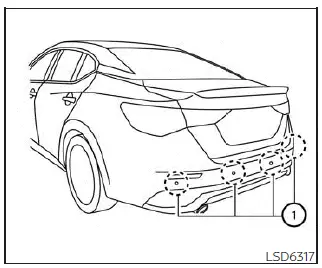
The sonar sensors 1 are located on the rear bumper of the Nissan Sentra. Always keep the areas around the sonar sensors clean and unobstructed.
The sensors may become blocked by temporary environmental conditions such as splashing water, mist, fog, ice, frost, or road debris.
Check the rear bumper regularly and remove any objects or buildup that may obstruct the sonar sensors.
Do not attach stickers (including transparent materials), install accessories, or apply additional paint near the sonar sensor areas, as these actions may interfere with proper system operation.
Do not strike or damage the area around the sonar sensors. If the rear bumper area is damaged due to a collision, it is recommended that you visit a NISSAN dealer to have the system inspected and serviced.
Other materials:
Accelerator Control System. Removal and Installation. Accelerator Control System
Accelerator Control System
Exploded View
Exploded View
1.
Accelerator pedal
assembly
2.
Brake pedal bracket
...
U0131 Can Communication
Dtc Description
DTC Description
DTC DETECTION LOGIC
DTC
CONSULT screen terms
(Trouble diagnosis
content)
DTC detection
condition
...
Noise, Vibration and Harshness (nvh) Troubleshooting. Nvh Troubleshooting Chart
Nvh Troubleshooting Chart
NVH Troubleshooting Chart
Use the chart below to find the cause of the
symptom. If necessary, repair or replace these parts.
...