Nissan Sentra B18 (2020-2025) Service Manual: Accelerator Control System :: Removal and Installation. Accelerator Control System
Accelerator Control System. Exploded View
Exploded View
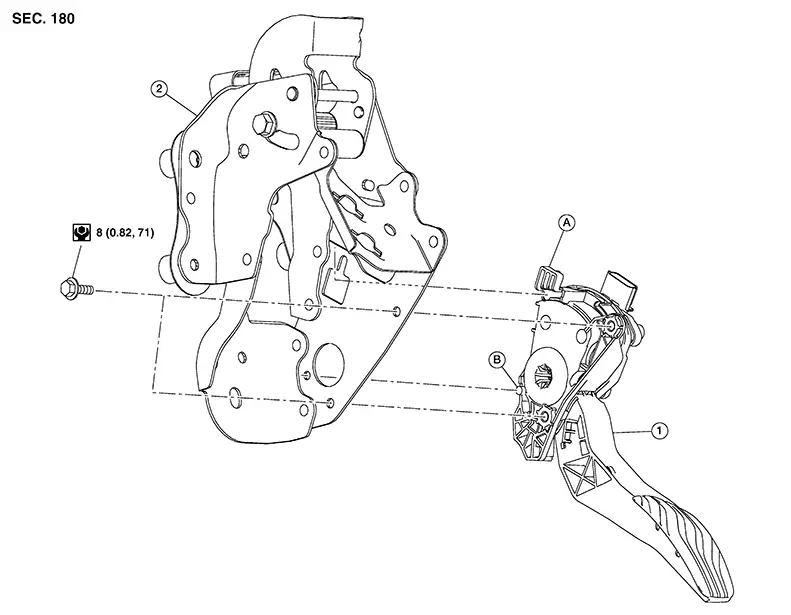
|
1. |
Accelerator pedal assembly |
2. |
Brake pedal bracket |
A. |
Locating hook |
|
B. |
Locating pin |
Removal and Installation
Removal and Installation
REMOVAL
Disconnect the harness connector from the accelerator pedal assembly.
Remove bolts and remove accelerator pedal assembly.
CAUTION:
-
Do not disassemble accelerator pedal assembly.
-
Do not remove accelerator pedal position sensor from accelerator pedal assembly.
-
Do not drop or impact the accelerator pedal assembly.
-
Do not expose the accelerator pedal assembly to water.
INSTALLATION
Installation is in the reverse order of removal.
-
Insert the locating hook and pin into the brake pedal bracket.
CAUTION:
Do not squeeze the locating hook into the brake pedal bracket when inserting the locating pin into the hole on the brake pedal bracket side.
Inspection
Inspection
INSPECTION AFTER INSTALLATION
Check that the accelerator pedal moves smoothly within the specified range.
 :
Front
:
Front
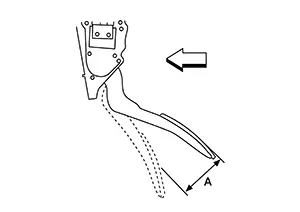
|
Accelerator pedal stroke (A) |
: Refer to Accelerator Control. |
For the electrical inspection of accelerator pedal position sensor. Refer to Work Procedure.
CAUTION:
-
Perform the “ACCELERATOR PEDAL RELEASED POSITION LEARNING�. Refer to Work Procedure.
-
The accelerator pedal should return smoothly to the fully raised position.
Other materials:
Preparation. Preparation
Preparation
Commercial Service Tools
Commercial Service Tools
Tool name
Description
Oil filter wrench
assortment
...
Mirrors
Manual anti-glare rearview mirror
Use the night position 1 to reduce glare from the headlights of vehicles behind
you when driving at night.
Select the day position 2 for normal visibility during daylight driving conditions.
WARNING
Use the night position only when necessary, as it reduces ...
Steering System. Basic Inspection
Diagnosis and Repair Work Flow. Work Flow (heated Steering Wheel)
Work Flow (heated Steering Wheel)
Work Flow (Heated
Steering Wheel)
OVERALL SEQUENCE
DETAILED FLOW
INTERVIEW CUSTOMER
Interview the customer to obtain as much information
...