Nissan Sentra B18 (2020-2025) Service Manual: Power Window Control System :: Basic Inspection
Diagnosis and Repair Work Flow. Work Flow. Work Flow
Work Flow
OVERALL SEQUENCE
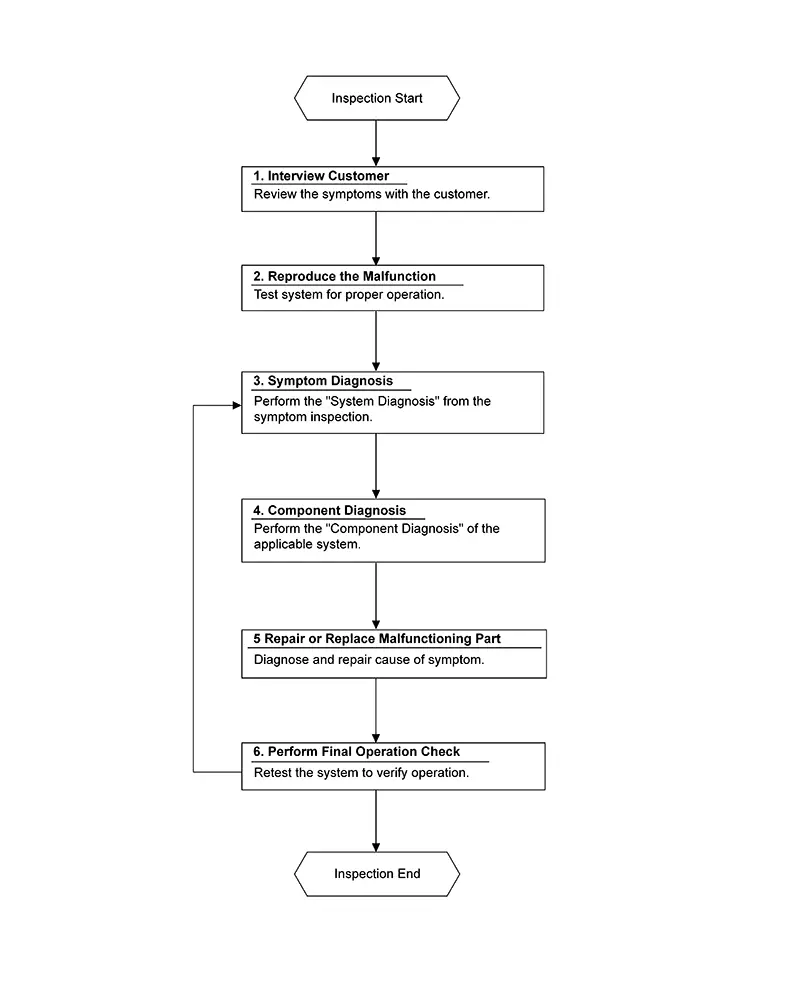
DETAILED FLOW
-
INTERVIEW CUSTOMER
-
Interview the customer to obtain as much information as possible about the conditions and environment under which the malfunction occurred.
GO TO 2.
-
-
REPRODUCE THE MALFUNCTION
-
Check the malfunction on the Nissan Sentra vehicle that the customer describes.
Inspect the relation of the symptoms and the condition when the symptoms occur.
GO TO 3.
-
-
SYMPTOM DIAGNOSIS
-
Use Symptom diagnosis from the symptom inspection result in step 2 and then identify where to start performing the diagnosis based on possible causes and symptoms.
GO TO 4.
-
-
COMPONENT DIAGNOSIS
-
Perform the diagnosis with Component diagnosis of the applicable system.
GO TO 5.
-
-
REPAIR OR REPLACE MALFUNCTIONING PART
-
Repair or replace the specified malfunctioning parts.
GO TO 6.
-
-
PERFORM FINAL OPERATION CHECK
-
Check that malfunctions are not reproduced when obtaining the malfunction information from the customer, referring to the symptom inspection result in step 2.
Are the malfunctions corrected?
YES >>Inspection End.
NO >>GO TO 3.
-
Additional Service When Removing Battery Negative Terminal. Description
Description
When the battery negative terminal is disconnected, the initialization is necessary for normal operation of power window system.
CAUTION:
The following specified operations can not be performed under the non-initialized condition:
-
Auto-up operation
-
Anti-pinch function
Work Procedure
Work Procedure
-
SYSTEM INITIALIZATION
-
Perform system initialization. Refer to Work Procedure.
GO TO 2.
-
-
CHECK ANTI-PINCH FUNCTION
-
Check anti-pinch function. Refer to Work Procedure.
Inspection End.
-
Additional Service When Replacing Main Power Window and Door Lock/unlock Switch. Description
Description
When the main power window and door lock/unlock switch is replaced, the initialization is necessary for normal operation of power window system.
CAUTION:
The following specified operations can not be performed under the non-initialized condition:
-
Auto-up operation
-
Anti-pinch function
Work Procedure
Work Procedure
-
SYSTEM INITIALIZATION
-
Perform system initialization. Refer to Work Procedure.
GO TO 2.
-
-
CHECK ANTI-PINCH FUNCTION
-
Check anti-pinch function. Refer to Work Procedure.
Inspection End.
-
System Initialization. Description
Description
If any of the following operations are performed, the initialization is necessary for normal operation of power window system:
-
Disconnection and connection of battery cable from negative terminal.
-
When main power window and door lock/unlock switch replaced.
-
Electric power supply to main power window and door lock/unlock switch or front power window motor LH is interrupted by blown fuse or disconnection and connection of the negative terminal of battery, etc.
-
Disconnection and connection of main power window and door lock/unlock switch harness connector.
-
Removal of front power window motor LH from regulator assembly.
-
Operation of regulator assembly as an independent unit.
-
Removal and installation of glass.
-
Removal and installation of door glass run.
CAUTION:
The following specified operations can not be performed under the non-initialized condition:
-
Auto-up operation
-
Anti-pinch function
Work Procedure
Work Procedure
-
STEP 1
-
-
Ignition switch ON.
-
Operate the main power window and door lock/unlock switch to fully open the window. (This operation is unnecessary if the window is already fully open)
-
Operate the main power window and door lock/unlock switch in the UP position (AUTO-UP operation). Even after glass stops at fully closed position, keep pulling the switch for 2 seconds or more.
-
Release the switch and check that AUTO-UP function operates normally.
-
GO TO 2.
-
-
STEP 2
-
Check anti-pinch function. Refer to Work Procedure.
Inspection End.
-
Anti-Pinch Inspection. Description
Description
If any of the following operations are performed, the initialization is necessary for normal operation of anti-pinch function:
-
Disconnection and connection of battery cable from negative terminal.
-
When main power window and door lock/unlock switch replaced.
-
Electric power supply to main power window and door lock/unlock switch or front power window motor LH is interrupted by blown fuse or disconnection and connection of the negative terminal of battery, etc.
-
Disconnection and connection of main power window and door lock/unlock switch harness connector.
-
Removal of front power window motor LH from regulator assembly.
-
Operation of regulator assembly as an independent unit.
-
Removal and installation of glass.
-
Removal and installation of door glass run.
Work Procedure
Work Procedure
-
CHECK ANTI-PINCH FUNCTION
-
-
Fully open the door window.
-
Place a piece of wood near fully closed position.
-
Close door glass completely with AUTO-UP.
-
Check the following conditions:
-
Check that glass lowers for approximately 150 mm (5.91 in.) without pinching piece of wood and stops.
-
Check that glass does not rise when operating the main power window and door lock/unlock switch while lowering.
CAUTION:
-
Perform initial setting when AUTO-UP operation or anti-pinch function does not operate normally.
-
Check that AUTO-UP operates before inspection when system initialization is performed.
-
Do not check with hands and other body parts because they may be pinched. Do not get pinched.
-
-
-
Inspection End.
-
Other materials:
Abs Branch Line Circuit (vehicle Can Communication 1 Circuit)
Diagnosis Procedure
Diagnosis Procedure
CHECK CONNECTOR
Turn the ignition switch OFF.
Disconnect the battery cable from the
negative terminal.
Check the terminals and connectors of
...
Component Parts
Display Audio with Bose with 8" Color Display
Component Parts Location
Component Parts
Location
No.
Component
Function
...
Precaution. Precautions
Precautions
Precautions for Supplemental Restraint System (srs) "air Bag" and "seat Belt Pre-Tensioner"
Precautions for Supplemental Restraint System (SRS) "AIR BAG" and "SEAT BELT PRE-TENSIONER"
The Supplemental Restraint System such as
“AIR BAG� and “SEAT BELT PRE-TENSIONER�,
...