
Nissan Sentra B18 (2020-2025) Owner's Manual: MOD system operation
The Moving Object Detection (MOD) system on the Nissan Sentra is designed to activate automatically in specific low-speed driving situations to enhance driver awareness during parking and maneuvering.
The MOD system will turn on automatically under the following conditions:
- When the shift lever of the Nissan Sentra is placed in the R (Reverse) position.
- When the CAMERA button is pressed to activate a camera view on the display.
- When vehicle speed decreases below approximately 6 mph (10 km/h) and a camera screen is shown.
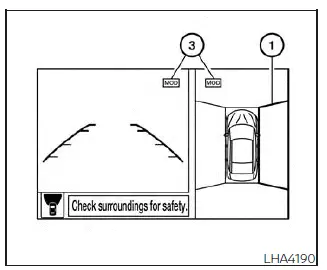
Front and bird's-eye views
The MOD system on the Nissan Sentra operates under the following conditions when a camera view is displayed:
- When the shift lever is in the P (Park) or N (Neutral) position and the vehicle is stopped, the MOD system detects moving objects in the bird's-eye view. The system will not operate if the outside mirrors are folding or unfolding, are in the stowed position, or if either front door is open.
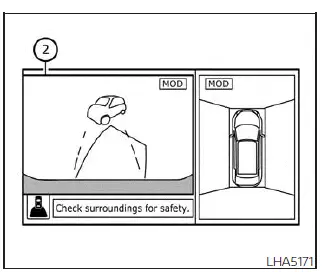
Rear and bird's-eye views
- When the shift lever is in the D (Drive) position and vehicle speed is below approximately 6 mph (10 km/h), the MOD system detects moving objects in the front view.
- When the shift lever is in the R (Reverse) position and vehicle speed is below approximately 6 mph (10 km/h), the MOD system detects moving objects in the rear view. The MOD system will not operate if the trunk lid of the Nissan Sentra is open.
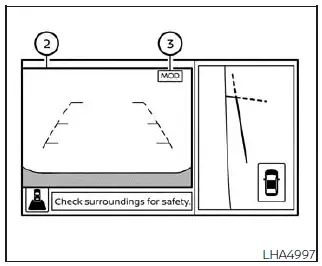
Rear and front-side views
The MOD system does not detect moving objects in the front-side view. In this mode, the MOD icon is not displayed on the screen.
When the MOD system detects moving objects near the Nissan Sentra, an audible chime sounds in the front or rear view, and a yellow frame appears around the area where motion is detected. As long as movement continues to be detected, the yellow frame remains visible.
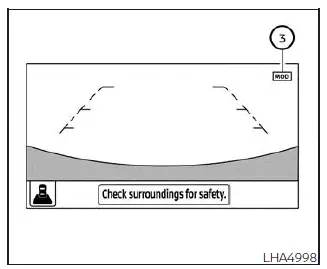
Full screen rear view
NOTE:
While the Rear Cross Traffic Alert (RCTA) chime is sounding, the MOD system will not emit an additional chime.
In the bird’s-eye view, the yellow frame 1 is displayed on each camera image (front, rear, right, or left) depending on where moving objects are detected around the Nissan Sentra.
The yellow frame 2 appears in the front view and rear view modes to highlight detected motion.
A blue MOD icon 3 is shown in views where the MOD system is actively operating. A gray MOD icon is displayed in views where the MOD system is not active. If the MOD system is switched off, the MOD icon 3 is not displayed.
Turning MOD on and off
Some Nissan Sentra vehicles allow the driver to manually enable or disable the MOD system based on personal preference.
To turn the MOD system on or off:
1. Touch the "Setting" key on the display.
2. Touch the "Camera" key.
3. Touch the "Moving Object Detection" key to switch the system between ON and OFF.
 Moving Object Detection (MOD)
CAMERA button
WARNING
Failure to follow the warnings and instructions for proper use of the Moving
Object Detection (MOD) system could result in serious injury or death.
The MOD syste ...
 MOD system limitations
WARNING
The following section describes the operational limitations of the Moving
Object Detection (MOD) system on the Nissan Sentra. Failure to use the Nissan Sentra
in accordance with these lim ...
Other materials:
Removal and Installation
Removal and Installation
REMOVAL
Lower front
edge of map lamp (1) down from the headlining by releasing the
metal clips, then slide forward to clear pawls at rear.
: Metal clip
:
Pawl
Disconnect
the harness connectors from the map lamp and remove.
INSTALLATION
...
Dtc Description
DTC Description
DESCRIPTION
CAN (Controller Area Network) is a serial communication
line for real-time application. It is an on-Nissan Sentra vehicle multiplex communication
line with high data communication speed and excellent error detection
ability. Many electronic control units a ...
P061b Ecm
Dtc Description
DTC Description
DTC DETECTION LOGIC
DTC
CONSULT screen terms
(Trouble diagnosis
content)
DTC detection
condition
...
