
Nissan Sentra B18 (2020-2025) Service Manual: Low Tire Pressure Warning
System Description
SYSTEM DIAGRAM
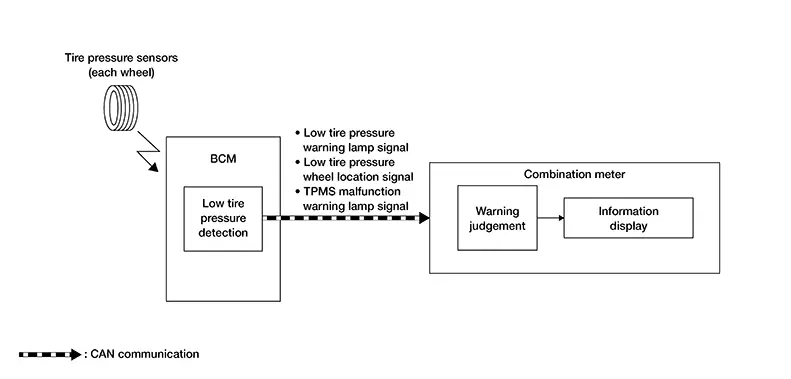
INPUT SIGNAL AND OUTPUT SIGNAL
Major signal transmission between each unit via communication is shown in the following table:
|
Component parts |
Signal item |
|---|---|
|
BCM |
Mainly transmits the following signals to the combination meter via CAN communication:
|
|
Combination meter |
Mainly receives the following signals from the BCM via CAN communication:
|
SIGNAL PATH
-
The BCM receives a signal transmitted from the tire pressure sensors installed in each wheel.
-
If the BCM detects the following condition, it sends the signal to the combination meter via CAN communication:
-
Tire pressure is low
-
-
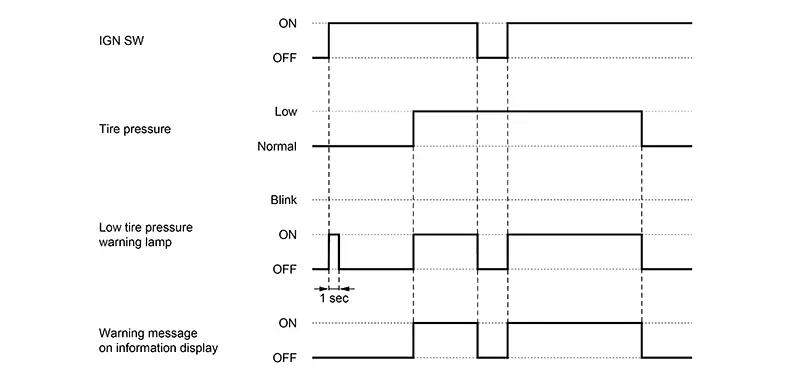
The combination meter turns the low tire pressure warning lamp ON. In addition, warning message will be displayed in the information display.
WARNING/INDICATOR OPERATION CONDITION
-
Tire pressure is low
WARNING/INDICATOR CANCEL CONDITION
-
Erasing DTC records.
-
Tire pressure of all the tires reaches the reference value. For the reference value of tire pressure, refer to Tire Air Pressure.
TIMING CHART
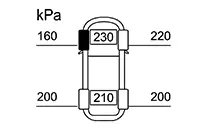
LOW TIRE PRESSURE LOCATION INDICATOR
The low tire pressure location indicator is displayed in the information display of the combination meter with the low tire pressure warning lamp and warning message under the following conditions:
-
Tire pressure is low.
-
Tire goes flat.
|
Design |
Message |
|---|---|
 |
Tire Pressure Low Add Air |
|
Design |
Message |
|---|---|
 |
Tire Pressure Low Add Air |
SYNCHRONIZATION WITH MASTER WARNING LAMP
Applicable to low tire pressure warning lamp lighting by low air pressure.
Refer to System Description.
 Tire Pressure Monitoring System
System Description
System Description
SYSTEM DIAGRAM
INPUT SIGNAL AND OUTPUT SIGNAL
Major signal transmission between each unit via
communication lines is shown in the following table: ...
 Tire Pressure Display
System Description
System Description
The adoption of this function allows tire pressure
indication in the information display of the combination meter.
Type A meter
...
Other materials:
System description
Component parts
Body control system
BODY CONTROL SYSTEM : Component Parts Location
Bcm (view with instrument panel removed)
Combination switch reading system
COMBINATION SWITCH READING SYSTEM : Component Parts Location
BCM (view with combination meter
removed)
Combination s ...
Parking Brake Switch Signal Circuit
Component Function Check
Component Function
Check
CHECK COMBINATION METER INPUT SIGNAL
CONSULT
Select “PKB SW� in “Data Monitor� mode of “METER/M&A�.
Check tha ...
Preparation
Special Service Tool
Special Service Tool
The actual shape of the tools may differ from those
illustrated here.
Tool number
(TechMate No.)
Tool name
Descriptio ...
