Nissan Sentra B18 (2020-2025) Owner's Manual: Keys
NISSAN Intelligent Key
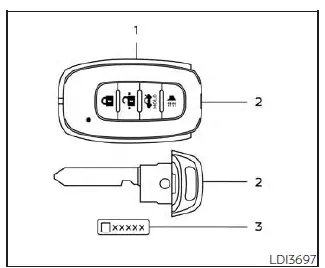
Type A (if so equipped)
- Intelligent Keys (two sets)
- Mechanical key
- Key number plate (one plate)
Your Nissan Sentra can be operated only with Intelligent Keys that are properly registered to the vehicle’s Intelligent Key components and the NISSAN Vehicle Immobilizer System. These security systems are designed to help prevent unauthorized vehicle operation.
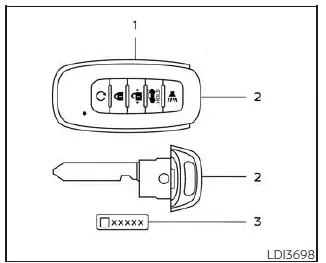
Type B (if so equipped)
Never leave the keys in the vehicle.
Up to four Intelligent Keys can be registered for use with a single Nissan Sentra. Any new Intelligent Key must be registered before use with both the Intelligent Key system and the NISSAN Vehicle Immobilizer System. It is recommended that you visit a NISSAN dealer for key registration. Because the registration process erases all existing key memory, be sure to bring all Intelligent Keys you currently own to the dealer.
A key number plate is supplied with your keys. Record the key number and keep it in a safe place, such as your wallet, and never inside the vehicle. If all keys are lost, this key number will be required to create replacements. For this reason, NISSAN recommends safeguarding the key number plate carefully.
NISSAN does not retain a record of key numbers. If at least one Intelligent Key remains, duplication can be performed without the key number. However, if all keys are lost, the key number plate becomes essential.
CAUTION
The following conditions or actions may damage the Intelligent Key:
- Do not allow the Intelligent Key, which contains electronic components, to come into contact with water or saltwater, as this may affect system operation.
- Do not drop the Intelligent Key.
- Do not strike the Intelligent Key against hard objects.
- Do not modify or alter the Intelligent Key.
- If the Intelligent Key becomes wet, immediately wipe it dry and allow it to dry completely.
- Do not leave the Intelligent Key in areas where temperatures exceed 140ºF (60ºC) for extended periods.
- Do not attach the Intelligent Key to key holders containing magnets.
- Do not place the Intelligent Key near devices that generate strong magnetic fields, such as televisions, audio equipment, or personal computers.
If an Intelligent Key is lost or stolen, NISSAN recommends erasing the ID code of that key from the vehicle. This can help prevent unauthorized use. For details on the erasing procedure, it is recommended that you visit a NISSAN dealer.
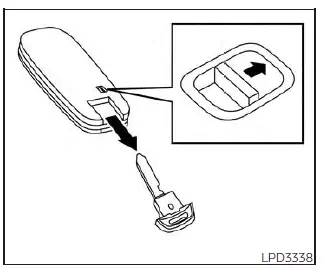
Mechanical key
The Intelligent Key for the Nissan Sentra contains a built-in mechanical key for emergency use.
To remove the mechanical key, slide the lock knob located on the back of the Intelligent Key.
To reinstall the mechanical key, insert it firmly back into the Intelligent Key until the lock knob returns to the locked position.
The mechanical key can be used to manually lock or unlock the driver’s door if needed.
CAUTION
Always carry the mechanical key securely installed inside the Intelligent Key.
NISSAN Vehicle Immobilizer System keys
Additional or replacement keys:
If at least one registered key is available, additional NISSAN Vehicle Immobilizer System keys can be duplicated without the key number. A maximum of four immobilizer keys can be used with one Nissan Sentra. All immobilizer keys must be brought to the NISSAN dealer during registration, as the process clears previously stored key codes. After registration, only keys coded at that time will be recognized. Any virtual key accessories (if so equipped) must also be re-registered. Keys not present during registration will no longer start the vehicle.
CAUTION
Do not allow the immobilizer system key, which contains an electronic transponder, to come into contact with water or saltwater. This may negatively affect system performance.
Other materials:
B2083-23 Request Sw (fr)
Dtc Description
DTC Description
DTC DETECTION LOGIC
DTC No.
CONSULT screen terms
(Trouble diagnosis
content)
DTC Detection Condition
...
P0300 Misfire
Dtc Description
DTC Description
When a misfire occurs, engine speed will fluctuate. If the engine
speed fluctuates enough to cause the crankshaft position (CKP) sensor signal to
vary, ECM can determine that a misfire is occurring.
...
Diagnosis System (intelligent Key Unit)
Consult Function (hands Free Module)
CONSULT Function
(HANDS FREE MODULE)
Intelligent Key unit
Refer to CONSULT Function
(HANDS FREE MODULE).
...