Nissan Sentra B18 (2020-2025) Service Manual: Intelligent Key Battery. Removal and Installation
Removal and Installation
Removal and Installation
-
Release the lock knob at the back of the Intelligent Key and remove the mechanical key.
-
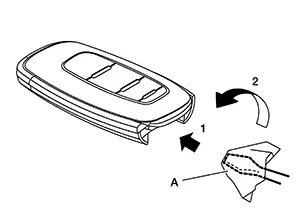
Insert remover tool (A) wrapped with a cloth into the slit of the corner and twist it to separate the upper part from the lower part as shown.
CAUTION:
-
Do not touch the circuit board or battery terminal.
-
The Intelligent Key is water-resistant. However, if it does get wet, immediately wipe it dry.
-
-
Replace the battery with new one.
Battery replacement
:Coin-type lithium battery (CR2032)
-
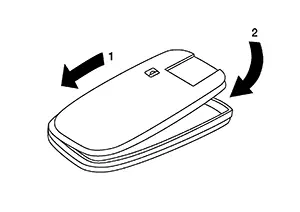
Align the tips of the upper and lower parts, and then push them together until it is securely closed as shown.
CAUTION:
-
When replacing battery, keep dirt, grease, and other foreign materials off the electrode contact area.
-
After replacing the battery, check that all Intelligent Key functions work normally.
-
Other materials:
Ecu Diagnosis Information
A/c Auto Amp.
Values on the Diagnosis Tool
Values on the
Diagnosis Tool
Note:
The following table includes information (items)
inapplicable to this Nissan Sentra vehicle: For information (items) applicable to
this vehicle, refer to CONSULT display items.
...
Evap Control System Pressure Sensor
Component Inspection
Component Inspection
CHECK EVAP CONTROL SYSTEM PRESSURE
SENSOR
Turn ignition switch OFF.
Remove EVAP control system pressure
sensor with its harness connector connected from
EV ...
Roof. Ecu Diagnosis Information. Moonroof Motor Assembly. Reference Value
Moonroof Motor Assembly. Reference Value
Reference Value
Reference Value
TERMINAL LAYOUT
PHYSICAL VALUES
Terminal No.
(Wire color)
Description
...