Nissan Sentra B18 (2020-2025) Owner's Manual: Heated seat switches
WARNING
Do not use the seat heater, or allow passengers to use it, if you or they cannot monitor elevated seat temperatures or have reduced sensitivity to pain in body areas contacting the seat. Use of the heated seats under these conditions could result in serious injury.
CAUTION
- The vehicle battery may discharge if the seat heater is operated while the engine is not running.
- Do not operate the seat heater for extended periods or when the seat is unoccupied.
- Do not place insulating materials such as blankets, cushions, or seat covers on the seat, as this may cause overheating.
- Do not place hard or heavy objects on the seat or pierce the seat surface with pins or similar objects, as this may damage the heating elements.
- Any liquid spilled on a heated seat should be wiped up immediately using a dry cloth.
- When cleaning the seat, never use gasoline, benzine, thinner, or similar solvents.
- If a malfunction is detected or the heated seat does not operate correctly, turn the switch off and have the system inspected. It is recommended that you visit a NISSAN dealer for service.
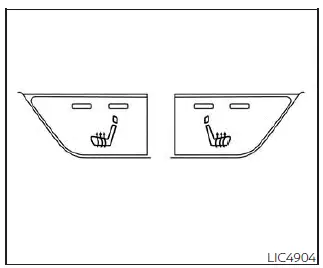
The front seats of the Nissan Sentra are equipped with built-in seat heaters for added comfort in cold conditions.
1. Place the ignition switch in the ON position.
2. Press the seat heater switch until two indicator lights illuminate for the high setting, or one indicator light illuminates for the low setting.
The heater is regulated by a thermostat that automatically cycles the heating element on and off. The indicator light remains illuminated as long as the switch is active.
3. Once the seat is sufficiently warmed, or before exiting the vehicle, press the switch again to turn the heated seat off.
Other materials:
Cvt Fluid Temperature Sensor
Exploded View
Exploded View
Transaxle assembly
Reduction gear
assembly
...
All Doors Do Not Lock/unlock or Trunk/back Door Do Not Open with Request Switch
Description
Description
All doors do not lock/unlock using front door
request switch or trunk does not open using trunk opener request
switch.
Note:
Before starting diagnosis check that Nissan Sentra vehicle
condition is as shown in “Conditions of vehicle�, and
check each ...
Driver Air Bag Module
Exploded View
Exploded View
1.
Steering wheel
2.
Driver air bag module
R ...