
Nissan Sentra B18 (2020-2025) Owner's Manual: Headlight control switch
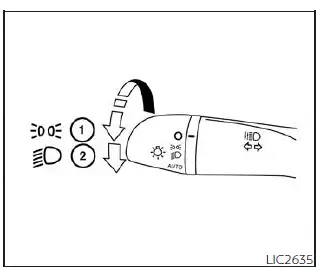
Type A (if so equipped)
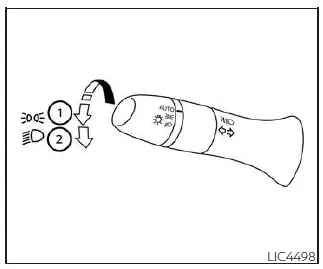
Type B (if so equipped)
Lighting
- Rotate the switch to the
 position to turn on the front parking lights, tail lights, license plate lights,
and instrument panel illumination. The
position to turn on the front parking lights, tail lights, license plate lights,
and instrument panel illumination. The
 indicator will illuminate in the meter.
 - Rotate the switch to the
 position to turn on the headlights. All other exterior and interior lights remain
on while the Nissan Sentra headlights are active.
position to turn on the headlights. All other exterior and interior lights remain
on while the Nissan Sentra headlights are active.
CAUTION
Always use the headlights with the engine running to avoid unnecessary discharge of the Nissan Sentra vehicle battery.
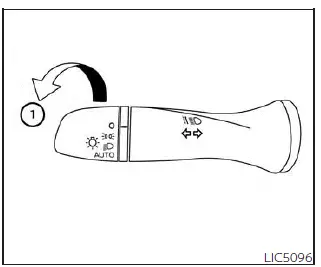
Autolight system
The autolight system on the Nissan Sentra automatically controls exterior lighting based on ambient light conditions. This system is designed to enhance driving convenience and safety and can perform the following functions:
- Automatically turn on the headlights, front parking lights, tail lights, license plate lights, and instrument panel illumination when ambient light levels are low.
- Automatically turn off all exterior and interior lights when sufficient daylight is detected.
- Keep the lights illuminated for a short period after the ignition switch is placed in the OFF position and all doors are closed.
To activate the autolight system:
1. For USA models: Turn the headlight switch to the AUTO position 1.
For Canada models: Turn the headlight switch to the AUTO 1 or
 position.
2. Place the ignition switch in the ON position.
3. The autolight system will now automatically turn the headlights on or off as lighting conditions change.
Initially, if the ignition switch is moved to the OFF position and a door is opened and left open, the headlights will remain illuminated for a short time. If another door is opened while the headlights are still on, the timer will continue.
To deactivate the autolight system:
For USA models: Turn the switch to the OFF position (if equipped),
 ,
or
,
or
 position.
For Canada models: Turn the switch to the
 position.
The Nissan Sentra headlights may also turn on automatically at twilight or during rainy conditions when the windshield wipers are operated continuously.
If the ignition switch is placed in the OFF position and a door is opened and left open, the headlights will remain on for approximately one minute.
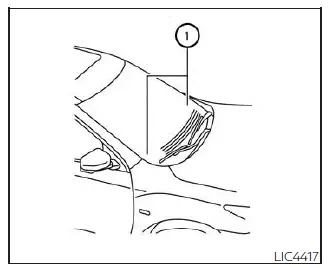
Do not place any objects on top of the autolight sensor located on the upper side of the instrument panel. The autolight sensor controls automatic headlight operation; if it is covered, the system will react as if it is dark and turn the headlights on. If this occurs while the vehicle is parked with the engine off and the ignition switch in the ON position, the Nissan Sentra battery may become discharged.
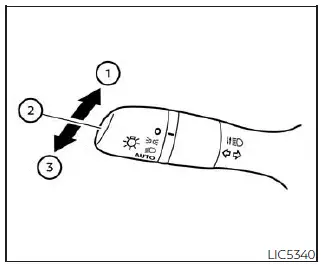
Headlight beam select
- To select the high beam function, push the lever forward. The high beam
headlights will turn on and the
 indicator will illuminate in the meter.
 - Pull the lever back to return to low beam operation.
- Pulling and releasing the lever will momentarily flash the high beam headlights.
High Beam Assist
The High Beam Assist system on the Nissan Sentra operates when the vehicle is driven at speeds of approximately 25 mph (40 km/h) or higher.
When an oncoming vehicle or a vehicle ahead is detected while the high beams are on, the system will automatically switch the headlights from high beam to low beam to reduce glare and improve safety.
WARNING
- The High Beam Assist system on the Nissan Sentra is designed as a driving convenience feature only and is not a substitute for attentive and responsible driving. The driver must remain alert at all times, follow safe driving practices, and manually switch between high beam and low beam when conditions require it.
- The high beam or low beam may not switch automatically under certain
conditions. In these situations, always control the headlights manually on your
Nissan Sentra.
- During adverse weather conditions such as rain, fog, snow, or strong wind.
- When a light source similar to a headlight or tail light is present near the vehicle.
- When the headlights of an oncoming or leading vehicle are turned off, partially obscured, discolored by dirt or foreign material, or misaligned.
- When there is a sudden or continuous change in surrounding brightness.
- When driving on roads with rolling hills, uneven elevation, or significant level changes.
- When driving on roads with many curves.
- When signs, mirrors, or reflective surfaces direct intense light toward the front of the vehicle.
- When objects or containers being towed by a leading vehicle reflect strong light.
- When a headlight on your Nissan Sentra is damaged, dirty, or partially obstructed.
- When the vehicle is leaning due to a punctured tire, towing condition, or uneven load.
- The timing of switching between low beam and high beam may vary under
the following conditions:
- The brightness level of headlights from oncoming or leading vehicles.
- The movement, speed, and direction of oncoming or leading vehicles.
- When only one headlight of an oncoming or leading vehicle is illuminated.
- When the oncoming or leading vehicle is a two-wheeled vehicle.
- Road characteristics such as slope, curvature, and surface condition.
- The number of passengers and the amount of luggage carried in the Nissan Sentra.
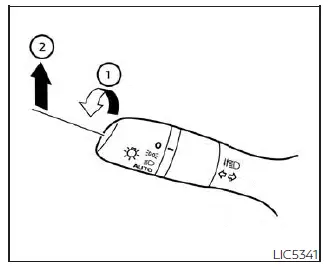
High Beam Assist operation
To activate the High Beam Assist system, turn the headlight switch to the AUTO
position 1 and push the lever forward to position 2 (high beam). When the system
is operating, the
 High Beam Assist indicator will illuminate in the meter while the headlights are
on.
High Beam Assist indicator will illuminate in the meter while the headlights are
on.
If the High Beam Assist indicator does not illuminate under these conditions, this may indicate a system malfunction. Have the Nissan Sentra inspected as soon as possible. It is recommended that you visit an authorized NISSAN dealer for service.
When vehicle speed decreases to below approximately 16 mph (25 km/h), the headlights automatically switch to low beam operation.
To turn off the High Beam Assist system, rotate the headlight switch to the
 position or select the low beam by placing the lever in the neutral position.
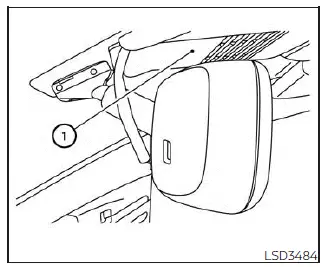
Ambient image sensor maintenance
The ambient image sensor 1 for the High Beam Assist system is located in front of the inside rearview mirror. To ensure reliable operation of the High Beam Assist system and to prevent malfunctions on the Nissan Sentra, observe the following precautions:
- Keep the windshield clean and free of dirt, snow, or ice.
- Do not attach stickers, decals (including transparent materials), or accessories near the ambient image sensor.
- Do not strike, damage, or touch the sensor lens or the surrounding area.
If the ambient image sensor is damaged due to an accident or impact, it is recommended that the Nissan Sentra be inspected by a NISSAN dealer.
Battery saver system (if so equipped)
The light reminder chime will sound if the headlight switch is in the
 or
or
 position and the driver’s door is opened while the ignition switch is in the OFF
or LOCK position.
position and the driver’s door is opened while the ignition switch is in the OFF
or LOCK position.
If the ignition switch is placed in the OFF or LOCK position while the headlight
switch remains in the
 or
or
 position, the battery saver function will automatically turn off the lights after
a period of time to help prevent battery discharge.
position, the battery saver function will automatically turn off the lights after
a period of time to help prevent battery discharge.
Always turn the headlight switch to the OFF or AUTO position when leaving the Nissan Sentra.
CAUTION
- Do not leave the lights on for extended periods when the engine is not running, as this may discharge the battery.
- If you turn the headlight switch back on after the lights have automatically turned off, they will not switch off again automatically. Be sure to place the light switch in the OFF (if equipped) or AUTO position when leaving the vehicle for extended periods to avoid battery discharge.

 LED Daytime Running Lights (DRL) system
The LED Daytime Running Lights (DRL) on the Nissan Sentra automatically illuminate
at 100% intensity when the engine is started and the parking brake is released.
The LED DRL operate when the head ...
Other materials:
Component Parts
Adas Control Unit
Component Parts Location
Component Parts
Location
A.
Instrument panel center area
(view with instrument panel
removed)
...
How to use the touch-screen
CAUTION
The glass display screen may break if it
is hit with a hard or sharp object. If the
glass screen breaks, do not touch it.
Doing so could result in an injury.
To clean the display, never use a rough
cloth, alcohol, benzine, thinner or any
kind of solvent or paper towel with a
chemic ...
Steering Switch Signal a Circuit
Diagnosis Procedure
Diagnosis Procedure
CHECK STEERING SWITCH SIGNAL A CIRCUIT
Ignition switch OFF.
Disconnect combination meter harness connector
and combination switch (sp ...
