Nissan Sentra B18 (2020-2025) Service Manual: Flash Code Index
Flash Code Index
WARNING LAMP FLASH CODE CHART
How to read flash codes
-
Put the Nissan Sentra vehicle in Diagnosis Mode. Refer to Trouble Diagnosis without CONSULT.
-
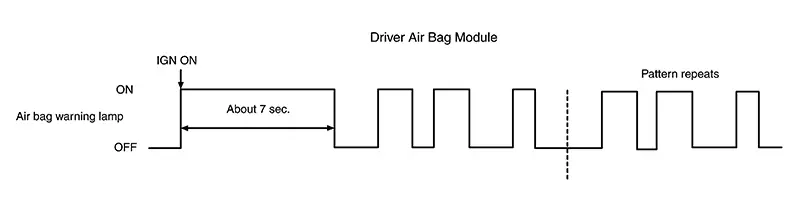
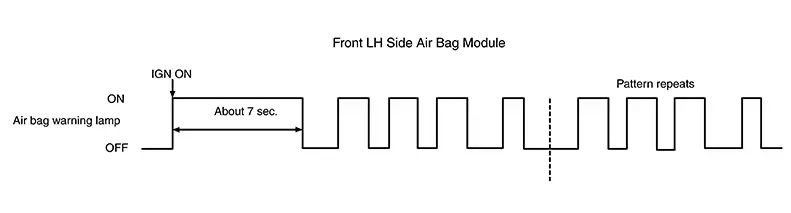
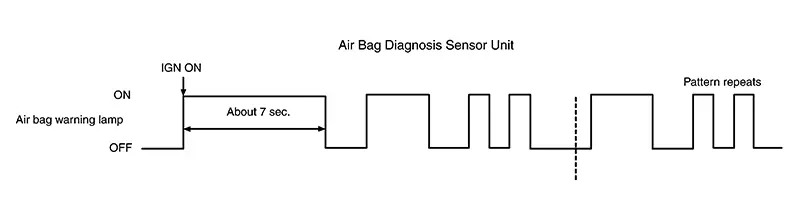
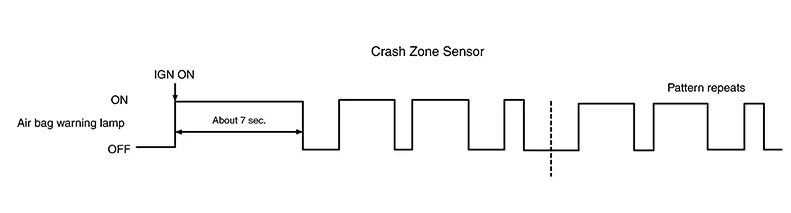
All codes are proceeded by a seven second �holding� flash.
-
Identify how many primary flashes are displayed as well as the length of each primary flash.
-
Refer to the tables and examples below to determine which SRS subsystem the code belongs to.
-
Count the short secondary flashes that follow the primary flashes.
-
Match the correct flashing pattern to the malfunctioning component and perform the Diagnosis Procedure.
Refer to the illustrations below for an example of each flashing pattern.
Front subsystem
|
Flashes (Primary) |
Flash Length (seconds) |
Flashes (Secondary) |
Malfunctioning Component or Circuit |
Reference |
|---|---|---|---|---|
|
2 |
1.5 |
1 |
Driver air bag module |
DTC Index (B0001) DTC Index (B0002) |
|
2 |
Front passenger air bag module |
DTC Index (B0010) DTC Index (B0011) |
||
|
3 |
Front LH seat belt pre-tensioner (shoulder) |
DTC Index (B1029) |
||
|
4 |
Front RH seat belt pre-tensioner (shoulder) |
DTC Index (B102A) |
||
|
5 |
Front LH seat belt pre-tensioner (lap) |
DTC Index (B1001) |
||
|
6 |
Front RH seat belt pre-tensioner (lap) |
DTC Index (B1002) |
Side subsystem
|
Flashes (Primary) |
Flash Length (seconds) |
Flashes (Secondary) |
Malfunctioning Component or Circuit |
Reference |
|---|---|---|---|---|
|
3 |
1.5 |
1 |
Front LH side air bag module |
DTC Index (B0020) |
|
2 |
Front RH side air bag module |
DTC Index (B0028) |
||
|
3 |
LH side curtain air bag module |
DTC Index (B0021) DTC Index (B0022) |
||
|
4 |
RH side curtain air bag module |
DTC Index (B0029) DTC Index (B002A) |
Air bag subsystem
|
Flashes (Primary) |
Flash Length (seconds) |
Flashes (Secondary) |
Malfunctioning Component or Circuit |
Reference |
|---|---|---|---|---|
|
1 |
3 |
1 |
Collision detection |
DTC Index (B12B5) |
|
2 |
Air bag diagnosis sensor unit |
DTC Index (B1000) |
||
|
3 |
Front passenger air bag OFF indicator |
DTC Index (B00D5) |
||
|
4 |
Occupant classification system |
DTC Index (B00A0) DTC Index (B1019) |
Sensor subsystem
|
Flashes (Primary) |
Flash Length (seconds) |
Flashes (Secondary) |
Malfunctioning Component or Circuit |
Reference |
|---|---|---|---|---|
|
2 |
3 |
1 |
Crash zone sensor |
DTC Index (B0094) |
|
2 |
Rear side air bag satellite sensor LH |
DTC Index (B0093) |
||
|
3 |
Rear side air bag satellite sensor RH |
DTC Index (B0098) |
||
|
4 |
Front door satellite sensor LH |
DTC Index (B0091) |
||
|
5 |
Front door satellite sensor RH |
DTC Index (B0096) |
||
|
6 |
Front seat belt buckle switch LH |
DTC Index (B0050) DTC Index (B2C21) DTC Index (B2F60) |
||
|
7 |
Front seat belt buckle switch RH |
DTC Index (B0052) |
Other materials:
B2083-23 Request Sw (fr)
Dtc Description
DTC Description
DTC DETECTION LOGIC
DTC No.
CONSULT screen terms
(Trouble diagnosis
content)
DTC Detection Condition
...
Steering Control System. Removal and Installation. Eps Control Unit. Removal and Installation
Eps Control Unit. Removal and Installation
Removal and Installation
Removal and Installation
The EPS
control unit is an integral part of the steering gear
assembly.
If the
replacement of the EPS control unit is necessary, replace the
steering gear assembly. Refer to Removal ...
Trip computer
1. Vehicle speed
The vehicle speed screen shows the current speed of the Nissan Sentra as well
as the average vehicle speed calculated since the last reset.
Average vehicle speed:
Press the OK button on the steering wheel to open the drive computer Reset menu,
then follow the on-screen in ...