Nissan Sentra B18 (2020-2025) Service Manual: Door & Lock :: Basic Inspection
Diagnosis and Repair Work Flow. Work Flow. Work Flow
Work Flow
OVERALL SEQUENCE
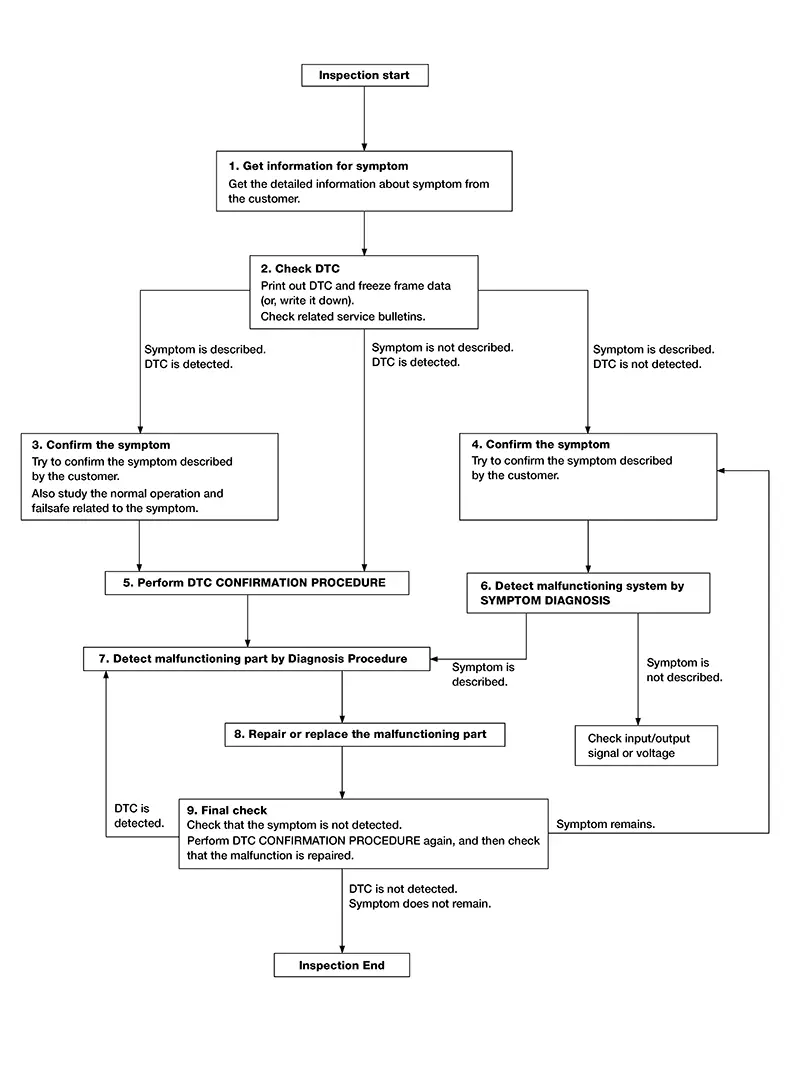
DETAILED FLOW
-
GET INFORMATION FOR SYMPTOM
-
-
Get detailed information from the customer about the symptom (the condition and the environment when the incident/malfunction occurs).
-
Check operation condition of the function that is malfunctioning.
-
GO TO 2.
-
-
CHECK DTC
-
 CONSULT
-
Check DTC.
-
Perform the following procedure if DTC is detected:
-
Record DTC and freeze frame data (print them out).
-
Erase DTC.
-
Study the relationship between the cause detected by DTC and the symptom described by the customer.
-
-
Check related service bulletins for information.
-
Are any symptoms described and any DTC detected?
Symptom is described, DTC is detected.>>GO TO 3.
Symptom is described, DTC is not detected.>>GO TO 4.
Symptom is not described, DTC is detected.>>GO TO 5.
-
-
CONFIRM THE SYMPTOM
-
Try to confirm the symptom described by the customer.
Also study the normal operation and fail-safe related to the symptom.
Verify relation between the symptom and the condition when the symptom is detected.
GO TO 5.
-
-
CONFIRM THE SYMPTOM
-
Try to confirm the symptom described by the customer.
Verify relation between the symptom and the condition when the symptom is detected.
GO TO 6.
-
-
PERFORM DTC CONFIRMATION PROCEDURE
-
CONSULT
Perform DTC CONFIRMATION PROCEDURE for the detected DTC and then check that DTC is detected again. At this time, always connect CONSULT to the Nissan Sentra vehicle and check self diagnostic results in real time.
If two or more DTCs are detected, refer to DTC Inspection Priority Chart and determine trouble diagnosis order.
Note:
-
Freeze frame data is useful if the DTC is not detected.
-
Perform Component Function Check if DTC CONFIRMATION PROCEDURE is not included on Service Manual. This simplified check procedure is an effective alternative though DTC cannot be detected during this check.
If the result of Component Function Check is NG, it is the same as the detection of DTC by DTC CONFIRMATION PROCEDURE.
-
Is DTC detected?
YES >>GO TO 7.
NO >>Check according to Intermittent Incident.
-
-
DETECT MALFUNCTIONING SYSTEM BY SYMPTOM DIAGNOSIS
-
CONSULT
Detect malfunctioning system according to SYMPTOM DIAGNOSIS based on the confirmed symptom in step 4, and determine the trouble diagnosis order based on possible causes and symptom.
Is the symptom described?
YES >>GO TO 7.
NO >>Monitor input data from related sensors or check voltage of related module terminals.
-
-
DETECT MALFUNCTIONING PART BY DIAGNOSIS PROCEDURE
-
Inspect according to Diagnosis Procedure of the system.
Is malfunctioning part detected?
YES >>GO TO 8.
NO >>Check according to Intermittent Incident.
-
-
REPAIR OR REPLACE THE MALFUNCTIONING PART
-
CONSULT
-
Repair or replace the malfunctioning part.
-
Reconnect parts or connectors disconnected during Diagnosis Procedure again after repair and replacement.
-
Check DTC. If DTC is detected, erase it.
-
GO TO 9.
-
-
FINAL CHECK
-
CONSULT
When DTC is detected in step 2, perform DTC CONFIRMATION PROCEDURE again, and then check that the malfunction is repaired securely.
When symptom is described by the customer, refer to confirmed symptom in step 3 or 4, and check that the symptom is not detected.
Is DTC detected and does symptom remain?
YES >>DTC is detected:GO TO 7.
YES >>Symptom remains:GO TO 4.
NO >>Before returning the Nissan Sentra vehicle to the customer, always erase DTC.
-
Additional Service When Replacing Bcm. Description. Description
Description
CAUTION:
When replacing the BCM, a new BCM must be used. The functions controlled by the BCM do not operate properly if a BCM from another Nissan Sentra vehicle is used.
Perform the system initialization when replacing BCM, replacing Intelligent Key or registering an additional Intelligent Key.
Intelligent Key Unit. Additional Service When Replacing Intelligent Key Unit
Work Procedure
Work Procedure
Perform the following operations when replacing Intelligent Key unit:
CAUTION:
When replacing the Intelligent Key unit, always replace it with a new one. The functions controlled by the Intelligent Key unit does not operate properly in case of reuse of the Intelligent Key unit from another Nissan Sentra vehicle.
BEFORE REPLACEMENT
When replacing Intelligent Key unit, save or print current Nissan Sentra vehicle specification with CONSULT before replacement.
Note:
If “Before ECU Replacement� of “Nissan Sentra Vehicle Configuration� cannot be used, use the “Manual Configuration� after replacing Intelligent Key unit.
AFTER REPLACEMENT
CAUTION:
When after replacing Intelligent Key unit, always perform “Operation Log Selection� or “Manual Configuration� with CONSULT. Or not doing so, Intelligent Key unit control function does not operate normally.
-
Complete the procedure of “Re/programming, Configuration� in order.
-
Configuration is different for each Nissan Sentra vehicle model. Confirm configuration of each vehicle model.
-
If you set incorrect “Vehicle Configuration�, incidents might occur.
When replacing Intelligent Key unit, perform the system initialization (NATS).
-
SAVING Nissan Sentra Vehicle SPECIFICATION
-
CONSULT
-
Select “Re/programming, Configuration�.
-
Select the operation according to the CONSULT screen.
-
Perform “Before ECU Replacement� of “Nissan Sentra Vehicle Configuration� to write vehicle specification.
If “Before ECU Replacement� of “Nissan Sentra Vehicle Configuration� cannot be used, use the “Manual Configuration� after replacing Intelligent Key unit.
-
GO TO 2.
-
-
REPLACE INTELLIGENT KEY UNIT
-
Replace Intelligent Key unit. Refer to Removal and Installation.
GO TO 3.
-
-
WRITING Nissan Sentra Vehicle SPECIFICATION
-
CONSULT
Select “Re/programming, Configuration�. Refer to Work Procedure.
GO TO 4.
-
-
INITIALIZE NATS
-
Perform NATS initialization.
Work End.
-
Configuration (intelligent Key Unit)
Work Procedure
Work Procedure
Vehicle specification needs to be written with CONSULT because it is not written after replacing Intelligent Key unit.
Configuration has follows.
|
Function |
Description |
||
|---|---|---|---|
|
Nissan Sentra Vehicle Configuration |
Before ECU Replacement |
|
|
|
After ECU Replacement |
FAST linked |
Note:
This item is displayed, but cannot be monitored. |
|
|
Manual selection |
Writes the Nissan Sentra vehicle configuration with manual selection. |
||
|
Operation Log Selection |
Writes the read Nissan Sentra vehicle configuration. |
||
CAUTION:
When replacing Intelligent Key unit, always perform “Re/programming, Configuration� with CONSULT. Or not doing so, Intelligent Key unit control function does not operate normally.
-
Complete the procedure of “Re/programming, Configuration� in order.
-
Configuration is different for each Nissan Sentra vehicle model. Confirm configuration of each vehicle model.
-
Never save vehicle configuration to Intelligent Key unit except for new Intelligent Key unit.
-
If you set incorrect Nissan Sentra vehicle configuration, incidents might occur.
-
WRITING MODE SELECTION
-
CONSULT
Select “Re/programming, Configuration� .
GO TO 2.
When writing manually>>GO TO 3.
-
-
WHEN WRITING SAVED DATA
-
CONSULT
Select the operation according to the CONSULT screen.
GO TO 4.
-
-
WHEN WRITING MANUALLY
-
CONSULT
-
Ignition switch ON.
-
Select “Manual selection�.
-
Select the “Type ID� searched by using “Global Web-FAST� (NISSAN parts catalogue) to write the “Type ID� into the Intelligent Key unit.
CAUTION:
-
Thoroughly read and understand the Nissan Sentra vehicle specification. ECU control may not operate normally if the setting is not correct.
-
Make sure to select “SETTING� even if the indicated configuration of brand new Intelligent Key unit is same as the desirable configuration. If not, configuration which is set automatically by selecting Nissan Sentra vehicle model cannot be memorized.
-
-
GO TO 4.
-
-
OPERATION CHECK
-
Confirm that each function controlled by Intelligent Key unit operates normally.
Work End.
-
Other materials:
Wiper & Washer. Preparation. Preparation. Special Service Tools
Preparation. Special Service Tools
Special Service Tools
Special Service Tools
The actual shape of the tools may differ from
those illustrated here.
Tool number
(TechMate No.)
Tool name
&nbs ...
Diagnostic Can Communication Circuit
Diagnosis Procedure
Diagnosis Procedure
CONNECTOR INSPECTION
Turn the ignition switch OFF.
Disconnect the battery cable from the
negative terminal.
Check the following terminals and
...
System temporarily unavailable
The following conditions may cause the Intelligent Cruise Control (ICC) system
in the Nissan Sentra to become temporarily unavailable.
In these situations, the ICC system may not cancel automatically and may be unable
to maintain the selected following distance from the vehicle ahead.
Cond ...