
Nissan Sentra B18 (2020-2025) Service Manual: Distance Sensor
Exploded View
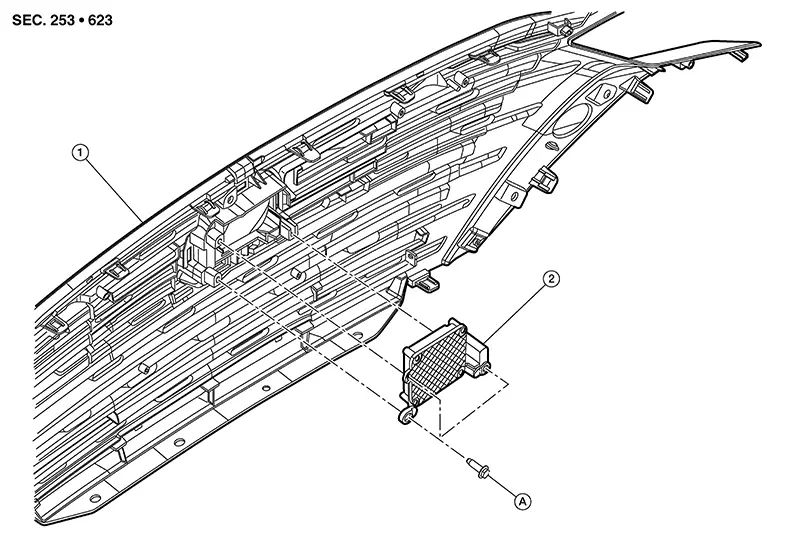
|
1. |
Front grille |
2. |
Distance sensor |
A. |
Refer to Removal and Installation. |
Removal and Installation
REMOVAL
Remove clips (A) and core support
cover (1). 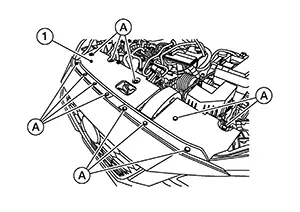
Remove bolt from front bumper fascia side retainer (LH). Refer to Exploded View.
Remove air inlet duct clips and remove air inlet duct. Refer to Exploded View.
Remove bolts from hood lock and position the hood lock aside. Refer to Exploded View.
Remove clips and position the air guide (upper) aside. Refer to Exploded View.
Disconnect the harness connector from distance sensor.
Remove bolts and remove distance sensor.
INSTALLATION
Installation is in the reverse order of removal.
Install distance sensor to the front
grille and tighten bolts to specification in sequence shown. 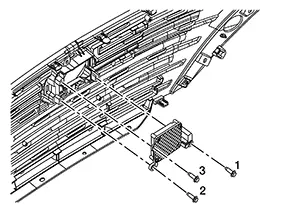
|
Distance sensor bolts |
: 4.9 N·m (0.50 kg-m, 43 in-lb) |
CAUTION:
-
If distance sensor is being replaced or has been disconnected, perform "ADDITIONAL SERVICE WHEN REPLACING DISTANCE SENSOR". Refer to Work Procedure.
-
Do not touch distance sensor face.
-
Do not drop or shock distance sensor.
-
Make sure distance sensor harness is installed without any twists.
 Front Camera Unit
Exploded View
Exploded View
1.
Front camera unit
bracket
...
 Driver Assistance Buzzer
Removal and Installation
Removal and
Installation
REMOVAL
Remove left knee air bag module.
Refer to Removal and Installation.
Remove steering column covers. Refer
to Removal an ...
Other materials:
Removal and Installation
Removal and Installation
REMOVAL
CAUTION:
Do not cause impact to steering column during
removal and installation.
Do not move steering gear during removal and
installation of steering column.
Set the
front ...
ECU diagnosis information
Diagnosis sensor unit
DTC Index
DIAGNOSTIC CODE CHART
NOTE:
Follow the procedures in numerical order when repairing malfunctioning
parts. Confirm whether malfunction is
eliminated using air bag warning lamp or CONSULT each time repair is finished.
If malfunction is still
observed, proceed ...
Dtc Description
DTC Description
Note:
The Signal Tech II Tool [– (NI-50190)] can be used
to perform the following functions: Refer to the Signal Tech II User
Guide for additional information.
Activate and display TPMS sensor IDs
Display tire pressure reported by the TPMS ...
