Nissan Sentra B18 (2020-2025) Service Manual: Diagnosis System (air Bag)
Description
Description
CAUTION:
-
Never use electrical test equipment on any circuit related to the SRS unless instructed in this Service Manual. SRS wiring harnesses can be identified by yellow and/or orange harnesses or harness connectors.
-
Never repair, splice or modify the SRS wiring harness. If the harness is damaged, replace it with a new one.
-
Keep ground portion clean.
DIAGNOSIS FUNCTION
-
The SRS self-diagnostic results can be read with air bag warning lamp and/or CONSULT.
-
The user mode is exclusively prepared for the customer (driver). This mode warns the driver of a system malfunction through the operation of the air bag warning lamp.
-
The diagnosis mode allows the technician to locate and inspect the malfunctioning part.
-
The mode applications for the air bag warning lamp and CONSULT are as per the following items:
×: Application, —: Not applicationDiagnosis tool
User mode
Diagnosis mode
Air bag warning lamp
×
×
CONSULT
–
×
On Board Diagnosis Function
On Board Diagnosis Function
ON-BOARD DIAGNOSIS
There are two self diagnosis functions with air bag warning lamp per the following items:
-
USER MODE
-
DIAGNOSIS MODE
METHOD OF STARTING
-
Diagnosis mode changes from user mode to diagnosis mode when changing operation is performed.
-
In user mode, when SRS air bag warning lamp is not turning ON, changing to diagnosis mode by ignition switch operation is not possible.
-
In diagnosis mode, when repair is complete and system is normal, the mode changes to user mode when ignition switch is OFF to ON.
Procedure to Change Diagnosis Mode
-
Ignition switch from OFF to ON.
-
SRS air bag lamp turns ON for 7 second and turns OFF, then ignition switch OFF within 2 second after the lamp turns OFF.
Note:
When in Diagnosis Mode, the air bag warning lamp may illuminate for more than 7 seconds after the ignition switch is ON. If this is the case, the ignition switch must still be cycled OFF after 7 seconds.
-
After ignition switch OFF, wait for 3 seconds or more.
-
Repeat operation 1 to 3 for 2 times so that operation 1 to 3 is repeated for 3 times in total.
-
Ignition switch from OFF to ON. Diagnosis mode changes.
USER MODE
In USER MODE, air bag warning lamp on combination meter turning ON when a malfunction is detected and warns the customer (driver).
How to Read Air Bag Warning Lamp
-
Ignition switch from OFF to ON, and check that the air bag warning lamp turns ON.
-
Compare the air bag warning lamp operation pattern with the examples.
Air Bag Warning Lamp Examples:
Air bag warning lamp flashing pattern (User Mode) Warning lamp
SRS condition
Reference item
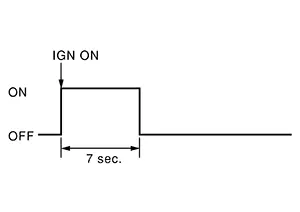
-
No malfunction is detected.
-
No further action is necessary.
—
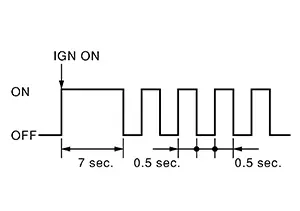
The system is malfunctioning and needs to be repaired.
Refer to Trouble Diagnosis with CONSULT or Trouble Diagnosis without CONSULT.
Zero point reset is incomplete
Refer to Special Repair Requirement.
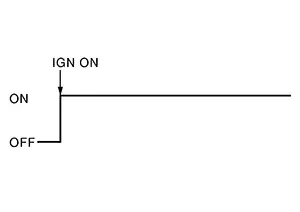
-
Air bag is deployed.
-
Seat belt pre-tensioner is deployed.
Refer to For Frontal Collision or For Side and Rollover Collision.
-
Air bag diagnosis sensor unit is malfunctioning.
-
Air bag power supply circuit is malfunctioning.
-
SRS air bag warning lamp circuit is malfunctioning.
Refer to Diagnosis Procedure.
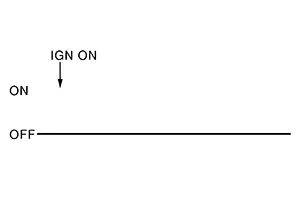
-
Air bag diagnosis sensor unit is malfunctioning.
-
Air bag warning lamp circuit is malfunctioning.
Refer to Diagnosis Procedure.
-
Trouble Diagnosis with Consult
Trouble Diagnosis with CONSULT
 CONSULT
DTC is displayed on “Self Diagnostic Result�.
Note:
If a malfunction is not detected on “Self Diagnostic Result [CURRENT]�, but a malfunction is detected during SRS Operation Check, the following cases may exist:
-
“Self Diagnostic Result [PAST]� memory might not be erased. Refer to SRS Final Check.
-
SRS system malfunctions intermittently. Refer to Inspection Procedure.
Trouble Diagnosis Without Consult
Trouble Diagnosis without CONSULT
DIAGNOSIS MODE
Note:
Diagnosis Mode can not be entered if a malfunction is not detected in User Mode.
 CONSULT
-
Ignition switch ON.
-
After AIR BAG warning lamp lights for 7 seconds, ignition switch OFF within 1 second.
-
Wait more than 3 seconds.
-
Repeat steps 1 to 3 two more times (3 times total).
-
Ignition switch ON.
SRS is now in Diagnosis Mode. Refer to Flash Code Index.
Srs History Check
SRS History Check
SRS HISTORY CHECK
-
Check repair history of the SRS. If no repairs have been made, perform On Board Diagnosis Function. If repairs have been made, GO TO step 2.
-
Erase �Self Diagnostic Result [PAST]� after repair. Refer to SRS Final Check.
Srs Final Check
SRS Final Check
DIAGNOSIS MODE
CONSULT
-
Confirm that zero point reset of OCS is complete.
-
If no DTCs are detected on “Self Diagnostic Result [CURRENT]�, repair of SRS is completed. Go to step 3.
If any DTCs are detected on “Self Diagnostic Result [CURRENT]�, the malfunction has not been repaired completely or another malfunction is being detected. Perform SRS Operation Check again. Refer to On Board Diagnosis Function.
-
Select “ERASE�.
Note:
Selecting “ERASE� will clear the SRS memory of the malfunction (“Self Diagnostic Result [PAST]�). If “Self Diagnostic Result [PAST]� is not erased, User Mode may show the previous system malfunction even if the malfunction has been repaired completely.
-
Check that no malfunction is detected in “Self Diagnostic Result [PAST]�.
-
Exit Diagnosis Mode and disconnect the CONSULT.
-
Perform SRS Operation Check. Refer to On Board Diagnosis Function.
Consult Function (air Bag)
CONSULT Function (AIR BAG)
CONSULT performs the following functions:
|
Diagnosis mode |
CGW Status |
Description |
||
|---|---|---|---|---|
|
Restricted Mode |
Diag Test Mode |
Open Mode |
||
|
Self Diagnostic Result |
Display |
Display |
Display |
Display non-network DTC which air bag diagnosis sensor unit memorizes |
|
CGW Information |
Display |
Display |
Display |
|
|
Data Monitor |
Display |
Display |
Display |
This item is displayed, but cannot be supported. |
|
ECU Identification |
Display |
Display |
Display |
Air bag diagnosis sensor unit part number is displayed. |
|
TROUBLE DIAG RECORD |
Display |
Display |
Display |
With TROUBLE DIAG RECORD, diagnosis results previously erased by a reset operation can be displayed on CONSULT screen. |
|
Configuration* |
Display |
Display |
Display |
Read and save the Nissan Sentra vehicle specification. |
|
Network-DTC* |
Display |
Display |
Display |
Display network DTC which air bag diagnosis sensor unit memorizes when performing "Diagnosis (All System)". |
*: Displays when performing "Diagnosis (All System)".
SELF DIAGNOSTIC RESULT
Refer to DTC Index.
FREEZE FRAME DATA (FFD)
The air bag diagnosis sensor unit records the following Nissan Sentra vehicle condition at the time a particular DTC is detected, and displays on CONSULT.
|
CONSULT screen item |
Indication/Unit |
Description |
|---|---|---|
|
ODO/TRIP METER |
km |
Total mileage (Odometer value) of the moment a particular DTC is detected. |
|
DTC count |
— |
DTC detection number of times. |
CGW INFORMATION
Display the diagnosis mode which a user can perform in Diag Test mode/Open Mode by switching the CGW status from Restricted mode to Diag Test Mode/Open Mode.
For the method of switching CAN Gateway status. Refer to CONSULT Function.
Consult Function (occupant Detection)
CONSULT Function (OCCUPANT DETECTION)
APPLICATION ITEM
CONSULT performs the following functions:
|
Diagnosis mode |
CGW Status |
Description |
||
|---|---|---|---|---|
|
Restricted Mode |
Diag Test Mode |
Open Mode |
||
|
CGW Information |
Display |
Display |
Display |
|
|
Data Monitor |
Display |
Display |
Display |
Displays the real-time input signal of occupant detection system control unit. |
|
Work support |
Non-display |
Non-display |
Display |
This mode enables a technician to adjust some devices faster and more accurately by following the indications on the CONSULT. |
CGW INFORMATION
Display the diagnosis mode which a user can perform in Diag Test mode/Open Mode by switching the CGW status from Restricted mode to Diag Test Mode/Open Mode.
For the method of switching CAN Gateway status. Refer to CONSULT Function.
DATA MONITOR
Note:
The following table includes information (items) inapplicable to this Nissan Sentra vehicle. For information (items) applicable to this vehicle, refer to CONSULT display items.
|
Monitor Item |
Description |
|---|---|
|
Buckle Switch Status [Not Moni/Unfasten/Fasten/Reload] |
The switch status input from front seat belt buckle switch RH.
|
|
Buckle Switch Spec [Not Moni/Nor Op/Nor Cl/Frm ACU] |
Displays the spec of the front seat belt buckle switch RH.
|
|
Buckle Switch Status (Comm) [Not Moni/Moni(wir)/Frm ACU] |
Displays the status of the front seat belt buckle switch RH signal.
|
WORK SUPPORT
|
Diagnostic Test Mode |
Diagnostic Item |
Description |
|---|---|---|
|
Work support |
Zero point reset function |
Perform zero point reset. Refer to Special Repair Requirement. |
Other materials:
Diagnosis System (intelligent Key Unit). Consult Function (hands Free Module)
Consult Function (hands Free Module)
CONSULT Function
(HANDS FREE MODULE)
Intelligent Key unit
Refer to CONSULT Function (HANDS FREE MODULE).
...
Rear Brake Caliper Assembly
Exploded View
Exploded View
1.
Brake caliper body
2.
Slide pin
3.
Slid ...
U215b-87 Can Comm Err (ipdm E/r)
Dtc Description
DTC Description
DESCRIPTION
CAN (Controller Area Network) is a serial communication
line for real time applications. It is an on-Nissan Sentra vehicle multiplex communication
line with high data communication speed and excellent error detection
ability. Modern Nissan ...