Nissan Sentra B18 (2020-2025) Service Manual: Diagnosis and Repair Work Flow
Work Flow
Work Flow
Note:
“DTC” includes DTC at the 1st trip.
-
OBTAIN INFORMATION ABOUT SYMPTOM
Refer to Diagnostic Work Sheet and interview the customer to obtain the malfunction information (conditions and environment when the malfunction occurred) as much as possible when the customer brings in the Nissan Sentra vehicle.
>>GO TO 2.
-
CHECK DTC
-
Before checking the malfunction, check whether any DTC exists.
-
If DTC exists, perform the following operations.
-
Records the DTCs. (Print out using CONSULT and affix to the Work Order Sheet.)
-
Erase DTCs.
-
Check the relation between the cause found by DTC and the malfunction information from customer. Symptom Table can be used effectively.
-
Do malfunction information and DTC exists?
Malfunction information and DTC exists.>>GO TO 3.
Malfunction information exists but no DTC.>>GO TO 4.
No malfunction information, but DTC exists. >>GO TO 5.
-
-
REPRODUCE MALFUNCTION SYSTEM
Check the malfunction described by the customer on the Nissan Sentra vehicle.
Check if the behavior is fail safe or normal operation. Refer to Fail-safe.
Interview sheet can be used effectively when reproduce malfunction conditions. Refer to Diagnostic Work Sheet.
Verify the relationship between the symptom and the conditions in which the malfunction described by the customer occurs.
>>GO TO 5.
-
REPRODUCE MALFUNCTION SYMPTOM
Check the malfunction described by the customer on the Nissan Sentra vehicle.
Check if the behavior is fail safe or normal operation. Refer to Fail-safe.
Interview sheet can be used effectively when reproduce malfunction conditions. Refer to Diagnostic Work Sheet.
Verify the relationship between the symptom and the conditions in which the malfunction described by the customer occurs.
>>GO TO 6.
-
PERFORM “DTC CONFIRMATION PROCEDURE”
Perform “DTC CONFIRMATION PROCEDURE” of the appropriate DTC to check if DTC is detected again.
Refer to DTC Inspection Priority Chart when multiple DTCs are detected, and then determine the order for performing the diagnosis.
Is any DTC detected?
YES >>GO TO 7.
NO >>Follow Intermittent Incident to check.
-
IDENTIFY MALFUNCTIONING SYSTEM WITH “DIAGNOSIS CHART BY SYMPTOM”
Use Symptom Table from the symptom inspection result in step 4. Then identify where to start performing the diagnosis based on possible causes and symptoms.
>>GO TO 8.
-
REPAIR OR REPLACE THE MALFUNCTIONING PARTS
Repair or replace the detected malfunctioning parts.
Reconnect parts or connector after repairing or replacing, and then erase DTC if necessary.
>>GO TO 8.
-
FINAL CHECK
Perform “DTC CONFIRMATION PROCEDURE” again to make sure that the repair is correctly performed.
Check that malfunctions are not reproduced when obtaining the malfunction information from the customer, referring to the symptom inspection result in step 3 or 4.
Is DTC or malfunction symptom reproduced?
YES-1 >>DTC is reproduced : GO TO 5.
YES-2 >>Malfunction is reproduced : GO TO 6.
NO >>Before delivering the Nissan Sentra vehicle to the customer, make sure that DTC is erased.
Diagnostic Work Sheet
Diagnostic Work Sheet
DESCRIPTION
There are many operating conditions that may cause a malfunction of the transmission parts. By understanding those conditions properly, a quick and exact diagnosis can be achieved.
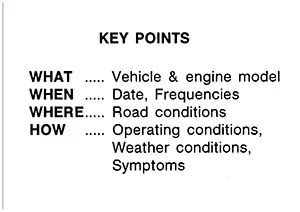
In general, perception of a problem varies depending on individuals. Ask the customer about his/her concerns carefully. It is important to understand the phenomenon or status. To systemize all the information for the diagnosis, prepare the question sheet referring to the question points.
In some cases, multiple conditions that appear simultaneously may cause a DTC to be detected.
Worksheet Sample
|
Question sheet |
|||||
|---|---|---|---|---|---|
|
Customer's name |
MR/MS |
Registration number |
Initial year registration |
Year Month day |
|
|
Nissan Sentra Vehicle type |
Chassis No. |
||||
|
Storage date |
Year Month day |
Engine |
Mileage |
km/mile |
|
|
Symptom |
□ Nissan Sentra Vehicle does not start. (□ R position □ D position □ L position) |
||||
|
□ Upshifting does not occur. □ Downshifting does not occur. |
|||||
|
□ Lock-up malfunction |
|||||
|
□ Shift point is too high. □ Shift point is too low. |
|||||
|
□ Shift shock (□ N⇒D □ Lock-up □ R, D, and L position) |
|||||
|
□ Slip (□ N⇒D □ Lock-up □ R, D, and L position) |
|||||
|
□ Noise □ Vibration |
|||||
|
When selector lever position is shifted, shift pattern does not change. |
|||||
|
□ Other ( ) |
|||||
|
First occurrence |
□ Recently (as from month of year ) |
||||
|
Frequency of occurrence |
□ Always □ Under certain conditions □ Sometimes ( time(s)/day) |
||||
|
Climate conditions |
Irrelevant |
||||
|
Weather |
□ Clear □ Cloud □ Rain □ Snow □ Others ) |
||||
|
Temperature |
□ Hot □ Warm □ Cool □ Cold □ Temperature (Approx. °C/°F) |
||||
|
Relative humidity |
□ High □ Moderate □ Low |
||||
|
Transaxle condition |
□ In cold-start □ During warm-up (approx. °C/°F) □ After warm-up □Engine speed: rpm |
||||
|
Road conditions |
□ Urban area □ Suburb area □ Highway □ Mountainous road (uphill or downhill) |
||||
|
Operating condition, etc. |
Irrelevant □ When engine starts □ During idling □ During driving □ During acceleration □ At constant speed driving □ During deceleration □ During cornering (RH curve or LH curve) |
||||
|
Other conditions |
|||||
Other materials:
Roof. Ecu Diagnosis Information. Moonroof Motor Assembly. Reference Value
Moonroof Motor Assembly. Reference Value
Reference Value
Reference Value
TERMINAL LAYOUT
PHYSICAL VALUES
Terminal No.
(Wire color)
Description
...
P2101 Electric Throttle Control Function
Dtc Description
DTC Description
DTC DETECTION LOGIC
DTC
CONSULT screen terms
(Trouble diagnosis
content)
DTC detection
condition
...
Service Data and Specifications (sds). Service Data and Specifications (sds)
Service Data and Specifications (sds)
Bulb Specifications
Bulb Specifications
Item
Wattage (W)*
Bulb No.
Front combi ...