Nissan Sentra B18 (2020-2025) Service Manual: Basic Inspection
Diagnosis and Repair Work Flow
Work Flow
Work Flow
OVERALL SEQUENCE
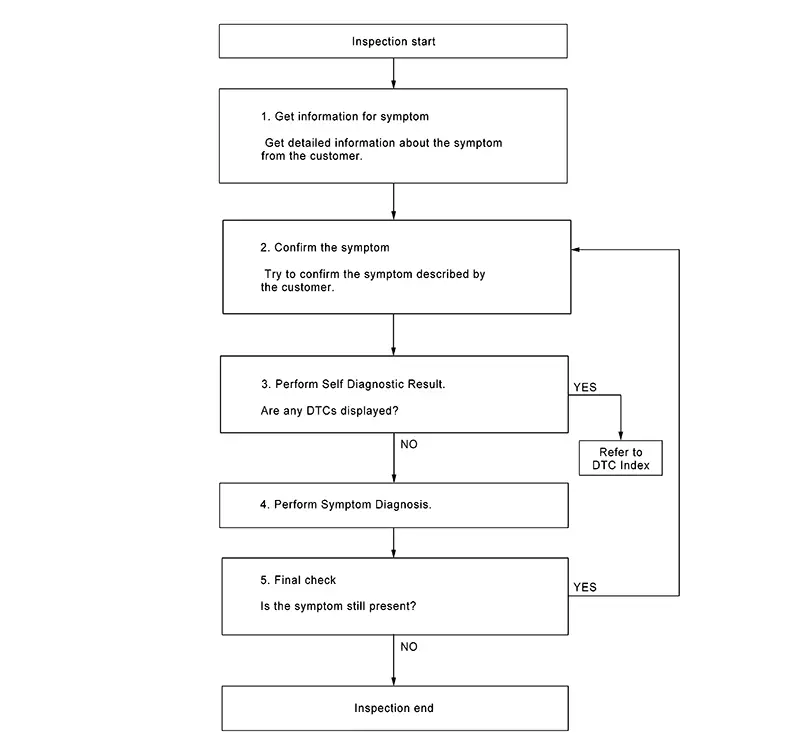
DETAILED FLOW
-
GET INFORMATION FOR SYMPTOM
-
-
Get detailed information from the customer about the symptom (the condition and the environment when the incident/malfunction occurred).
-
At the dealer, check whether the customer’s Nissan Sentra vehicle has been registered for the telematics service. If it is not registered, do not replace the TCU, and register for the telematics service.
-
GO TO 2.
-
-
CONFIRM THE SYMPTOM
-
Try to confirm the symptom described by the customer. Verify relation between the symptom and the condition when the symptom is detected.
GO TO 3.
-
-
PERFORM SELF DIAGNOSTIC RESULT
-
 CONSULT
-
Ignition switch ON and wait for 2 seconds or more.
-
Select “Self Diagnostic Result� mode of “IVC�.
-
Are any DTCs detected?
YES >>Refer to DTC Index.
NO >>GO TO 4.
-
-
PERFORM SYMPTOM DIAGNOSIS
-
Refer to Symptom Table.
GO TO 5.
-
-
FINAL CHECK
-
-
After confirming registration status and DTC status, if the phenomenon that the telematics service cannot be used continues for more than 5 minutes and does not resolve, replace the TCU. Refer to Removal and Installation.
-
Refer to symptom described by the customer in step 2.
-
Is the symptom still present?
YES >>GO TO 2.
NO >>Inspection End.
-
Additional Service When Replacing Tcu
Description
Description
Note:
-
You must have ALL customer keys before beginning this procedure.
-
Each TCU is registered to a specific VIN. TCU’s cannot be swapped between Nissan Sentra vehicles. Once a TCU is registered to a vehicle, the TCU cannot be used in another vehicle.
-
The VIN must be written to the replacement TCU after installation.
-
The replacement TCU must come from Nissan North America parts supply.
When a TCU is replaced, TCU activation is required. Refer to TSB for activation details.
Additional Service After Automatic Report
Description
Description
When the automatic report function of the TCU is activated, the TCU is locked. After the automatic report function of the TCU is activated, it is necessary to release the lock.
Work Procedure
Work Procedure
-
AUTOMATIC REPORT PREVENTION RELEASE
-
CONSULT Work support
-
Ignition switch ON.
-
Select "Automatic Notification Prevention Release" to unlock the TCU.
-
Work End.
-
Configuration (tcu)
Description
Description
-
Vehicle specification needs to be written with CONSULT after replacing the TCU.
-
Configuration requires a network connection.
-
CONSULT connects to network and downloads the configuration data from the server. Refer to Work Procedure.
For details of the network connection and operation, refer to “CONSULT Operation Manual�.
CAUTION:
-
Complete the “Configuration� procedure in order.
-
If the “Configuration� procedure is performed incorrectly, incidents may occur.
Work Procedure
Work Procedure
-
WRITING VEHICLE SPECIFICATION
-
CONSULT
Perform writing of the Nissan Sentra vehicle specification to TCU following "Automatic Configuration" procedure of "Configuration" according to CONSULT Operation Manual.
Note:
-
Log into network according to CONSULT.
-
For details of the network connection and operation, refer to “CONSULT Operation Manual�.
-
Work End.
-
Other materials:
Work Procedure (Before Replacing Electric
Throttle Control Actuator)
CHECK DTC
Perform DTC P0101 confirmation procedure.
Refer to Confirmation Procedure.
Is the DTC P0101 displayed?
YES >>
GO TO 2.
NO >>
Replace electric throttle control actuator.
Refer to Removal and ...
Stall Test
Work Procedure
Work Procedure
INSPECTION
Check the engine oil level. Replenish if
necessary. Refer to Inspection.
Check for leak of the CVT fluid. Refer to
Inspection.
Drive for about 10 minutes to warm up the
Nissan Sentra vehicle so that the CVT fluid temperature is 50 ...
Stop Lamp Switch
Component Inspection
Component Inspection
CHECK STOP LAMP SWITCH 1
Ignition switch OFF.
Disconnect stop lamp switch connector.
Check continuity betwe ...