Nissan Sentra B18 (2020-2025) Service Manual: B1321 Front Right Tweeter
Dtc Description
DTC Description
DTC DETECTION LOGIC
|
DTC No. |
CONSULT screen terms (Trouble diagnosis content) |
DTC detection condition |
||
|---|---|---|---|---|
|
B1321–13 |
Front right tweeter (Front tweeter RH) |
[OPEN] |
Diagnosis condition |
When ignition switch is ON. |
|
Signal (terminal) |
|
|||
|
Threshold |
– |
|||
|
Diagnosis delay time |
30 seconds or more |
|||
POSSIBLE CAUSE
-
FR SP RH+ open
-
FR SP RH− open
-
Front tweeter RH
-
AV control unit
FAIL-SAFE
Front tweeter RH inoperative
Confirmation Procedure
Confirmation Procedure
-
PERFORM DTC CONFIRMATION PROCEDURE
-
 CONSULT
-
Ignition switch ON.
-
Ignition switch OFF and wait at least 30 seconds.
-
Ignition switch ON and wait at least 30 seconds or more.
-
Select “Self Diagnostic Result� mode of “MULTI AV�.
-
Check DTC.
-
Is DTC B1321–13 detected?
YES>>Proceed to DTC Diagnosis Procedure.
NO>>To check malfunction symptom before repair: Refer to Intermittent Incident.
NO>>Confirmation after repair: Inspection End.
-
Dtc Diagnosis Procedure
DTC Diagnosis Procedure
-
CHECK SOUND SIGNAL CIRCUITS FOR OPEN
-
-
Ignition switch OFF.
-
Disconnect AV control unit connector, front tweeter RH connector.
-
Check the continuity between AV control unit connector and front tweeter RH connector.
AV control unit
Front tweeter RH
Continuity
Connector
Terminal
Connector
Terminal
M103
11
M47
1
Yes
12
2
-
Is the inspection result normal?
YES >>GO TO 2.
NO >>Repair or replace harness or connectors.
-
-
CHECK FRONT TWEETER RH SIGNAL
-
-
Connect AV control unit connector and front tweeter RH connector.
-
Ignition switch ON.
-
AV control unit ON.
-
Check signal between the terminals of AV control unit connector .
AV control unit
Condition
Reference value
Connector
(+)
(−)
Terminals
M103
11
12
Audio signal output
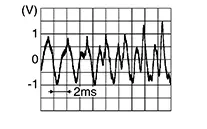
-
Is the inspection result normal?
YES >>Replace front tweeter RH. Refer to Removal and Installation.
NO >>Replace AV control unit. Refer to Removal and Installation.
-
Other materials:
Removal and Installation
Av Control Unit
Exploded View
Exploded View
1.
Audio unit bracket (LH)
2.
Audio unit
3.
...
Preparation. Preparation
Preparation
Special Service Tool
Special Service Tool
The actual shape of the tools may differ from those
illustrated here.
Tool number
(TechMate No.)
Tool name
...
U2118-87 Can Comm Err (intelligent Key)
Dtc Description
DTC Description
DESCRIPTION
CAN (Controller Area Network) is a serial communication
line for real time applications. It is an on-Nissan Sentra vehicle multiplex communication
line with high data communication speed and excellent error detection
ability. Modern Nissan ...