
Nissan Sentra Owners Manual: System features
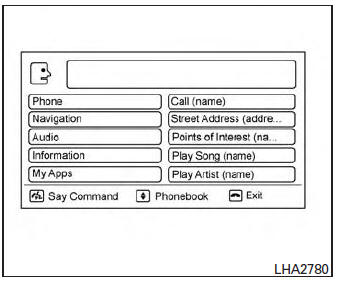
NISSAN Voice Recognition can activate the following systems:
- Bluetoothâ„¢ Hands-Free Phone System
- Navigation
- Audio
- Information
- My Apps
For additional information on the navigation system, see the separate Navigation System Owner’s Manual.
How to say numbers
NISSAN Voice Recognition requires a certain way to speak numbers in voice commands. Refer to the following examples.
General rule: Either “zero� or “oh� can be used for “0�.
Phone numbers
Speak phone numbers according to the following example. For 1-800-662-6200, say dial number and then speak the phone number in any of the following formats:
- “one eight oh oh six six two six two oh oh�
- “one eight hundred six six two six two oh oh�
- “one eight zero zero six six two six two oh oh�
For the best voice recognition phone dialing results, say phone numbers as single digits. Also, full numbers can only be spoken for “800�. For example, you cannot say 555-6000 as “five five five six thousand�.
 Using the system
Initialization
When the ignition switch is in the ON position,
NISSAN Voice Recognition is initialized, which
takes a few seconds. When completed, the system
is ready to accept voice commands. If
...
 Bluetooth® Hands-Free Phone System voice commands
To access the Bluetooth® Hands-Free Phone
System voice commands:
Press the button.
Say “Call� and then a name in the vehicle
phonebook to call that entry. Otherwise, say
“Phone� t ...
Other materials:
LATCH (Lower Anchors and Tethers for CHildren) System
WARNINGFailure to follow the warnings and
instructions
for proper use and installation of
child restraints could result in serious injury
or death of a child or other passengers
in a sudden stop or collision:
Attach LATCH system compatible
child restraints only at ...
U1000 can comm circuit
Dtc logic
Dtc detection logic
Dtc
Consult
Detection condition
Possible malfunction location
U1000
Can comm circ
[u1000]
When combination meter is not receiving can communication
signals for 2 seconds or more.
Combination meter
Diagnosis procedure
1.Ch ...
P1551, P1552 Battery current sensor
DTC Logic
DTC DETECTION LOGIC
DTC No.
CONSULT screen terms
(Trouble diagnosis content)
DTC detecting condition
Possible cause
P1551
BAT CURRENT SENSOR
(Battery current sensor)
An excessively low voltage from the sensor
is sent to ECM.
Harness or ...
