
Nissan Sentra Service Manual: Symptom diagnosis
Audio system
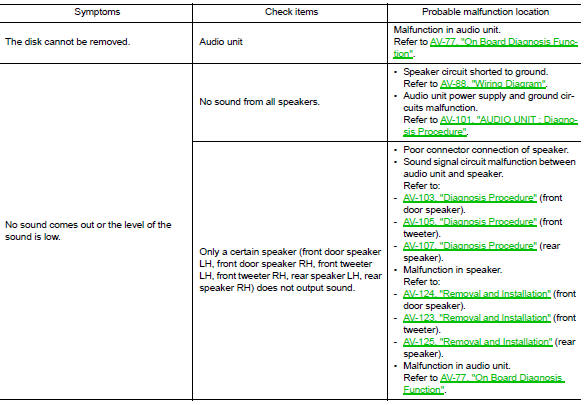
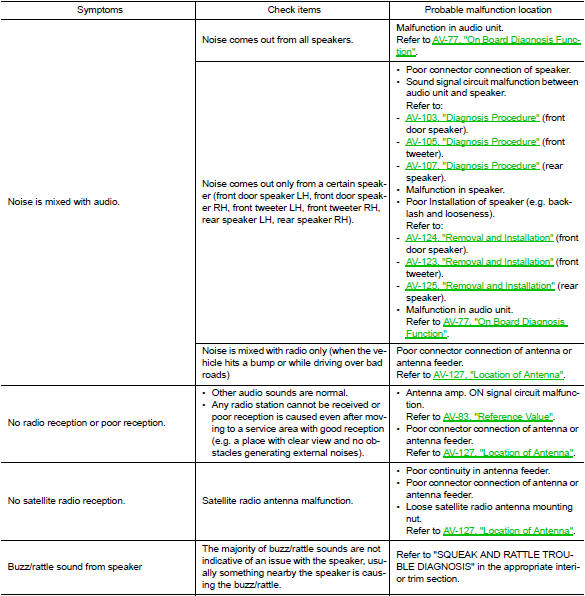
Symptom table
Related to audio
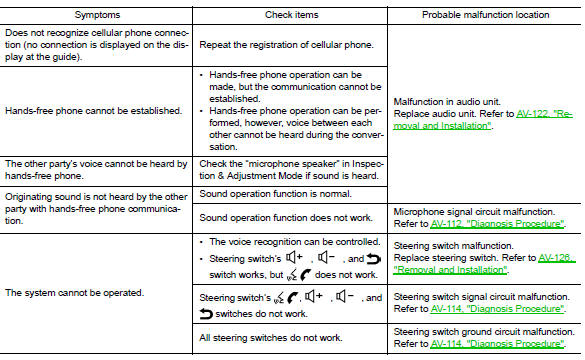
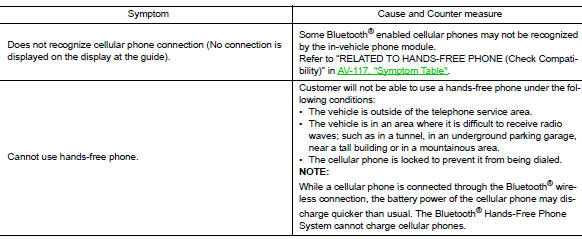
Related to hands-free phone
- Before performing diagnosis, confirm that the cellular phone being used by the customer is compatible with the vehicle.
- It is possible that a malfunction is occurring due to a version change of the phone even though the phone is a compatible type. This can be confirmed by changing the cellular phone to another compatible type, and check that it operates normally. It is important to determine whether the cause of the malfunction is the vehicle or the cellular phone.
Check compatibility
- Make sure the customer’s bluetooth® related concern is understood.
- Verify the customer’s concern.
Note:
The customer’s phone may be required, depending upon their concern.
- Write down the customer’s phone brand, model and service provider.
Note:
It is necessary to know the service provider. On occasion, a given phone may be on the approved list with one provider, but may not be on the approved list with other providers.
- Go to “www.nissanusa.com/bluetooth/”.
- Using the website’s search engine, find out if the customer’s phone is on the approved list.
- If the customer’s phone is NOT on the approved list: Stop diagnosis here. The customer needs to obtain a Bluetooth® phone that is on the approved list before any further action.
- If the feature related to the customer’s concern shows as “N” (not compatible): Stop diagnosis here. If the customer still wants the feature to function, they will need to get an approved phone showing the feature as “Y” (compatible) in the “Basic Features”.
- If the feature related to the customer’s concern shows as “y” (compatible): perform diagnosis as per the following table.
Normal operating condition
Description
Related to noise
The majority of the audio concerns are the result of outside causes (bad cd, electromagnetic interference, etc.).
The following noise results from variations in field strength, such as fading noise and multi-path noise, or external noise from trains and other sources. It is not a malfunction.
- Fading noise: this noise occurs because of variations in the field strength in a narrow range due to mountains or buildings blocking the signal.
- Multi-path noise: This noise results from the waves sent directly from the broadcast station arriving at the antenna at a different time from the waves which reflect off mountains or buildings.
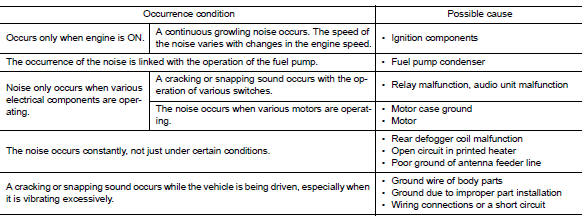
The vehicle itself can be a source of noise if noise prevention parts or electrical equipment is malfunctioning.
Check if noise is caused and/or changed by engine speed, ignition switch turned to each position, and operation of each piece of electrical equipment, and determine the cause.
Note:
The source of the noise can be found easily by listening to the noise while removing the fuses of electrical components, one by one.
Type of noise and possible cause
Related to hands-free phone

 Dtc/circuit diagnosis
Power supply and ground circuit
Audio unit
AUDIO UNIT : Diagnosis Procedure
Regarding wiring diagram information, refer to av-88, "wiring diagram".
1.Check fuse
Check that the following ...
 Removal and installation
Audio unit
Exploded view
Audio unit
Audio unit bracket (LH)
Audio unit bracket (rh)
Removal and installation
Removal
Disconnect the negative battery terminal. Refer to pg-50, " ...
Other materials:
Troubleshooting guide
Symptom
Possible Cause
When pushing the ignition switch to stop
the engine
The P (Park) warning light in the instrument
panel illuminates and the inside chime
sounds continuously.
The shift lever is not in the P (Park) position.
Make sure that the shift ...
Seat belts
The seat belts can be cleaned by wiping them
with a sponge dampened in a mild soap solution.
Allow the belts to dry completely in the shade
before using them. See “Seat belt maintenance”
in the “Safety – Seats, seat belts and supplemental
restraint system” section of this manual.
...
Manual control
While using the voice recognition system, it is
possible to select menu options by using the
steering wheel controls instead of speaking voice
commands. This can be especially helpful if the
noise of driving makes it difficult for the voice
recognition system to accurately interpret commands.
...
