
Nissan Sentra Owners Manual: NISSAN Intelligent Key® battery discharge
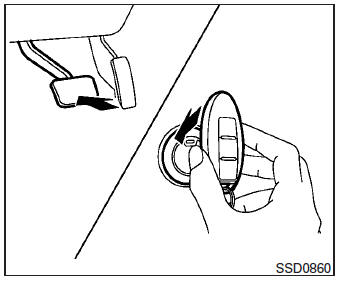
If the battery of the NISSAN Intelligent Key® is discharged, or environmental conditions interfere with the Intelligent Key operation, start the engine according to the following procedure:
- Place the shift lever in the P (Park) position.
- Firmly apply the foot brake.
- Touch the ignition switch with the Intelligent Key as illustrated. (A chime will sound.) After step 3 is performed, when the ignition switch is pushed without depressing the brake pedal, the ignition switch position will change to ACC.
- Push the ignition switch while depressing the brake pedal within 10 seconds after the chime sounds. The engine will start.
NOTE:
- When the ignition switch is pushed to the ACC or ON position or the engine is started by the above procedure, the Intelligent Key battery discharge indicator appears in the vehicle information display even when the Intelligent Key is inside the vehicle. This is not a malfunction. To turn off the Intelligent Key battery discharge indicator, touch the ignition switch with the Intelligent Key again.
- If the Intelligent Key battery discharge indicator appears, replace the battery as soon as possible. See “Battery Replacement� in the “Maintenance and do-it-yourself� section.
 Emergency engine shut off
To shut off the engine in an emergency situation
while driving, perform the following procedure:
Rapidly push the push-button ignition switch 3
consecutive times in less than 1.5 seconds, or
...
 NISSAN vehicle immobilizer system
The NISSAN Vehicle Immobilizer system will not
allow the engine to start without the use of the
registered key.
If the engine fails to start using a registered key
(for example, when interferenc ...
Other materials:
Removal and installation
Bcm (body control module)
Removal and Installation
Note:
Before replacing bcm, perform “read configuration” to save or print
current vehicle specification. Refer
to bcs-116, "configuration (bcm) : description".
Removal
Disconnect the negative battery terminal. Refer to ...
Service data and specifications (SDS)
Idle speed
*: Under the following conditions
A/C switch: OFF
Electric load: OFF (Lights, heater fan & rear window defogger)
Steering wheel: Kept in straight-ahead position
Ignition timing
*: Under the following conditions
A/C switch: OFF
Electric load: OFF (Lights, hea ...
VDC OFF Switch
Component Function Check
1.CHECK VDC OFF SWITCH OPERATION
Check that VDC OFF indicator lamp in combination meter turns
ON/OFF when VDC OFF switch is operated.
Is the inspection result normal?
YES >> Inspection End.
NO >> Proceed to diagnosis procedure. Refer to BRC-92, "D ...
