
Nissan Sentra Service Manual: Automatic speed control device (ASCD)
AUTOMATIC SPEED CONTROL DEVICE (ASCD) : Switch Name and Function
SWITCHES AND INDICATORS
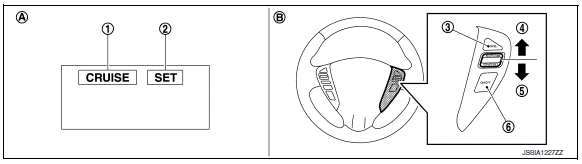
- CRUISE indicator
- SET indicator*
- CANCEL switch
- ACCEL/RES switch
- COAST/SET switch
- ASCD MAIN switch
- On the combination meter
- On the steering wheel
*: Not applicable
Set speed range
ASCD system can be set the following vehicle speed.

Switch operation
| Item | Function |
| CANCEL switch | Cancels the cruise control driving. |
| ACCEL/RES switch |
|
| COAST/SET switch |
|
| ASCD MAIN switch | Master switch to activate the ASCD system. |
Refer to EC-51, "AUTOMATIC SPEED CONTROL DEVICE (ASCD) : System Description" for ASCD operating instructions.
 Operation
...
 On board diagnostic (OBD) system
Diagnosis Description
This system is an on board diagnostic system that records exhaust
emission-related diagnostic information
and detects a sensors/actuator-related malfunction. A malfunction is ...
Other materials:
P0500 VSS
EXCEPT FOR M/T MODELS
EXCEPT FOR M/T MODELS : Description
ECM receives vehicle speed signals from two different paths via CAN
communication line: One is from the
ABS actuator and electric unit (control unit) via the combination unit and the
other is from TCM.
EXCEPT FOR M/T MODELS : DTC Logi ...
Preparation
Special service tool
The actual shape of the tools may differ from those illustrated here.
HFC-134a (r-134a) service tool and equipmen.T.
Do not mix HFC-134a (R-134a) refrigerant and/or its specified oil with CFC-12
(R-12) refrigerant and/or its oil.
Separate and non-interchangeable se ...
Rear seat
Exploded View
Rear seatback assembly (rh)
Seatback striker
Seatback latch release knob
Seatback latch assembly
Seatback silencer (RH)
Rear seatback frame (rh)
Seatback latch release knob finisher
Rear seat bolster trim (RH)
Rear seat bolster pad (RH)
Rear seat bolster (rh)
...
