Nissan Sentra B18 (2020-2025) Service Manual: Srs Air Bag Control System :: Basic Inspection
Diagnosis and Repair Work Flow. Work Flow. Work Flow
Work Flow
OVERALL SEQUENCE
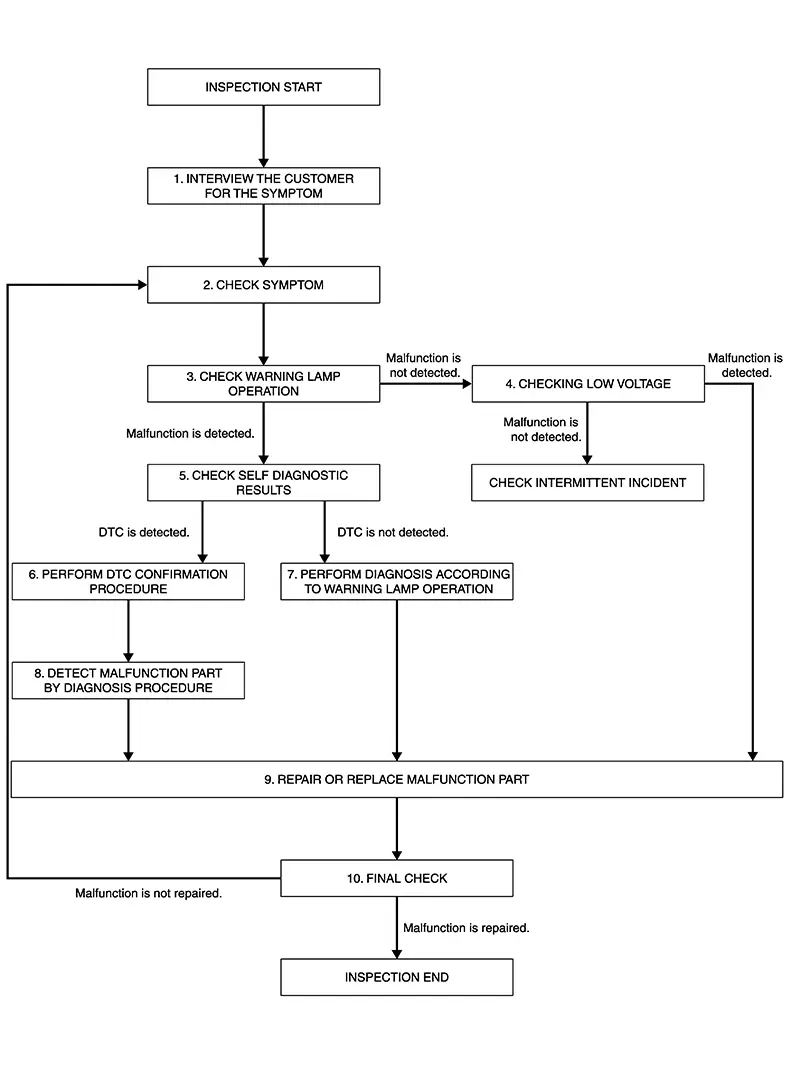
DETAILED FLOW
-
INTERVIEW THE CUSTOMER FOR THE SYMPTOM
-
Interview the customer for the symptom (the condition and the environment when the incident/malfunction occurs).
GO TO 2.
-
-
CHECK SYMPTOM
-
Check the symptom from the customer information.
GO TO 3.
-
-
CHECK WARNING LAMP OPERATION
-
Check air bag warning lamp operation in the user mode. Refer to On Board Diagnosis Function.
Are any malfunction detected?
YES >>GO TO 5.
NO >>GO TO 4.
-
-
CHECK LOW VOLTAGE
-
 CONSULT
Check low voltage.
Are any malfunction detected?
YES >>GO TO 9.
NO >>Check intermittent incident. Refer to Intermittent Incident.
-
-
CHECK SELF DIAGNOSTIC RESULT
-
CONSULT
Check “Self Diagnostic Result� or diagnosis mode.
If it is impossible to switch to diagnosis mode, follow the same procedure that DTC is not detected.
Note:
Perform the following procedure if DTC is detected:
-
Record DTC. (Print them out.)
-
Erase self diagnostic result.
-
Study the relationship between the malfunction that DTC or air bag warning lamp indicates and the symptom that the customer describes.
-
Check related service bulletins for information.
-
Is DTC detected?
YES >>GO TO 6.
NO >>GO TO 7.
-
-
PERFORM DTC CONFIRMATION PROCEDURE
-
Perform DTC CONFIRMATION PROCEDURE for the DTC.
GO TO 8.
-
-
PERFORM DIAGNOSIS ACCORDING TO WARNING LAMP OPERATION
-
-
Check air bag warning lamp operation in the user mode. Refer to On Board Diagnosis Function.
-
Perform Diagnosis Procedure for the air bag warning lamp operation. Refer to Trouble Diagnosis with CONSULT or Trouble Diagnosis without CONSULT.
-
GO TO 9.
-
-
DETECT MALFUNCTIONING PART BY DIAGNOSTIC PROCEDURE
-
Inspect according to Diagnostic Procedure of the DTC.
GO TO 9.
-
-
REPAIR OR REPLACE THE MALFUNCTION PART
-
Repair or replace the malfunctioning part.
GO TO 10.
-
-
FINAL CHECK
-
Check self diagnostic result and air bag warning lamp operation in the user mode.
Is the malfunction repaired?
YES >>Inspection End.
NO >>GO TO 2.
-
Configuration (air Bag Diagnosis Sensor Unit). Work Procedure. Work Procedure
Work Procedure
Since vehicle specifications are not yet written in a new air bag diagnosis sensor unit, it is necessary to write then “Re/programming, Configuration� with CONSULT.
Configuration has three functions as follows:
|
Function |
Description |
|
|---|---|---|
|
Before Replace ECU |
|
|
|
After Replace ECU |
FAST linked |
Searched for by using Global Web-FAST (NISSAN parts catalogue) to automatically write the Type ID* into the air bag diagnosis sensor unit. |
|
Manual selection |
Searched for by using Global Web-FAST (NISSAN parts catalogue) to write the selected Type ID* into the air bag diagnosis sensor unit. Writes the Nissan Sentra vehicle configuration by manual selection. Note:
This item is displayed, but not used. |
|
*: For the Type ID, that part number (Nissan Sentra vehicle specification) to be written to the air bag diagnosis sensor unit.
-
CHECKING AIR BAG DIAGNOSIS SENSOR UNIT TYPE ID
-
CONSULT
-
Perform ECU setting according to the “C/U setting� procedure in the “CONSULT Operation Manual�. Refer to CONSULT Operation Manual.
-
Check if the Type ID of the air bag diagnosis sensor unit is displayed on the CONSULT screen.
-
Is Type ID displayed?
YES >>GO TO 2.
NO >>GO TO 3.
-
-
WRITING Nissan Sentra Vehicle SPECIFICATION
-
CONSULT
Follow the procedure displayed in CONSULT for writing the saved Nissan Sentra vehicle specification data to the air bag diagnosis sensor unit.
GO TO 5.
-
-
CHECKING AIR BAG DIAGNOSIS SENSOR UNIT TYPE ID
-
Use Global Web-FAST (NISSAN parts catalogue) to search for the air bag diagnosis sensor unit of the applicable Nissan Sentra vehicle and find the Type ID. Refer to “FAST linked� in the “CONSULT Operation Manual�.
Note:
For FAST linked parts, even if a system number cannot be acquired from the air bag sensor unit before replacement, the applicable ECU setting operation can still be performed by acquiring the system number from Global Web-FAST (NISSAN parts catalogue).
GO TO 4.
-
-
WRITING Nissan Sentra Vehicle SPECIFICATION (FAST LINKED)
-
CONSULT
Perform ECU setting according to the “C/U setting� procedure in the “CONSULT Operation Manual�. Refer to CONSULT Operation Manual.
GO TO 5.
-
-
CHECK ALL ECU SELF DIAGNOSTIC RESULT
-
CONSULT
-
Erase all ECU self-diagnosis results.
-
Ignition switch OFF.
-
Ignition switch ON.
-
Check that all ECU self-diagnosis results have no DTC.
-
Work End.
-
Inspection and Adjustment. Additional Service When Replacing Control Unit
Description
Description
Warning:
Always perform zero point reset using CONSULT when removing and installing the front passenger seat or servicing the occupant classification system. If zero point reset is not performed, the OCS may not operate normally, which may increase the risk of serious injury in a collision.
Special Repair Requirement
Special Repair Requirement
WORK PROCEDURE WHEN REPLACING OCS CONTROL UNIT
-
PERFORM ZERO POINT RESET
-
Perform zero point reset. Refer to Special Repair Requirement.
Inspection End.
-
Zero Point Reset
Description
Description
Zero point reset is an initializing procedure for the OCS (weight) sensors that must be performed using CONSULT when removing and installing passenger seat or servicing the OCS system. If zero point reset is not performed, the initialization is incomplete and OCS may not operate normally.
Note:
-
When reinstalling the passenger seat, the initial value for the OCS sensors may change, and the OCS may not operate normally.
-
When zero point reset is performed after removal and installation of passenger seat, CONSULT displays �complete�.
Special Repair Requirement
Special Repair Requirement
-
PERFORM ZERO POINT RESET
-
CONSULT
-
Perform preliminary checks:
Note:
-
Level the Nissan Sentra vehicle
-
Minimize vibrations near the vehicle
-
Remove any objects on passenger seat
-
Do not touch the Nissan Sentra vehicle during zero point reset
-
-
Select “Start� on “Zero point reset function� screen from “Work support� mode of “OCCUPANT DETECTION�.
-
“Zero point reset function� starts.
-
GO TO 2.
-
-
CONFIRM RESET
-
CONSULT
Check that “Complete� is displayed on “Zero point reset function�.
CAUTION:
-
“Complete� may be displayed if the seat has been reinstalled, or “Zero point reset function� has already been performed.
-
�Incomplete� may be displayed if a new seat is installed.
-
Air bag warning lamp flashes in user mode if zero point reset is �incomplete�.
-
Is zero point reset status “complete�?
YES>>Print out “Zero point reset current status� screen. Inspection End.
NO>>Recheck the preliminary check items and perform zero point reset again.
-
Intermittent Incident. Inspection Procedure
Inspection Procedure
INTERMITTENT TROUBLE
An intermittent incident may have occurred in the past but is not being detected currently. This DTC will not be detected on “Self Diagnostic Result [CURRENT], but may be viewed on “Self Diagnostic Result [PAST]� if the DTC has not been erased.
Trouble Diagnosis with Consult
Trouble Diagnosis with CONSULT
CHECK SRS REPAIR HISTORY
Refer to SRS History Check.
Other materials:
Line Pressure Solenoid Valve Circuit
Diagnosis Procedure
Diagnosis Procedure
CHECK HARNESS CONNECTOR
Ignition switch OFF.
Check the mating condition of TCM
harness connector and CVT unit harness
connector.
Is the inspect ...
B2f70-01 Stop Lamp
Dtc Description
DTC Description
DTC DETECTION LOGIC
DTC No.
CONSULT screen items
(Trouble diagnosis
content)
DTC detecting condition
...
How to use the remote keyless entry function
The remote keyless entry function on the Nissan Sentra allows you to control
all door locks using the Intelligent Key. This convenient system enables locking
and unlocking of the doors from a distance of up to approximately 33 ft (10 m) away
from the vehicle, depending on surrounding condition ...