
Nissan Sentra B18 (2020-2025) Service Manual: How to Check
-
If fuse is blown, be sure to eliminate cause of malfunction before installing new fuse.
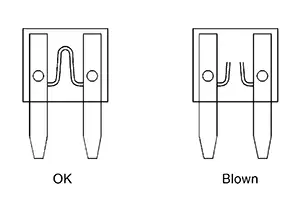
-
Use fuse of specified rating. Never use fuse of more than specified rating.
-
Do not partially install fuse; always insert it into fuse holder properly.
-
Remove fuse for “ELECTRICAL PARTS (BAT)� if Nissan Sentra vehicle is not used for a long period of time.
EXTENDED STORAGE SWITCH (IF SO EQUIPPED)
Note:
-
When extended storage switch is pulled out, a message may be shown in the meter or display. To turn message/display off, push extended storage switch in.
-
The following information is related to extended storage switch (shipping mode). For information related to BCM shipping mode, refer to System Description.
The following switch may be mounted on the fuse block (Junction Box) for transportation and storage.
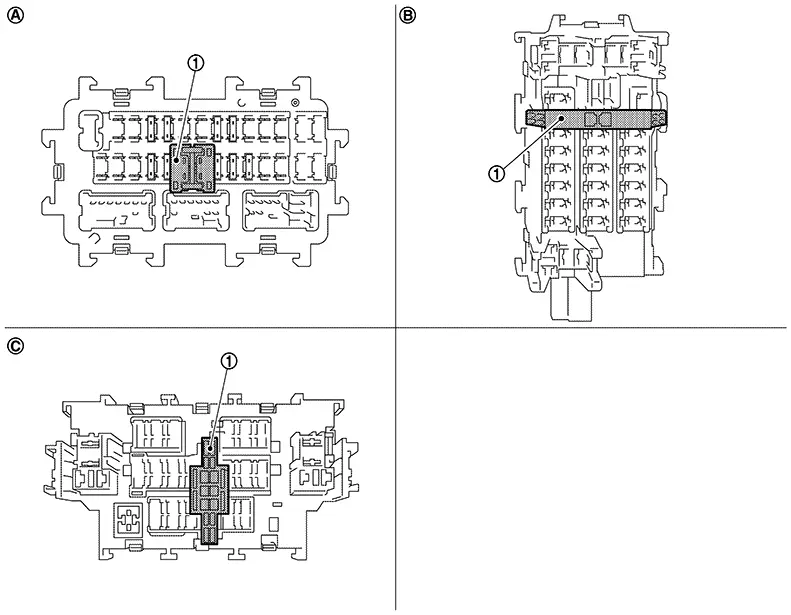
|
|
Extended storage switch |
||||
|
|
Type A |
|
Type B |
|
Type C |

Remove the extended storage switch if it interferes when checking fuses.
How/When to turn Extended Storage Switch ON/OFF
CAUTION:
-
Ignition switch OFF when operating the extended storage switch.
-
Under normal conditions, keep the extended storage switch in ON state. Never operate the extended storage switch except when necessary.
-
Type A
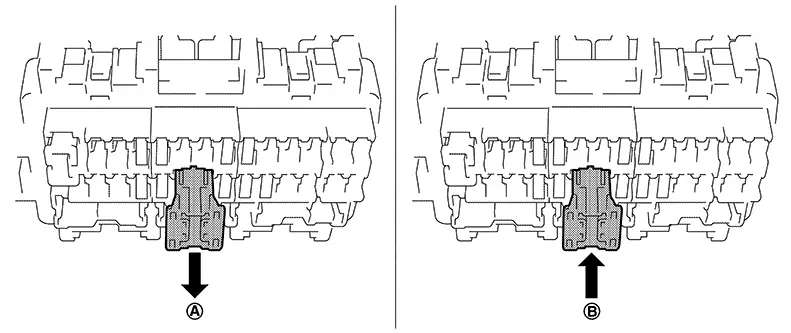
-
To place the extended storage switch in the OFF position, pull out in
 direction as shown in the figure.
 -
To place the extended storage switch in the ON position, press in
 direction as shown in the figure.
-
-
Type B
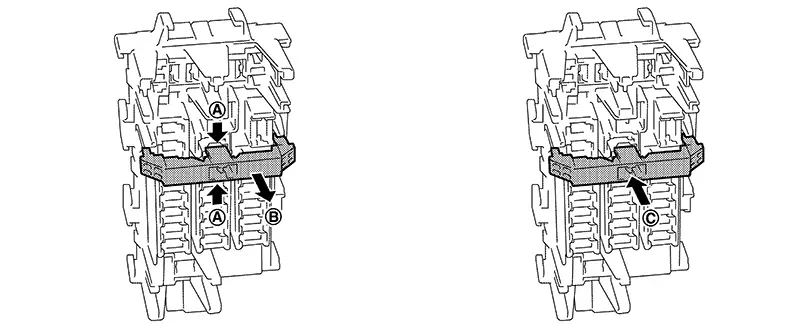
-
To place the extended storage switch in the OFF position, pinch tabs
of the switch and pull out in direction as shown in the figure. -
To place the extended storage switch in the ON position, press in
 direction as shown in the figure.
-
-
Type C
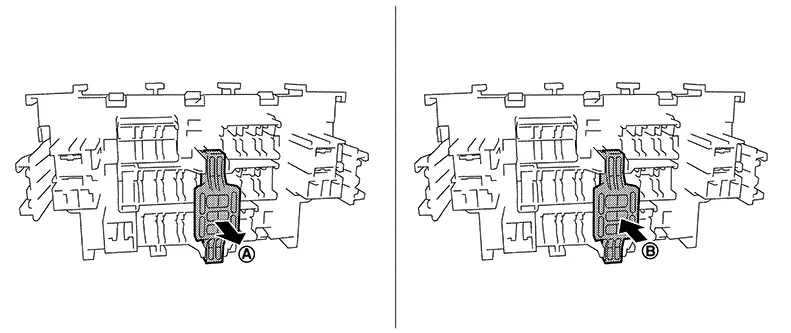
-
To place the extended storage switch in the OFF position, pull out in
direction as shown in the figure. -
To place the extended storage switch in the ON position, press in
direction as shown in the figure.
-
How To Remove Extended Storage Switch
Type A
-
Ignition switch OFF.
-
Place the extended storage switch in the OFF position.
-
Pinch tabs
and tilt to disengage the extended storage
switch. Pinch tabs to remove the extended storage switch.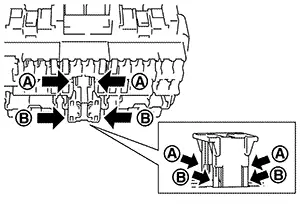
CAUTION:
For bus bar type extended storage switch, never replace bus bar with a fuse, or fuse may continually open.
Note:
-
Extended storage switch and fuse (or bus bar) are removed together. Remove fuse (or bus bar) from extended storage switch, if necessary.
-
Install removed fuse (or bus bar) to fuse block.
-
Extended storage switch is for transportation and storage. Reinstallation of switch is not required after removal, but fuse (or bus bar) must be reinstalled/pushed back in to activate all electrical systems and turn message off (which may be shown in meter/display).
-
Type B
-
Ignition switch OFF.
-
Place the extended storage switch in the OFF position.
-
Pinch tabs
and firmly pull out the extended storage
switch in direction.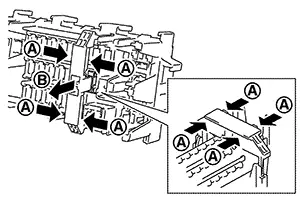
CAUTION:
For bus bar type extended storage switch, never replace bus bar with a fuse, or fuse may continually open.
Note:
-
Extended storage switch and fuse (or bus bar) may be removed together. Remove fuse (or bus bar) from extended storage switch, if necessary.
-
Install removed fuse (or bus bar) to fuse block.
-
Extended storage switch is for transportation and storage. Reinstallation of switch is not required after removal, but fuse (or bus bar) must be reinstalled/pushed back in to activate all electrical systems and turn message off (which may be shown in meter/display).
-
Type C
-
Ignition switch OFF.
-
Place the extended storage switch in the OFF position.
-
Pinch tabs
and firmly pull out the extended storage
switch in direction.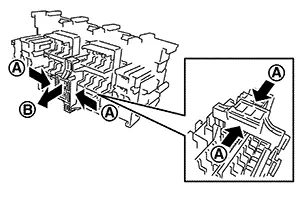
CAUTION:
For bus bar type extended storage switch, never replace bus bar with a fuse, or fuse may continually open.
Note:
-
Extended storage switch and fuse (or bus bar) are removed together. Remove fuse (or bus bar) from extended storage switch, if necessary.
-
Install removed fuse (or bus bar) to fuse block.
-
Extended storage switch is for transportation and storage. Reinstallation of switch is not required after removal, but fuse (or bus bar) must be reinstalled/pushed back in to activate all electrical systems and turn message off (which may be shown in meter/display).
-
 Fuse Inspection
...

Other materials:
Thermostat
Exploded View
Exploded View
1.
Water inlet
2.
Thermostat
assembly
3.
...
Av Control Unit
List of Ecu Reference
List of ECU Reference
ECU
Reference
AV control unit
Values on the Diagnosis Tool
...
Dtc Confirmation Procedure
DTC Confirmation Procedure
DTC CONFIRMATION
CONSULT
Ignition switch ON and wait for 2 seconds or
more.
Select “Self Diagnostic Result� mode
...
