Nissan Sentra B18 (2020-2025) Service Manual: Door Lock Function
System Diagram
System Diagram
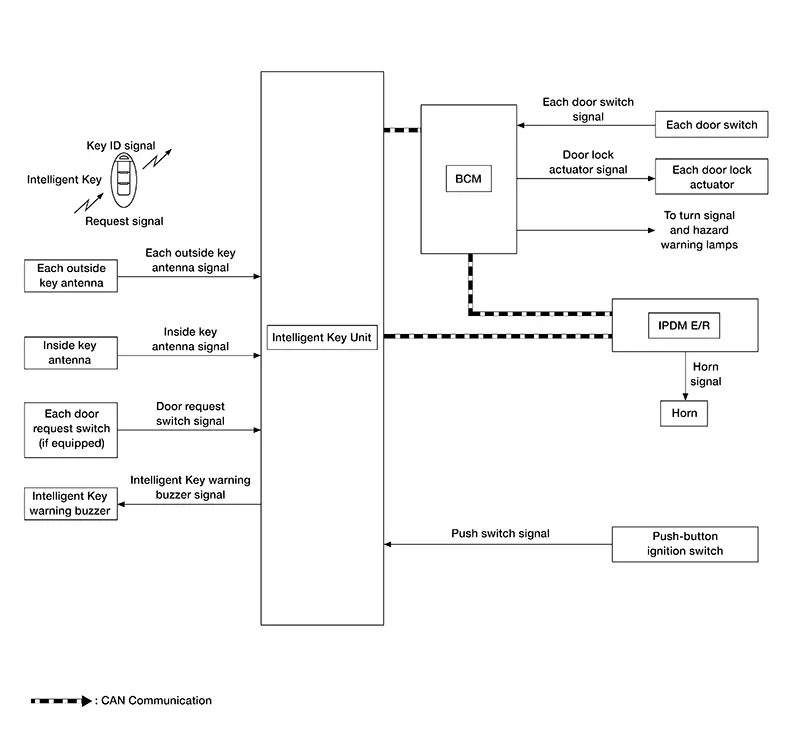
System Description
System Description
Only when pressing the door request switch it is possible to lock and unlock the door by carrying the Intelligent Key.
INPUT SIGNAL AND OUTPUT SIGNAL
|
Signal name |
Input |
Output |
Description |
|---|---|---|---|
|
Key ID signal |
Intelligent Key |
Intelligent Key unit |
The Intelligent Key unit receives key ID signal inputs and activates the actuators accordingly. |
|
Outside key antenna signal |
Outside key antenna |
Intelligent Key unit |
The Intelligent Key unit receives outside key antenna signals inputs and activates the actuators accordingly. |
|
Inside key antenna signal |
Inside key antenna |
Intelligent Key unit |
The Intelligent Key unit receives inside key antenna signals inputs and activates the actuators accordingly. |
|
Door request switch signal |
Door request switch |
BCM (CAN) |
The BCM receives door request switch signal inputs and activates the actuators accordingly. |
|
Push switch signal |
Push-button ignition switch |
Intelligent Key unit |
The Intelligent Key unit receives push switch signal inputs and activates the actuators accordingly. |
|
Door switch signal |
Door switch |
BCM |
The BCM receives door switch signals inputs and activates the actuators accordingly. |
OPERATION DESCRIPTION
-
When the Intelligent Key unit detects that each door request switch is pressed, it activates the outside key antenna and inside key antenna corresponding to the pressed door request switch and transmits the request signal to the Intelligent Key. Then check that the Intelligent Key is near the door.
-
If the Intelligent Key is within the outside key antenna detection area, it receives the request signal and transmits the key ID signal to the Intelligent Key unit.
-
Intelligent Key unit receives the key ID signal and compares it with the registered key ID.
-
BCM locks/unlocks each doors.
-
Intelligent Key unit sounds Intelligent Key warning buzzer (lock: 2 times, unlock: 1 time) and blinks hazard warning lamps (lock: 2 times, unlock: 1 time) at the same time as a reminder.
OPERATION CONDITION
If the following conditions are satisfied, door lock/unlock operation is performed if the door request switch is operated:
|
Each door request switch operation |
Operation condition |
|---|---|
|
Lock |
|
|
Unlock |
|
*: Even with a registered Intelligent Key remaining inside the Nissan Sentra vehicle, door locks can be locked/unlocked from outside of the vehicle with a spare Intelligent Key as long as key IDs are different.
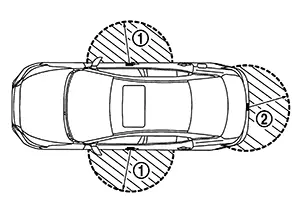
OUTSIDE KEY ANTENNA DETECTION AREA
The outside key antenna detection area of door
lock/unlock function is in the range of approximately 80 cm (31.50
in) surrounding the front door LH  , front door RH
and rear bumper
, front door RH
and rear bumper  . However, this operating range depends on the
ambient conditions.
. However, this operating range depends on the
ambient conditions.
HAZARD AND BUZZER REMINDER FUNCTION
During lock or unlock operation by each door request switch, the hazard warning lamps and Intelligent Key warning buzzer blinks or honks as a reminder.
Operating Function Of Hazard And buzzer Reminder
|
Operation |
Hazard warning lamp blinks |
Intelligent Key warning buzzer honks |
|---|---|---|
|
Unlock |
Once |
Once |
|
Lock |
Twice |
Twice |
Hazard and buzzer reminder does not operate in the following conditions:
-
Ignition switch is ON.
-
Door is open (only lock operation).
How To Change Hazard And Buzzer Reminder Mode
 CONSULT
Hazard and buzzer reminder mode can be changed.
Refer to CONSULT Function (BCM - INTELLIGENT KEY).
AUTO DOOR LOCK FUNCTION
After door is unlocked by door request switch operation and if 30 seconds or more passes without performing the following operation, all doors are automatically locked. However, operation check function does not activate.
|
Operating condition |
|
How To Change Auto Door Lock Operation Mode
CONSULT
Auto door lock operation mode can be changed.
Refer to CONSULT Function (BCM - INTELLIGENT KEY).
LIST OF OPERATION RELATED PARTS
Parts marked with × are the parts related to operation.
|
Function |
Intelligent Key |
Door switch |
Door request switch |
Door lock actuator |
Inside key antenna |
Outside key antenna |
CAN communication system |
Intelligent Key unit |
BCM |
Hazard warning lamp |
Intelligent Key warning buzzer |
Push-button ignition switch |
|---|---|---|---|---|---|---|---|---|---|---|---|---|
|
Door lock/unlock function |
× |
× |
× |
× |
× |
× |
× |
× |
||||
|
Hazard reminder function |
× |
× |
× |
× |
× |
|||||||
|
Auto door lock function |
× |
× |
× |
× |
× |
Other materials:
Symptom Diagnosis. Overheating Cause Analysis
Overheating Cause Analysis
Diagnosis Chart by Symptom
Diagnosis Chart by Symptom
Symptom
Inspection item
Cooling system
...
Diagnosis System (intelligent Key Unit)
Consult Function (hands Free Module)
CONSULT Function
(HANDS FREE MODULE)
Intelligent Key unit
Refer to CONSULT Function
(HANDS FREE MODULE).
...
Dtc Index
DTC Index
Self Diagnostic
Result
DTC
Diagnostic item
SRS air bag warning lamp
Reference
...