
Nissan Sentra Service Manual: Diagnosis system (bcm) (without intelligent key system)
Common item
COMMON ITEM : CONSULT Function (BCM - COMMON ITEM)
APPLICATION ITEM
CONSULT performs the following functions via CAN communication with BCM.
| Direct Diagnostic Mode | Description |
| ECU identification | The BCM part number is displayed. |
| Self Diagnostic Result | The BCM self diagnostic results are displayed. |
| Data Monitor | The BCM input/output data is displayed in real time. |
| Active Test | The BCM activates outputs to test components. |
| Work support | The settings for BCM functions can be changed. |
| Configuration |
|
| CAN DIAG SUPPORT MNTR | The result of transmit/receive diagnosis of CAN communication is displayed. |
SYSTEM APPLICATION
BCM can perform the following functions.
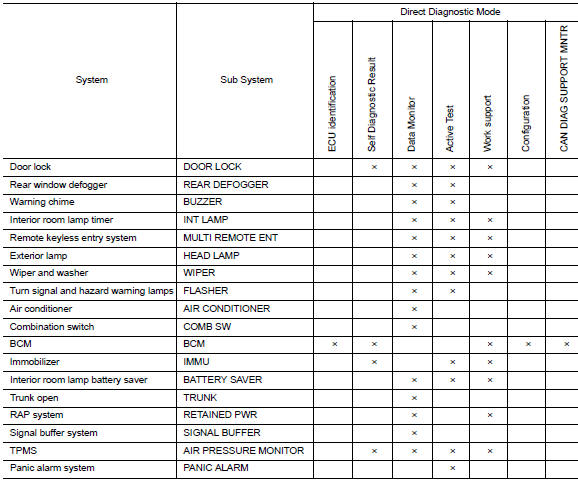
Int lamp
Int lamp : consult function (bcm - int lamp)
DATA MONITOR
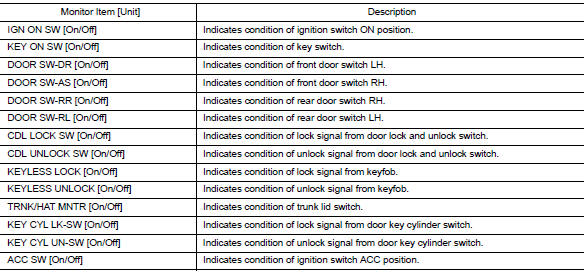
ACTIVE TEST

WORK SUPPORT
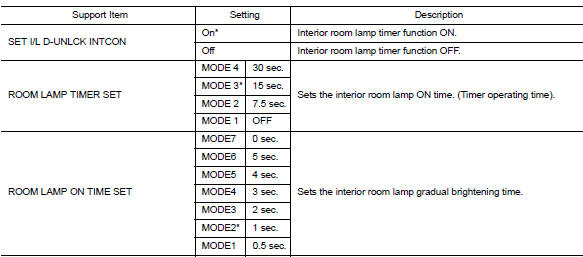
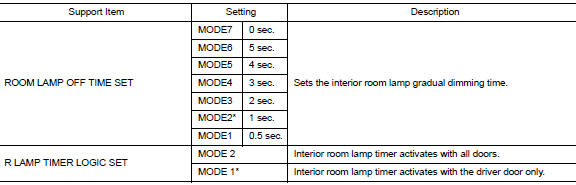
* : Initial setting
Battery saver
Battery saver : consult function (bcm - battery saver)
DATA MONITOR
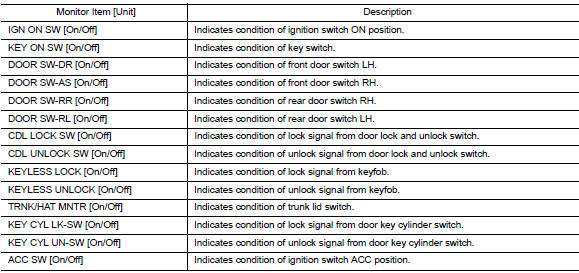
ACTIVE TEST

WORK SUPPORT

* : Initial setting
 Diagnosis system (bcm) (with intelligent key system)
Common item
COMMON ITEM : CONSULT Function (BCM - COMMON ITEM)
APPLICATION ITEM
CONSULT performs the following functions via CAN communication with BCM.
Direct Diagnostic Mode
Descriptio ...
 Ecu diagnosis information
BCM
List of ECU Reference
...
Other materials:
Fog light switch (if so equipped)
To turn the fog lights on, turn the headlight switch
to the position, then turn the
fog light
switch to the position.
If the headlight switch is in the AUTO position
and the fog light switch is moved to the ON
position, both the fog lights and the headlights
(including all other ...
Precaution for Work
When removing or disassembling each component, be careful not to damage
or deform it. If a component
may be subject to interference, be sure to protect it with a shop cloth.
When removing (disengaging) components with a screwdriver or similar
tool, be sure to wrap the component
with a ...
Operating range
The Intelligent Key functions can only be used
when the Intelligent Key is within the specified
operating range from the request switch 1.
When the Intelligent Key battery is discharged or
strong radio waves are present near the operating
location, the Intelligent Key operating range
becom ...
