Nissan Sentra B18 (2020-2025) Service Manual: Cvt Shift Selector
Exploded View
Exploded View
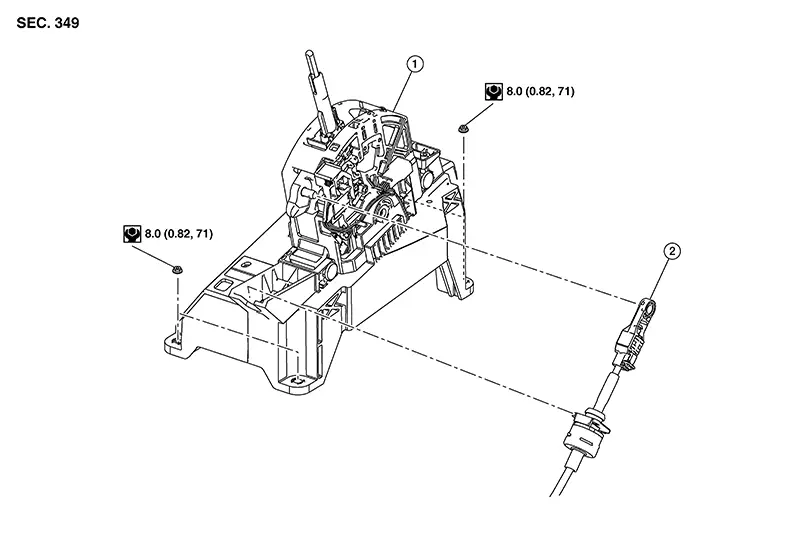
|
1. |
Selector lever |
2. |
Control cable |
Removal and Installation
Removal and Installation
REMOVAL
CAUTION:
Always apply the parking brake before performing removal and installation.
Disconnect battery. Refer to Battery Disconnect.
Shift the selector lever to “N� position.
Remove the center console. Refer to Removal and Installation.
Disconnect the CVT shift selector connector.
Shift the selector lever to “P� position.
Remove the harness retainers from the CVT shift selector.
Remove the control cable from the CVT shift selector with the following procedure:
Remove control cable (A) from shift selector as
shown ( ).
).
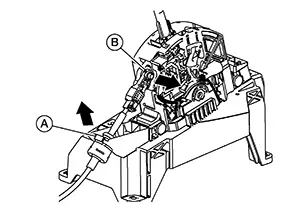
Remove control cable (B) from CVT shift selector
in the direction shown ().
Remove nuts (A).
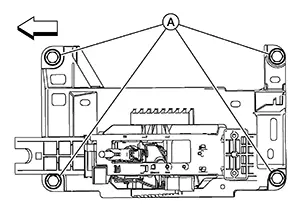
Remove the CVT shift selector.
INSTALLATION
Installation is in the reverse order of removal.
-
Pay attention to the following when connecting the control cable to the CVT shift selector.
-
Before connecting the control cable (1) to the CVT shift selector assembly (2), make sure the slider (3) is open and the lock (4) is pulled out as shown.
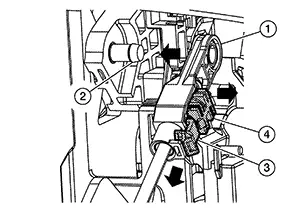
-
Install the socket (A) onto the CVT shift selector.
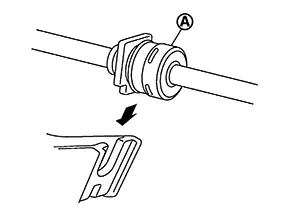
CAUTION:
-
Place the socket onto the CVT shift lever, then fasten it in place from above.
-
Check that the pulling on the socket does not disconnect it.
-
-
Perform adjustment procedure. Refer to Inspection and Adjustment.
Inspection
Inspection
INSPECTION AFTER INSTALLATION
Check the CVT position. Refer to Inspection.
If a malfunction is found, adjust the CVT position. Refer to Adjustment.
Other materials:
P0127 Iat Sensor
Dtc Description
DTC Description
DTC DETECTION LOGIC
DTC
CONSULT screen terms
(Trouble diagnosis
content)
DTC detection
condition
...
Text messaging
WARNING
Laws in some jurisdictions may restrict the use of Text-to-Speech features.
Always check local regulations before using this function in your Nissan
Sentra.
Laws in some jurisdictions may limit the use of certain applications
and features, including social networking a ...
Preparation. Preparation
Preparation
Special Service Tools
Special Service Tools
The actual shape of the tools may differ from
those illustrated here.
Tool number
(TechMate No.)
Tool name
...