Nissan Sentra B18 (2020-2025) Service Manual: Action Test
Ldw
Work Procedure
Work Procedure
-
Perform action test to verify the customer's concern.
-
Perform action test and check the system operation after system diagnosis.
Warning:
Be careful of traffic conditions and safety around the Nissan Sentra vehicle when performing road test.
CAUTION:
-
Fully understand the following items well before the road test;
-
System description: System Description
-
Handling precaution: Handling Precaution
-
-
CHECK LDW SYSTEM SETTING
-
Start the engine.
-
Check that the LDW system setting can be enabled/disabled on the information display.
-
Turn OFF the ignition switch and wait for 30 seconds or more.
-
Check that the previous setting is saved when the engine starts again.
GO TO 2.
-
-
ACTION TEST FOR LDW
-
Enable the setting of the LDW system on the information display.
-
Turn LDW system display ON (Speaker icon is ON at the “Lane� position).
-
Check the LDW operation according to the following table.
4.2 inch Information Display Condition
Action
Display on information display
Steering vibration
LDW OFF
—
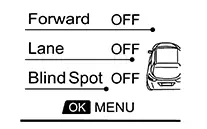
OFF
LDW ON
Nissan Sentra Vehicle speed is less than approx. 55 km/h (34 MPH)
—
LDW system indicator : White
Speaker icon : White
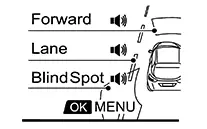
OFF
Nissan Sentra Vehicle speed is approx. 55 km/h (34 MPH) or more
Nissan Sentra Vehicle closes to lane marker
Turn signal is OFF or ON (Opposite to the deviate side)
—
Yellow (Blink)

ON
LDW system indicator : Yellow (Blink)
Speaker icon : White
Turn signal is ON (Deviate side)
—
LDW system indicator : White
Speaker icon : White
OFF
Note:7 inch Information Display Condition
Action
Display on information display
Steering vibration
LDW OFF
—
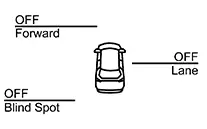
OFF
LDW ON
Nissan Sentra Vehicle speed is less than approx. 55 km/h (34 MPH)
—
LDW system indicator : White
Speaker icon : White
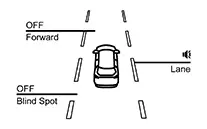
OFF
Nissan Sentra Vehicle speed is approx. 55 km/h (34 MPH) or more
Nissan Sentra Vehicle closes to lane marker
Turn signal is OFF or ON (Opposite to the deviate side)
—
Yellow (Blink)
ON
LDW system indicator : Yellow (Blink)
Speaker icon : White
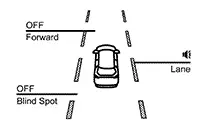
Turn signal is ON (Deviate side)
—
LDW system indicator : White
Speaker icon : White
OFF

After the operating conditions of warning are satisfied, the warning continues until the Nissan Sentra vehicle speed reaches approximately 55 km/h (34 MPH). Refer to System Description.
INSPECTION END
-
Blind Spot Warning
Work Procedure
Work Procedure
-
Perform action test to verify the customer's concern.
-
Perform action test and check the system operation after system diagnosis.
CAUTION:
Fully understand the following items well before the road test;
-
System description: System Description
-
Handling precaution: Handling Precaution
-
CHECK BSW SYSTEM SETTING
-
Start the engine.
-
Check that the BSW system setting can be enabled/disabled on the information display.
-
Turn OFF the ignition switch and wait for 5 seconds or more.
-
Check that the previous setting is saved when the engine starts again.
GO TO 2.
-
-
BSW SYSTEM ACTION TEST
-
Enable the setting of the BSW system on the information display.
-
Turn BSW system display ON (Speaker icon is ON at the “Blind spot�).
-
Check BSW operation according to the following table.
4.2 inch Information Display Condition
Action
Display on information display
Steering vibration
BSW OFF
—
OFF
BSW ON
Nissan Sentra Vehicle speed is less than approx. 29 km/h (18 MPH)
—
BSW system indicator : White
Speaker icon : White
OFF
Nissan Sentra Vehicle speed is approx. 29 km/h (18 MPH) or more
Nissan Sentra Vehicle closes to lane marker
Turn signal is OFF or ON (Opposite to the deviate side)
—
Yellow (Blink)
ON
BSW system indicator : Yellow (Blink)
Speaker icon : White
Turn signal is ON (Deviate side)
—
BSW system indicator : White
Speaker icon : White
OFF
BSW is malfunction
The BSW system is automatically canceled.
Note:
The system operates if the ignition switch is turned OFF⇒ON after the condition improves
BSW system indicator : White
Exclamation icon: Yellow
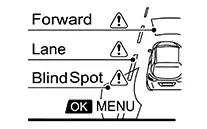
OFF
Malfunction
Front camera unit high temperature
The BSW system is automatically canceled.
Note:
The system operates if the ignition switch is turned OFF⇒ON after the condition improves
BSW system indicator : White
Exclamation icon : Yellow (Blink)
OFF
Unavailable
High Cabin
Temperature
Note:7 inch Information Display Condition
Action
Indication on the BSW indicator
Display on information display
Buzzer
BSW OFF
—
OFF
OFF
BSW ON
Nissan Sentra Vehicle speed is less than approx. 29 km/h (18 MPH)
—
OFF
BSW system indicator : White
Speaker icon : White
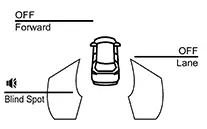
OFF
Nissan Sentra Vehicle speed is approx. 32 km/h (20 MPH) or more
Nissan Sentra Vehicle is not detected
—
OFF
BSW system indicator : White
Speaker icon : White
OFF
Nissan Sentra Vehicle is detected
Turn signal is OFF
—
ON
BSW system indicator : White
Speaker icon : White
OFF
Nissan Sentra Vehicle is detected before turn signal operates
Turn signal is ON (Nissan Sentra vehicle detected direction)
—
Blink
Yellow (Blink)
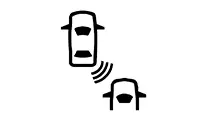
Short continuous beeps
BSW system indicator : Yellow (Blink)
Speaker icon : White
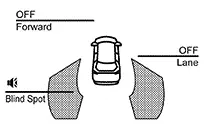
Nissan Sentra Vehicle is detected after turn signal operates
Turn signal is ON (Nissan Sentra vehicle detected direction)
—
Blink
Yellow (Blink)
OFF
BSW system indicator : Yellow (Blink)
Speaker icon : White
-
If Nissan Sentra vehicle speed exceeds approximately 32 km/h (20 MPH), BSW function operates until the vehicle speed becomes lower than approximately 29 km/h (18 MPH).
-
Time shown in the figure is approximate time.
-
INSPECTION END
-
Tsr
Work Procedure
Work Procedure
-
Perform action test to verify the customer's concern.
-
Perform action test and check the system operation after system diagnosis.
Warning:
Be careful of traffic conditions and safety around the Nissan Sentra vehicle when performing road test.
CAUTION:
-
Fully understand the following items well before the road test;
-
System description for TSR: Refer to System Description.
-
Handling precaution: Refer to Precautions for Traffic Sign Recognition.
-
-
CHECK TSR SYSTEM SETTING
-
Start the engine.
-
After starting the engine wait for 30 seconds or more.
-
Enable the setting of the TSR system on the information display.
-
Turn OFF the ignition switch and wait for 5 seconds or more.
-
Check that the previous setting is saved when the engine starts again.
GO TO 2.
-
-
ACTION TEST FOR LDW
-
Enable the setting of the TSR system on the information display.
-
Check the TSR operation according to the following table.
4.2 inch Information Display System status
Condition
Display on combination meter
Upper part
Middle part
TSR OFF
—
—
TSR ON
Road sign not detected
—
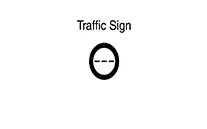
Road sign detected (except for speed limit signs)
—
This is an example. For details of displayed signs, Refer to System Description.
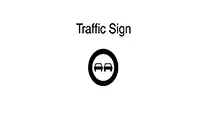
Road sign detected (Speed limit signs)
This is an example. For details of displayed signs, Refer to System Description.
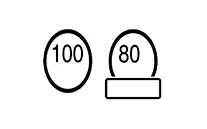
This is an example. For details of displayed signs, Refer to System Description.
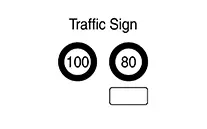
7 inch Information Display System status
Condition
Display on combination meter
Upper part
Middle part
TSR OFF
—
—
TSR ON
Road sign not detected
—
Road sign detected (except for speed limit signs)
—
This is an example. For details of displayed signs, Refer to System Description.
Road sign detected (Speed limit signs)
This is an example. For details of displayed signs, Refer to System Description.
This is an example. For details of displayed signs, Refer to System Description.
INSPECTION END
-
Rcta
Work Procedure
Work Procedure
-
Perform action test to verify the customer's concern.
-
Perform action test and check the system operation after system diagnosis.
Warning:
Be careful of traffic conditions and safety around the Nissan Sentra vehicle when performing road test.
CAUTION:
-
Fully understand the following items well before the road test;
-
System description for RCTA: Refer to System Description.
-
Handling precaution: Refer to Precautions for Rear Cross Traffic Alert.
-
-
CHECK BSW/RCTA SYSTEM SETTING
-
Start the engine.
-
After start the engine wait for 30 seconds or more.
-
Enable the setting of the BSW system on the information display.
-
Turn OFF the ignition switch and wait for 5 seconds or more.
-
Check that the previous setting is saved when the engine starts again.
GO TO 2.
-
-
ACTION TEST FOR RCTA
-
Enable the setting of the BSW system on the information display.
-
Check the RCTA operation according to the following table.
Condition
Action
Indication on the BSW indicator
Display on information display
Buzzer
RCTA OFF
—
OFF
—
OFF
RCTA ON
Shift lever is in any position other than reverse
—
OFF
—
OFF
Shift lever is in reverse
Nissan Sentra Vehicle speed is less then approx. 8 km/h (5 MPH)
Nissan Sentra Vehicle is not detected
—
OFF
—
OFF
Nissan Sentra Vehicle is detected
—
Blink
—
Single beep
Nissan Sentra Vehicle speed is approx. 8 km/h (5 MPH) or more
Nissan Sentra Vehicle is detected
—
—
—
—
INSPECTION END
-
I-Da
Work Procedure
Work Procedure
-
Perform action test to verify the customer's concern.
-
Perform action test and check the system operation after system diagnosis.
Warning:
Be careful of traffic conditions and safety around the Nissan Sentra vehicle when performing road test.
CAUTION:
-
Fully understand the following items well before the road test;
-
System description for I-DA: Refer to System Description.
-
Handling precaution: Refer to Precautions for I-DA.
-
-
CHECK I-DA SYSTEM SETTING
-
Start the engine.
-
After starting the engine wait for 30 seconds or more.
-
Check that the I-DA system setting can be enabled/disabled on the information display.
-
Turn OFF the ignition switch and wait for 5 seconds or more.
-
Check that the previous setting is saved when the engine starts again.
GO TO 2.
-
-
ACTION TEST FOR I-DA
-
Enable the setting of the I-DA system on the information display.
-
Check the I-DA operation according to the following table.
Nissan Sentra Vehicle condition/ Driver’s operation
Display on combination meter
I-DA OFF
—
I-DA ON
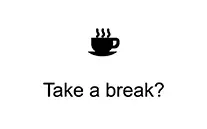
INSPECTION END
-
Other materials:
Door Lock Function
System Diagram
System Diagram
System Description
System Description
Only when pressing the door request switch it is
possible to lock and unlock the door by carrying the Intelligent
Key.
INPUT SIGNAL AND OUTPUT SIGNAL
...
Front Camera Unit
Values on the Diagnosis Tool
Values On The Diagnosis Tool
Note:
The following table includes information (items)
inapplicable to this Nissan Sentra vehicle. For information (items) applicable to this
vehicle, refer to CONSULT display items.
...
Dtc/circuit Diagnosis. Position Switch
Position Switch
Back-Up Lamp Switch
Component Inspection
Component Inspection
CHECK BACK-UP LAMP SWITCH
Disconnect position switch harness connector.
Refer to Removal and Installation.
...