
Nissan Sentra Owners Manual: Locking with key
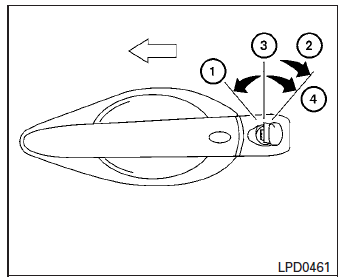
Driver’s side
The power door lock system allows you to lock or unlock all doors at the same time.
Turning the key toward the front 1 of the vehicle locks all doors.
Turning the key one time toward the rear 2 of the vehicle unlocks that door. From that position, returning the key to neutral 3 (where the key can only be removed and inserted) and turning it toward the rear again 4 within 5 seconds unlocks all doors.
 Doors
Doors
When the doors are locked using one of the
following methods, the doors cannot be opened
using the inside or outside door handles. The
doors must be unlocked to open the doors.
WARNING
...
 Locking with inside lock knob
Inside lock
To lock the door without the key, move the inside
lock knob to the lock position 1 , then close the
door.
To unlock the door without the key, move the
inside lock knob to the unlo ...
Other materials:
NISSAN vehicle immobilizer system
The NISSAN Vehicle Immobilizer system will not
allow the engine to start without the use of the
registered key.
If the engine fails to start using a registered key
(for example, when interference is caused by
another registered key, an automated toll road
device or automatic payment device o ...
Diagnosis and repair workflow
Work flow
Overall sequence
Detailed flow
1. Obtain information about symptom
Interview the customer to obtain as much information as possible about the
conditions and environment under
which the malfunction occurred.
>> GO TO 2.
2. Confirm concern
Check the malfunction on the veh ...
Rear drum brake
BRAKE LINING
BRAKE LINING : Inspection
INSPECTION
Brake Lining
Check brake lining wear thickness (A). Check using a scale if
necessary.
Lining wear thickness (A) : Refer to BR-55, "Rear
Drum Brake".
BRAKE DRUM
BRAKE DRUM : Inspection
INSPECTION
Appearance
Check surfac ...
