
Nissan Sentra Service Manual: Liquid Gasket
REMOVAL OF LIQUID GASKET SEALING
- After removing the bolts and nuts, separate the mating surface and remove the liquid gasket using Tool (A).
Tool Number : KV10111100 (J-37228)
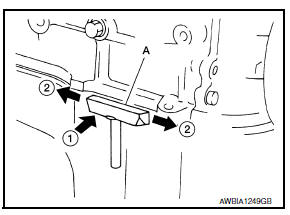
CAUTION:
Be careful not to damage the mating surfaces.
- In areas where the cutter is difficult to use, use a plastic hammer to lightly tap (1) the cutter where the liquid gasket is applied. Use a plastic hammer to slide (2) the cutter by tapping on the side.
CAUTION:
Do not damage the mating surfaces.
LIQUID GASKET APPLICATION PROCEDURE
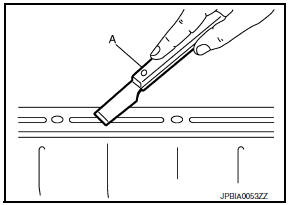
- Using suitable tool (A), remove old liquid gasket adhering to the liquid gasket application surface and the mating surface.
- Remove liquid gasket completely from the groove of the liquid gasket application surface, mounting bolts, and bolt holes.
- Wipe the liquid gasket application surface and the mating surface with white gasoline (lighting and heating use) to remove adhering moisture, grease and foreign materials.
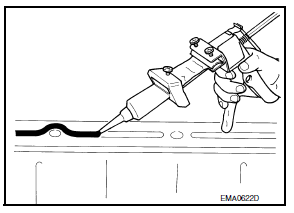
- Attach liquid gasket tube to the suitable tool.
Use Genuine Silicone RTV Sealant, or equivalent. Refer to GI-21, "Recommended Chemical Products and Sealants".
- Apply liquid gasket without gaps to the specified location according to the specified dimensions.
- If there is a groove for liquid gasket application, apply liquid gasket to the groove.

- As for bolt holes (B), normally apply liquid gasket inside the
holes. Occasionally, it should be applied outside the holes.
Check to read the text of this manual.
(A) : Groov
 Inside
- Within five minutes of liquid gasket application, install the mating component.
- If liquid gasket protrudes, wipe it off immediately.
- Do not retighten mounting bolts or nuts after the installation.
- After 30 minutes or more have passed from the installation, fill engine oil and engine coolant.
CAUTION:
If there are specific instructions in the procedures contained in this manual concerning liquid gasket application, observe them.
 Parts Requiring Angle Tightening
Use the Tool for the final tightening of the following engine parts:
Tool number : KV10112100 (BT-8653-A)
Camshaft sprocket (INT) bolt
Cylinder head bolts
Main bearing cap bolts
Connec ...
 Preparation
...
Other materials:
Steering wheel
Inspection
CONDITION OF INSTALLATION
Check installation condition of power steering gear
assembly, front suspension, front drive shaft and steering
column.
Check if movement exists when steering wheel is moved up and
down, to the left and right and to the axial
direction.
S ...
Wheel alignment
Inspection
DESCRIPTION
Measure the wheel alignment under unladen conditions.
NOTE:
“Unladen conditions” means that fuel, engine coolant, and lubricants are
full. Spare tire, jack, hand tools and
mats are in designated positions.
PRELIMINARY
Check the following:
Tires for impro ...
Diagnosis system (ipdm e/r) (with intelligent key system)
Diagnosis Description
AUTO ACTIVE TEST
Description
In auto active test, the IPDM E/R sends a drive signal to the following
systems to check their operation.
Front wiper (LO, HI)
Parking lamp
License plate lamp
Tail lamp
Front fog lamp (if equipped)
Headlamp (LO, HI)
A/C compres ...
