
Nissan Sentra Owners Manual: Hood
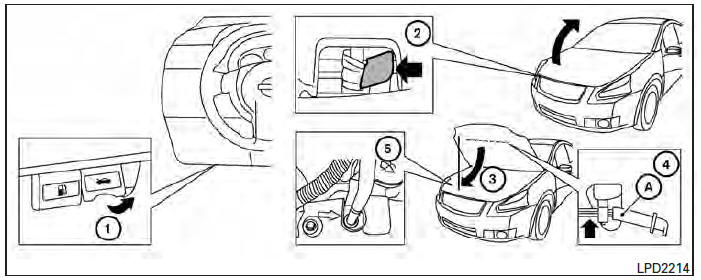
- Pull the hood lock release handle 1 located below the instrument panel until the hood springs up slightly.
- Locate the lever 2 in between the hood and grille and push the lever sideways with your fingertips.
- Raise the hood 3 .
- Remove the support rod 4 and insert it into the slot marked by an arrow 5 .
NOTE:
Do not place the support rod in a location other than the designated slot.
Hold the coated parts A when removing or resetting the support rod. Avoid direct contact with the metal parts, as they may be hot immediately after the engine has been stopped.
When closing the hood, return the support rod to its original position, lower the hood to approximately 12 in (30 cm) above the latch and release it. This allows proper engagement of the hood latch.
WARNING
|
 Troubleshooting guide
Symptom
Possible Cause
When pushing the ignition switch to stop
the engine
The P (Park) warning light in the instrument
panel illuminates and the inside chime
...
 Trunk lid
...
Other materials:
Dlc branch line circuit
Diagnosis procedure
1.Check connector
Turn the ignition switch off.
Disconnect the battery cable from the negative terminal
Check the terminals and connectors of the data link connector for damage,
bend and loose connection
(connector side and harness side).
Is the inspection result ...
Accelerator pedal released position
learning
Description
Accelerator Pedal Released Position Learning is a function of ECM to learn
the fully released position of the
accelerator pedal by monitoring the accelerator pedal position sensor output
signal. It must be performed each
time harness connector of accelerator pedal position sensor ...
Bluetooth® settings
To access the phone settings:
Press the [ ] button.
Touch the “Settings� key.
Touch the “Phone & Bluetooth� key.
Menu Item
Result
Phone Settings
See “Phone settings� in this section for more information.
Connect New Device
Touch to co ...
