
Nissan Sentra Service Manual: Coil spring
Exploded View
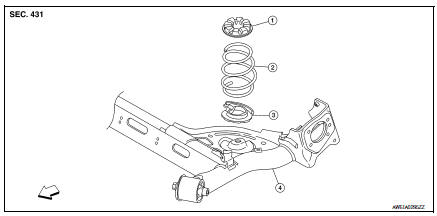
- Upper rubber seat
- Coil spring
- Lower rubber seat
- Rear suspension beam
 Front
Front
Removal and Installation
REMOVAL
- Set a suitable jack under the rear suspension beam.
CAUTION:
- At this step, the jack must be set only for supporting the removal procedure. For details on jacking up the vehicle, refer to GI-31, "Garage Jack and Safety Stand and 2-Pole Lift".
- Do not damage the rear suspension beam with the jack.
- Remove the lower shock absorber bolts. Refer to RSU-8, "Exploded View".
- Slowly lower the suitable jack. Remove the upper rubber seat, the coil spring, and the lower rubber seat from the rear suspension beam.
CAUTION:
Make sure the rear suspension beam is stable when using the jack.
- Inspect the components. Refer to RSU-12, "Inspection".
INSTALLATION
Installation is in the reverse order of removal.
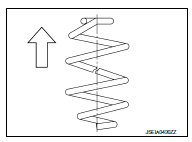
- Identify the upper side of the coil spring.
 : Upper side
NOTE:
The top of the coil spring has a flat shape.
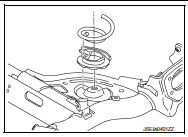
- Align the lower end of the coil spring with the steps on the lower rubber seat.
Inspection
INSPECTION AFTER REMOVAL
Check the upper rubber seat, the lower rubber seat, and the coil spring for deformation, cracks, and damage.
Replace the parts if necessary.
 Rear shock absorber
Exploded View
Rear suspension beam
Shock absorber
Bound bumper
Bound bumper cover
Washer
Bushing
Distance tube
Bushing
Washer
Piston rod lock nut
Cap
Front
Removal and ...
 Rear suspension beam
Exploded View
Rear suspension beam
Rear suspension arm bracket
Front
Removal and Installation
NOTE:
When removing components such as hoses, tubes, lines, etc., cap or plug
openings ...
Other materials:
Precaution
Precaution for Supplemental Restraint System (SRS) "AIR BAG" and "SEAT
BELT PRE-TENSIONER"
The Supplemental Restraint System such as “AIR BAG” and “SEAT BELT PRE-TENSIONER”,
used along
with a front seat belt, helps to reduce the risk or severity of injur ...
B0098 Front door satellite sensor RH
Description
DTC B0098 FRONT DOOR SATELLITE SENSOR RH
The front door satellite sensor RH is wired to the air bag diagnosis sensor
unit. The air bag diagnosis sensor
unit will monitor the front door satellite sensor RH for internal failures and
its circuits for communication errors.
PART LOCA ...
Vehicle phonebook
To access the vehicle phonebook:
Press the button on the
control panel.
Touch the “Phonebook� key
Choose the desired entry from the displayed
list.
The number of the entry will be displayed on
the screen. Touch the number to initiate dialing.
NOTE:
To scroll quickly through ...
