
Nissan Sentra Service Manual: Garage Jack and Safety Stand and 2-Pole Lift
WARNING:
- Park the vehicle on a level surface when using the jack. Make sure to avoid damaging pipes, tubes, etc. under the vehicle.
- Never get under the vehicle while it is supported only by the jack. Always use safety stands when you have to get under the vehicle.
- Place wheel chocks at both front and back of the wheels on the ground.
- Lift at reinforced area of front suspension member where lower control arm attaches, staying in center line of wheels.
- When lifting the vehicle, open the lift arms as wide as possible and ensure that the front and rear of the vehicle are well balanced.
- When setting the lift arm, do not allow the arm to contact the brake tubes, brake cable, fuel lines and sill spoiler.
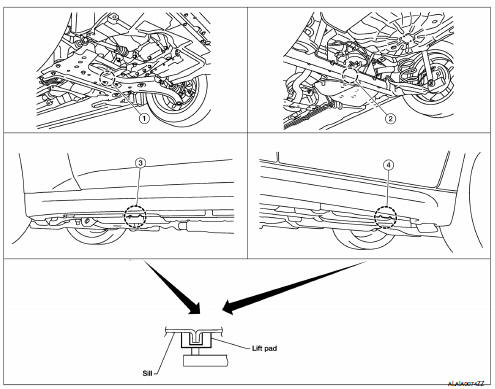
- Garage jack point (front)
- Garage jack point (rear)
- Safety stand point and lift up point (front)
- Safety stand point and lift up point (rear)
 Special Service Tool
The actual shapes of Kent-Moore tools may differ from those of special
service tools illustrated here.
CAUTION:
Every time the vehicle is lifted up, maintain the complete vehicle
curb co ...
 Board-on Lift
CAUTION:
Make sure vehicle is empty when lifting.
The board-on lift attachment (A) set at front end of vehicle
should be set on the front of the sill under the front door
opening.
Position ...
Other materials:
Hood
Pull the hood lock release handle 1 located
below the instrument panel until the hood
springs up slightly.
Locate the lever 2 in between the hood and
grille and push the lever sideways with your
fingertips.
Raise the hood 3 .
Remove the support rod 4 and insert it into
the slo ...
Dtc/circuit diagnosis
U1000 can comm circuit
Description
Refer to LAN-7, "CAN COMMUNICATION SYSTEM : System Description".
Dtc logic
DTC DETECTION LOGIC
NOTE:
U1000 can be set if a module harness was disconnected and reconnected,
perhaps during a repair. Confirm
that there are actual CAN diagnostic sym ...
Air conditioner operation (if so equipped)
Start the engine, turn the fan control dial to the
desired position, and press the
button to
activate the air conditioner. When the air conditioner
is on, cooling and dehumidifying functions
are added to the heater operation.
The air conditioner cooling function operates
only whe ...
