
Nissan Sentra Service Manual: Front regulator
Exploded View
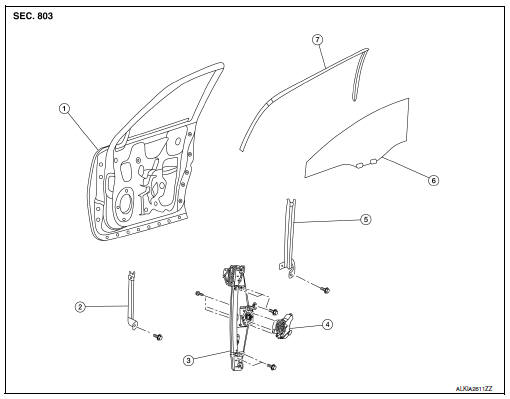
- Front door panel
- Front door glass channel front
- Front door glass regulator
- Front door glass regulator motor
- Front door glass channel rear
- Front door glass
- Front door glass rubber run
Removal and Installation
REMOVAL
WARNING:
- Before servicing, turn ignition switch OFF, disconnect both battery terminals and wait at least three minutes.
- Do not use air tools or electric tools for servicing.
NOTE:
LH front door panel shown; RH side similar.
- Disconnect the battery positive and negative terminal. Refer to PG-50, "Removal and Installation (Battery)".
- Remove the front door finisher. Refer to INT-15, "Removal and Installation".
- Remove the vapor barrier.
CAUTION:
Use care to not damage or tear vapor barrier during removal.
- Temporarily reconnect both battery terminals and the main power window and door lock/unlock switch (LH door) or power window and door lock/unlock switch (RH door) to raise/lower the door glass until the door glass bolts can be seen through the access holes.
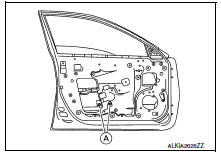
- Remove the front door regulator to glass bolts (A).
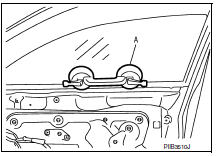
- Raise the front door glass and hold with a suction lifter (A).
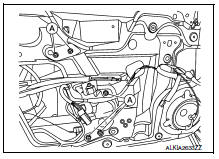
- Disconnect the harness connector from the front door glass regulator motor.
- Remove front door glass regulator bolts (A) and the front door glass regulator.
INSPECTION AFTER REMOVAL
Check the front door glass regulator for the following items. If a malfunction is detected, replace the regulator.
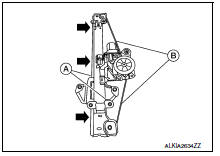
- Excessive cable wear (B).
- Regulator channel deformation (A).
- Apply multi-purpose grease at the application points (

) as shown.
INSTALLATION
Installation is in the reverse order of removal.
Inspection and Adjustment
SYSTEM INITIALIZATION (IF NECESSARY)
- If any of the following occur, system initialization must be performed.
- Electric power supply to power window switch or motor is interrupted by blown fuse or disconnecting battery cable, etc.
- Removal and installation of the regulator assembly.
- Removal and installation of the motor from the regulator assembly.
- Removal and installation of the harness connector of the power window switch.
- Operation of the regulator assembly as a unit.
- Removal and installation of the door glass.
- Removal and installation of the door glass run.
- Window is partly opened and or closed multiple times with out being fully closed.
- To perform system initialization, refer to PWC-29, "Work Procedure".
INSPECT THE FUNCTION OF THE ANTI-PINCH SYSTEM.
To inspect the anti-pinch system, refer to PWC-29, "Work Procedure".
 Front door glass
Removal and Installation
REMOVAL
WARNING:
Before servicing, turn ignition switch OFF, disconnect both
battery terminals and wait at least three
minutes.
Do not use air tools or electric ...
 Front power window motor
Removal and Installation
REMOVAL
Remove the front door glass regulator (2). Refer to GW-16,
"Removal and Installation".
Remove the bolts (A) and the front power window motor (1).
...
Other materials:
U1000 CAN Comm circuit
DTC Logic
DTC DETECTION LOGIC
DTC
Display Item
Malfunction detected condition
Possible causes
U1000
CAN COMM CIRCUIT
When CAN communication signal is not continuously
received for 2 seconds or more
CAN communication system malfunction
Diagnosis Procedure
...
Pandora® audio (if so equipped)
The vehicle’s audio system is capable of playing
audio streaming through a compatible, USBconnected
audio device using the Pandora® music
service.
Connecting a device for use with
Pandora® audio
Devices capable of streaming Pandora® audio
can be connected to the vehicle’s audio system
...
Door locks/unlocks precaution
Do not push the door handle request switch
with the Intelligent Key held in your hand as
illustrated. The close distance to the door
handle will cause the Intelligent Key system
to have difficulty recognizing that the Intelligent
Key is outside the vehicle.
After locking with the ...
