
Nissan Sentra Service Manual: Diagnosis system (bcm) (with intelligent key system)
Common item
Common item : consult function (bcm - common item)
APPLICATION ITEM
CONSULT performs the following functions via CAN communication with BCM.
| Direct Diagnostic Mode | Description |
| ECU identification | The BCM part number is displayed. |
| Self Diagnostic Result | The BCM self diagnostic results are displayed. |
| Data Monitor | The BCM input/output data is displayed in real time. |
| Active Test | The BCM activates outputs to test components. |
| Work support | The settings for BCM functions can be changed. |
| Configuration |
|
| CAN DIAG SUPPORT MNTR | The result of transmit/receive diagnosis of CAN communication is displayed. |
SYSTEM APPLICATION
BCM can perform the following functions.
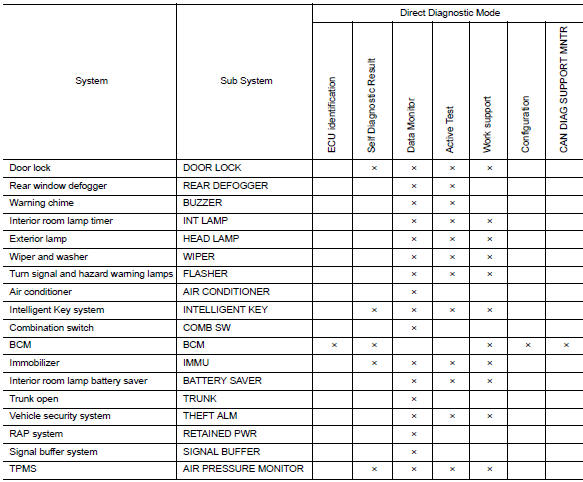
Buzzer
Buzzer : consult function (bcm - buzzer)
DATA MONITOR
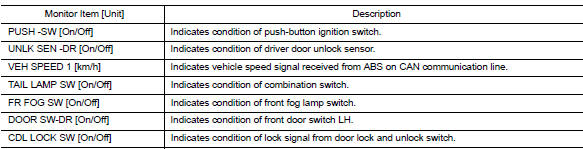
ACTIVE TEST

 Diagnosis system (combination meter)
Consult function (meter/m&a)
Application items
Consult can perform the following diagnosis modes via can communication and
the combination meter.
Self diag result
Refer to mwi-26, " ...
 Diagnosis system (bcm) (without intelligent
key system)
Diagnosis system (bcm) (without intelligent
key system)
Common item
Common item : consult function (bcm -
common item)
APPLICATION ITEM
CONSULT performs the following functions via CAN communication with BCM.
Direct Diagnostic Mode
Descripti ...
Other materials:
Precaution for Brake System
WARNING:
Clean any dust from the front brake and rear brake with a vacuum
dust collector. Do not blow with
compressed air.
Brake fluid: Refer to MA-11, "Fluids and Lubricants".
Do not reuse drained brake fluid.
Do not spill or splash brake fluid on painted surfaces. Brake fluid ...
P0137 HO2S2
DTC Logic
DTC DETECTION LOGIC
The heated oxygen sensor 2 has a much longer switching time
between rich and lean than the air fuel ratio (A/F) sensor 1. The oxygen
storage capacity of the three way catalyst (manifold) causes the
longer switching time. To judge the malfunctions of heated oxygen
...
P0444, P0445 EVAP Canister purge volume control solenoid valve
DTC Logic
DTC DETECTION LOGIC
DTC No.
CONSULT screen terms
(Trouble diagnosis content)
DTC detecting condition
Possible cause
P0444
PURG VOLUME CONT/V
(Evaporative emission system
purge control valve circuit open)
An excessively low voltage signal is sent to ...
