
Nissan Sentra Service Manual: Diagnosis system (AIR BAG)
Description
CAUTION:
- Never use electrical test equipment on any circuit related to the SRS unless instructed in this Service Manual. SRS wiring harnesses can be identified by yellow and/or orange harnesses or harness connectors.
- Never repair, splice or modify the SRS wiring harness. If the harness is damaged, replace it with a new one.
- Keep ground portion clean.
DIAGNOSIS FUNCTION
- The SRS self-diagnostic results can be read with air bag warning lamp and/or CONSULT.
- The user mode is exclusively prepared for the customer (driver). This mode warns the driver of a system malfunction through the operation of the air bag warning lamp.
- The diagnosis mode allows the technician to locate and inspect the malfunctioning part.
- The mode applications for the air bag warning lamp and CONSULT are as per the following items.

On Board Diagnosis Function
ON-BOARD DIAGNOSIS
There are two self diagnosis functions with air bag warning lamp per the following items.
- USER MODE
- DIAGNOSIS MODE
METHOD OF STARTING
- Diagnosis mode changes from user mode to diagnosis mode when changing operation is performed.
- In user mode, when SRS air bag warning lamp is not turning ON, changing to diagnosis mode by ignition switch operation is not possible.
- In diagnosis mode, when repair is complete and system is normal, the mode changes to user mode when ignition switch is turned from OFF to ON.
Procedure to Change Diagnosis Mode
- Turn ignition switch from OFF to ON.
- SRS air bag lamp turns ON for 7 second and turns OFF, then turn ignition switch OFF within 2 second after the lamp turns OFF.
NOTE:
When in Diagnosis Mode, the air bag warning lamp may illuminate for more than 7 seconds after the ignition switch is turned ON. If this is the case, the ignition switch must still be cycled OFF after 7 seconds.
- After turning ignition switch OFF, wait for 3 seconds or more.
- Repeat operation 1 to 3 for 2 times so that operation 1 to 3 is repeated for 3 times in total.
- Turn ignition switch from OFF to ON. Diagnosis mode changes.
USER MODE
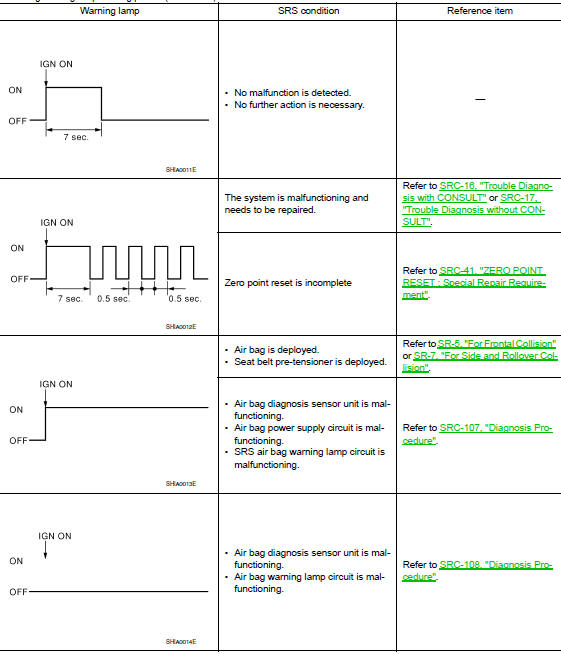
In USER MODE, air bag warning lamp on combination meter turning ON when a malfunction is detected and warns the customer (driver).
How to Read Air Bag Warning Lamp
- Turn the ignition switch from OFF to ON, and check that the air bag warning lamp turns ON.
- Compare the air bag warning lamp operation pattern with the examples.
Air Bag Warning Lamp Examples:
Air bag warning lamp flashing pattern (User Mode)
Trouble Diagnosis with CONSULT
- Connect CONSULT
- DTC is displayed on SELF-DIAG RESULTS.
NOTE:
If a malfunction is not detected on SELF-DIAG RESULTS [CURRENT], but a malfunction is detected during SRS Operation Check, the following cases may exist:
- SELF-DIAG [PAST] memory might not be erased. Refer to SRC-17, "SRS Final Check".
- SRS system malfunctions intermittently. Refer to SRC-42, "Inspection Procedure".
Trouble Diagnosis without CONSULT
DIAGNOSIS MODE
NOTE:
Diagnosis Mode can not be entered if a malfunction is not detected in User Mode.
- Turn ignition switch ON.
- After AIR BAG warning lamp lights for 7 seconds, turn ignition switch OFF within 1 second.
- Wait more than 3 seconds.
- Repeat steps 1 to 3 two more times (3 times total).
- Turn ignition switch ON
SRS is now in Diagnosis Mode. Refer to SRC-23, "Flash Code Index".
SRS History Check
SRS HISTORY CHECK
- Check repair history of the SRS. If no repairs have been made, perform SRC-15, "On Board Diagnosis Function". If repairs have been made, GO TO step 2.
- Erase ”SELF-DIAG [PAST]” after repair. Refer to SRC-17, "SRS Final Check".
SRS Final Check
DIAGNOSIS MODE
- Connect CONSULT.
- Confirm that zero point reset of OCS is complete.
- If no DTCs are detected on “SELF-DIAG RESULTS [CURRENT]”, repair of SRS
is completed. Go to step
4.
If any DTCs are detected on “SELF-DIAG RESULTS [CURRENT]”, the malfunction has not been repaired completely or another malfunction is being detected. Perform SRS Operation Check again. Refer to SRC- 15, "On Board Diagnosis Function".
- Touch “ERASE”.
NOTE:
Touching “ERASE” will clear the SRS memory of the malfunction (“SELF-DIAG [PAST]”). If “SELFDIAG [PAST]” is not erased, User Mode may show the previous system malfunction even if the malfunction has been repaired completely.
- Check that no malfunction is detected in “SELF-DIAG [PAST]”.
- Exit Diagnosis Mode and disconnect the CONSULT
- Perform SRS Operation Check. Refer to SRC-15, "On Board Diagnosis Function".
CONSULT Function (AIR BAG)
CONSULT can display each diagnostic item using the diagnostic test modes shown following.
| Diagnostic Test Mode | Diagnostic Item | Description |
| Self Diagnostic Result | SELF-DIAG RESULT [CURRENT | A current Self-diagnosis result (also indicated by the number of warning lamp flashes in the Diagnosis mode) is displayed on the CONSULT screen in real time. This refers to a malfunctioning part requiring repairs. |
| Data Monitor | DATA MONITOR | Displays air bag diagnosis sensor unit input/output data in real time. |
| Ecu Identification | ECU DISCRIMINATED NO. | Air bag diagnosis sensor unit ECU discriminated number (identification number) or part number is displayed. Air bag diagnosis sensor unit has individual ECU discriminated number (identification number) or part number based on model and equipment. |
| Trouble Diagnostic Record | TROUBLE DIAG RECORD [PAST] | With TROUBLE DIAG RECORD, diagnosis results previously erased by a reset operation can be displayed on the CONSULT screen. |
CONSULT Function (OCCUPANT DETECTION)
CONSULT can display each diagnostic item using the diagnostic test modes shown following
| Diagnostic Test Mode | Diagnostic Item | Description |
| Work Support | ZERO POINT RESET FUNCTION | Perform zero point reset. Refer to SRC-41, "ZERO POINT RESET : Special Repair Requirement". |
 System
SRS air bag system
SRS AIR BAG SYSTEM : System Diagram
SRS AIR BAG SYSTEM : System Description
The air bag deploys if the air bag diagnosis sensor unit is activated
while the ignition swi ...
 ECU diagnosis information
Diagnosis sensor unit
DTC Index
DIAGNOSTIC CODE CHART
NOTE:
Follow the procedures in numerical order when repairing malfunctioning
parts. Confirm whether malfunction is
eliminated using air bag ...
Other materials:
OIL
Description
MAINTENANCE OF OIL LEVEL
The compressor oil is circulating in the system together with the
refrigerant. It is necessary to fill compressor
with oil when replacing A/C system parts or when a large amount of refrigerant
leakage is detected. It is important
to always maintain oil l ...
Component parts
Component Parts Location
BCM (view under instrument panel
on the left side of the vehicle)
Front power window motor LH (RH
similar) (view with front door finisher
removed)
Rear power window motor LH (RH
similar) (view with rear door finisher
removed)
Main power window and do ...
Special Service Tool
The actual shapes of Kent-Moore tools may differ from those of special
service tools illustrated here.
CAUTION:
Every time the vehicle is lifted up, maintain the complete vehicle
curb condition.
Since the vehicle's center of gravity changes when removing main
parts on the front si ...
